8
Observation/Acquisition Flow
Main Controls Introduction
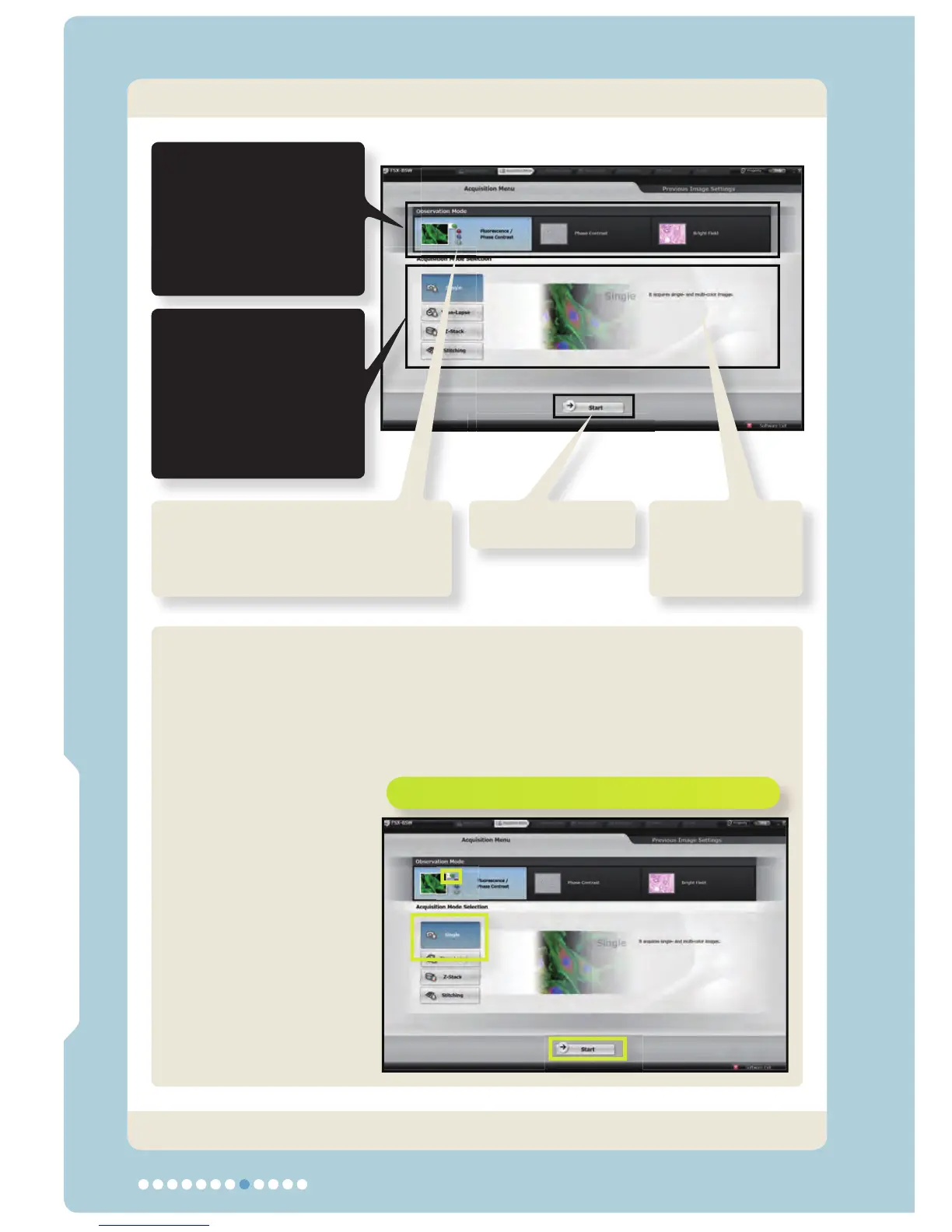
3. Selecting the Observation/Acquisition Methods
Observation/Acquisition Flow
Click on the buttons enclosed in yellow frames.
Select the
observation method.
Fluorescence & Phase
contrast observation /
Phase contrast
observation /
Bright Field observation
Select the acquisition
method.
Single /
Time-Lapse /
Z-Stack /
Stitching
(Scheduled to be available
in March 2009)
Select the fl uorescence color to be
used as the observation standard
or the phase contrast.
Green / Red / Blue / Phase contrast
Start button
The selection
summary is
displayed.
The subsequent description in this manual assumes that the following
selections are made.
Observation method: Fluorescence & Phase contrast observation
Observation standard color: Green
Acquisition method: Single
Now the observation and acquisition methods have been selected.



 To Next Page