You can select between
12
and 24 hour
display
by
pressing the LIST button while
selling the hour and minute.
Example:
10:38
P.M
10:38
PM"
~
22:38
(Initial setting)
You can select the order
of
the "year",
"month", "day"
by
pressing the LIST button
while setting them.
Example:
January
7,2008
1M
70
2008v (Initial setting)
•
70
1M
2008v
•
2008v
1M
70
Changing
Ihe
Time
and
Date
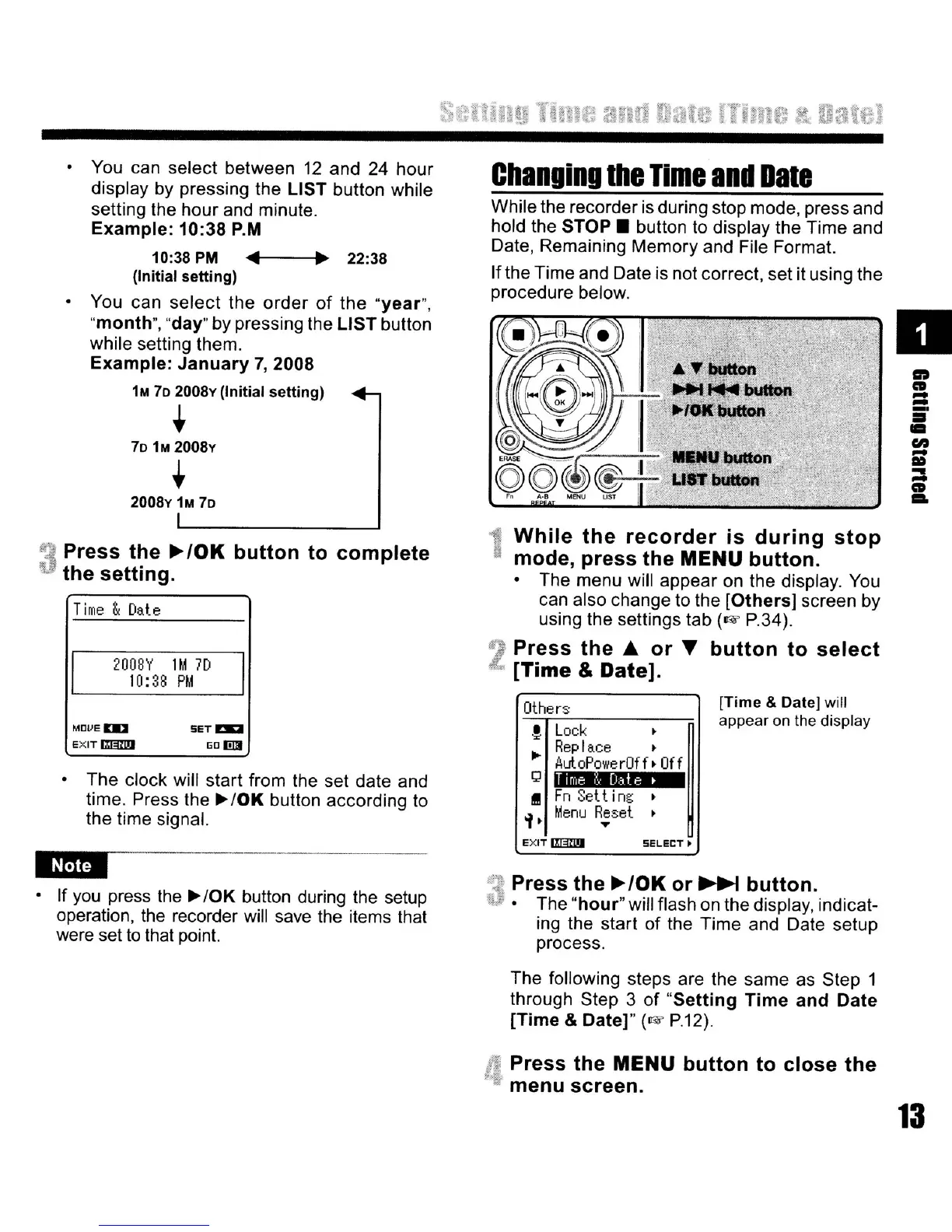
While the recorder is during stop mode, press and
hold the
STOP.
button
to
display the Time and
Date, Remaining Memory and File Format.
Ifthe Time and Date is not correct, set it using the
procedure below.
IIDIU
button
USTbulion
D
1ft
CD
-
-
iii'
•
en
-
III
:::
CD
...
3
Press
the
~/OK
button
to
complete
the
setting.
Time
&
Date
200BY
1M
70
10:38
PM
While
the
recorder
is
during
stop
mode,
press
the
MENU
button.
The menu will appear on the display.
You
can also change to the
[Others]
screen
by
using the settings tab
(o>i'
P.34).
2
Press
the
.&
or
'Y
button
to
select
[Time
& Date).
The clock will start from the set date and
time. Press the
~
10K
button according to
the time signal.
ami
If
you
press the
~
10K button during the setup
operation,
the
recorder will save the items that
were set
to
that point.
Press
the
~/OK
or
~
button.
The
"hour"
will flash on the display, indicat-
ing the start
of
the Time and Date setup
process.
The following steps are the same as Step 1
through Step 3
of
"Setting
Time
and
Date
[Time
&
Date]"
(o>i'
P.12).
Press
the
MENU
button
to
close
the
•
menu
screen.
13
[Time
& Date]
will
appear
on
the display
SELECT.
Others
!
Lock
Replace
•
..
AuloPowerOf
f> Off
g
I
Fn
Selt
ing
of.
Menu
R.;set
eXIT
II§ZD
SETm:I
liD I!l3
MDveDD
eXITmlmJ



 To Next Page