9
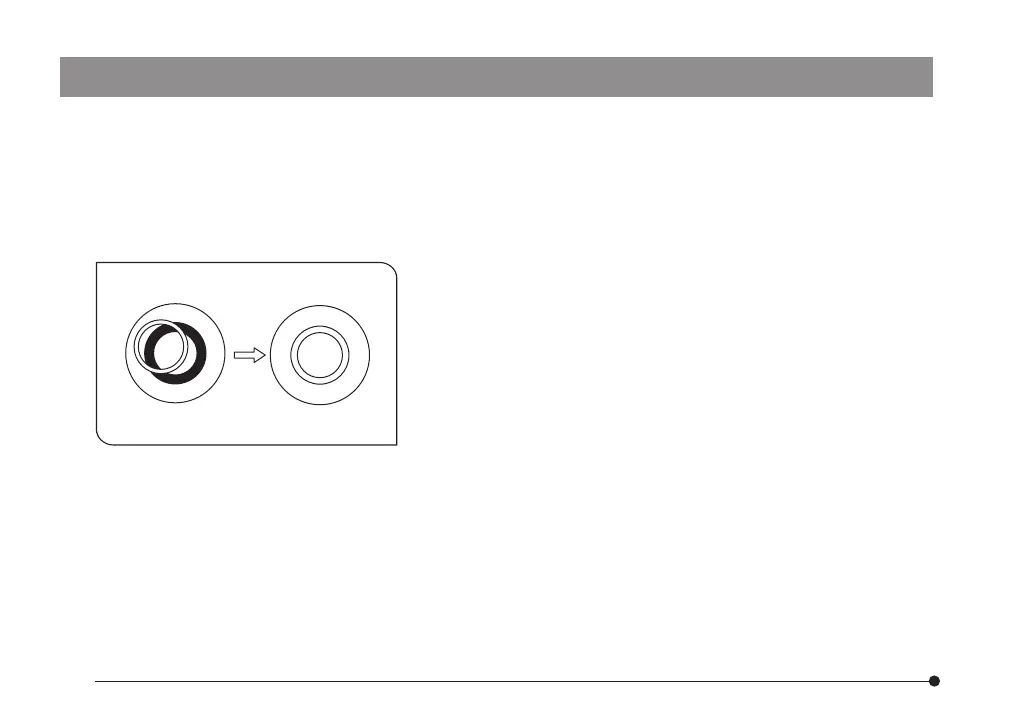
Fig. 2
7. Rotate the upper section of the U-CT30 centering telescope
and bring the bright ring (condenser ring slit) and dark ring
(objective phase plate) into focus.
8. Use the optical element centering screw to center the phase
contrast ring so that the bright ring overlaps the dark ring within
the field of view. (Fig. 2)
#If a multiple number of ring slit images appear, select the
brightest ring to overlap with the phase plate.
9. Repeat steps 7 and 8 for each phase contrast ring.
10. Remove the U-CT30 centering telescope and replace it with
the eyepiece.
11. Widen the field iris diaphragm opening until the diaphragm
image circumscribes the field of view.
}If increased contrast is required, insert the 45IF550 green inter-
ference filter into the filter mount at the base of the micro-
scope frame.
3. Mount the phase contrast objective to be used in the revolving nosepiece and rotate the nosepiece to
swing in the objective.
4. Open the aperture iris diaphragm.
#When the aperture iris diaphragm is stopped down, flare may occur at the center.
5. Place the specimen on the stage and move the stage up and down to bring the specimen in focus.
6. Remove the eyepiece from the eyepiece sleeve and replace with the U-CT30 centering telescope.
ax7353_inst.pmd 20.04.2005, 12:279


 To Next Page