35
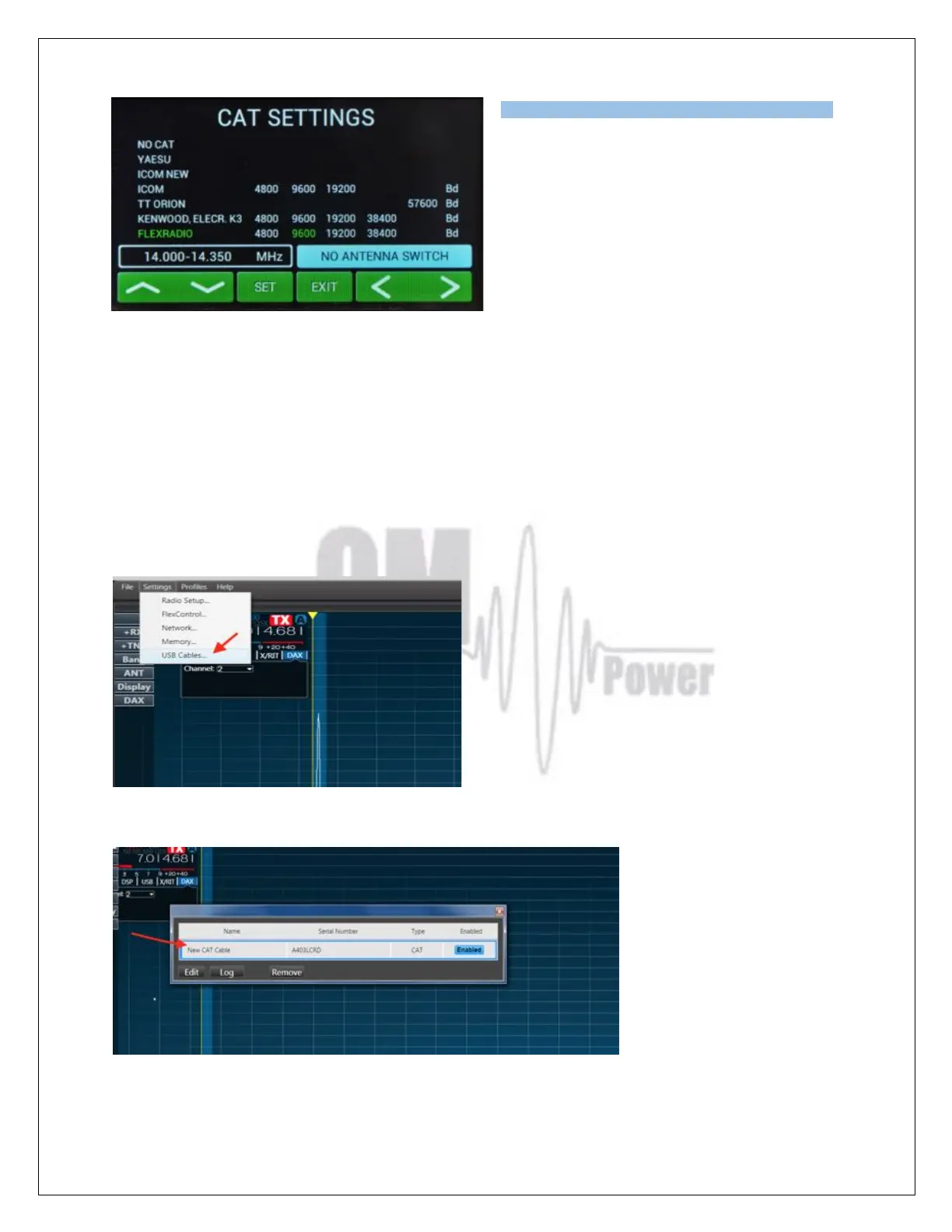
In the CAT SETTINGS menu select FLEXRADIO,
baud rate 9600 and press SET.
NOTE: If you have already configured other
programs to communicate with the Flex 6XXX
using a different baud rate then set the same baud
rate for the Amplifier CAT setting.
Flex Radio 6xxx series connection using USB output
Connect from the Flex USB port directly to the TCVR port on the OM2501A using an USB – FTDI
serial port adapter and a null modem serial cable (both ends of the cable have a female DB-9
connectors (pins 2 and 3 are crossed).
NOTE: A USB adapter equipped with a genuine FTDI chip set is a must. Knock off FTDI chip sets do
not work properly.
Now connect the DB9 end of the null modem cable/FTDI adapter to the TCVR port on the OM2501A.
Activate Smart SDR and from the Flex SSDR main screen choose Settings then USB Cables
Now connect the USB-FTDI adapter to a USB port on the Flex radio. A new line showing the
connected USB adapter will appear.
Double click on the new usb adapter line to open the configuration window for this COM port .
Set all parameters in the configuration window according to the picture below.



 To Next Page