9
Omnipod DASH™ Insulin Management System 11 Omnipod DASH™ Insulin Management System
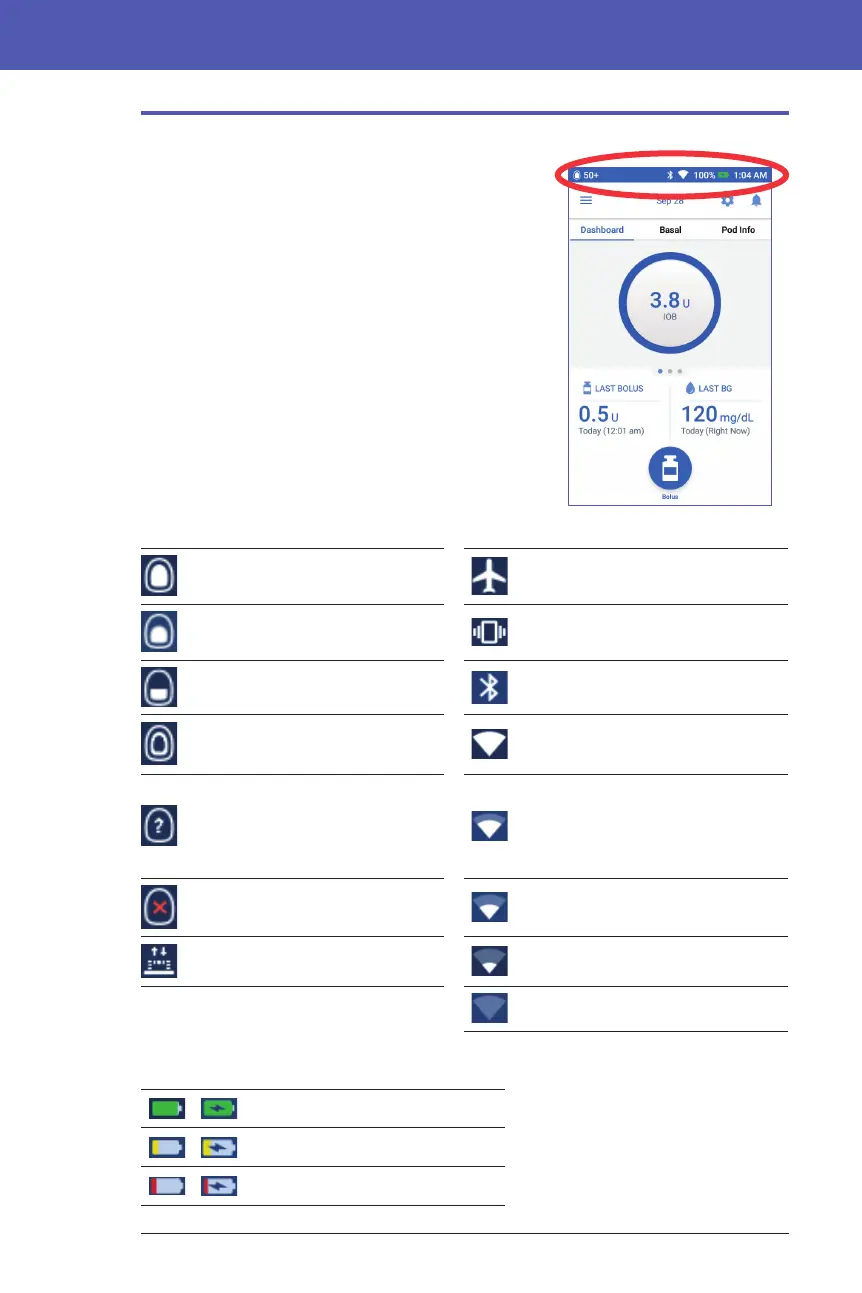
The Status Bar
Most screens have a status bar that shows you:
• e Pod status, including how much insulin is
le in an active Pod
• Whether a temp basal rate is running
• Whether the PDM will vibrate for selected
notications
• e Bluetooth® icon
• If Wi-Fi is on, the strength of the Wi-Fi signal
• e status of the PDM's battery
• e current time
Status bar icon denitions:
More than 50 units in Pod Airplane mode on
Between 50 and 26 units in Pod Vibration mode on
Between 25 and 5 units in Pod Bluetooth® setting on
Less than 5 units in Pod Wi-Fi on: strong signal
PDM unable to communicate
with Pod; units in Pod
shown as "- -" when unable to
communicate.
Wi-Fi on: good signal
No active Pod Wi-Fi on: fair signal
Temp basal rate active Wi-Fi on: low signal
Wi-Fi on: no signal
e PDM's battery icons, during normal operation and while charging, are:
100% to 31% charge
30% to 16% charge
15% to 0% charge



 To Next Page