Omnipod DASH™ Insulin Management System 1
10
1 Omnipod DASH™ Insulin Management System
For charging instructions, see"Charge the battery" on page 22.
The PDM's Lock and PIN Screens
Aer you set up your PDM, the Lock and PIN screens appear whenever you wake
up your PDM. e Lock and PIN screens help conrm that you are using the
correct PDM.
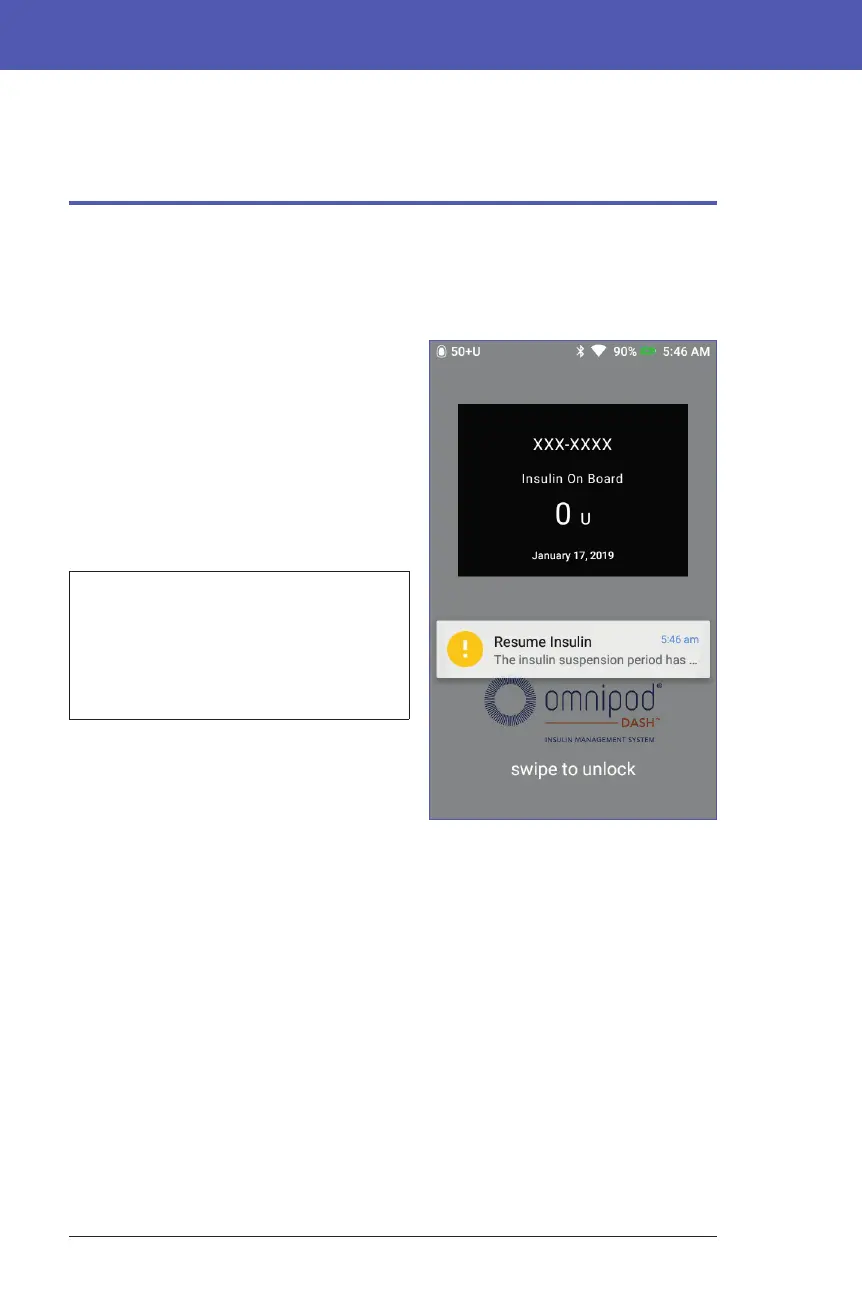
e Lock screen displays:
• Your selected background image
• Your customized message
• e amount of insulin on board, if the
Bolus Calculator is on
• Today's date
• Any alarm or notication messages
Warning: Always identify the
PDM as yours before using it. Using
someone else's PDM can result in
incorrect insulin delivery for both of
you.
Unlock your PDM
In the remainder of this User Guide,
instructions to "wake up" or "unlock" the
PDM mean to do the following:
1. Press the Power button briey. See the PDM image on page 3 for the location
of the Power button.
2. Unlock the Lock screen by either swiping le to right or by swiping up from
the bottom. e PIN screen appears.
3. Enter your 4-digit PIN.
4. Tap the checkmark. e Home screen or your most recent screen appears.
Note: If a hazard alarm or an advisory alarm is occurring, the alarm message
appears.



 To Next Page