27
Initial PDM Setup 22 Initial PDM Setup
You can adjust your Maximum Basal Rate later, if your needs change.
Create a Basal Program
e next step is to dene a Basal Program. For a description of basal rates, basal
segments, and Basal Programs, see "Basal Insulin Delivery" on page 149.
Name and tag the Basal Program
1. Review the description of Basal Programs, then tap NEXT.
2. e default name for the Basal Program is Basal 1. To change the name, tap
the Program Name eld and enter the new name (see "Selecting, Adding, and
Deleting Items" on page 6) and then tap the checkmark.
3. Optional: To add a visual icon to your Basal Program, tap one of the tags. Tap
the tag a second time to deselect it.
4. Tap NEXT.
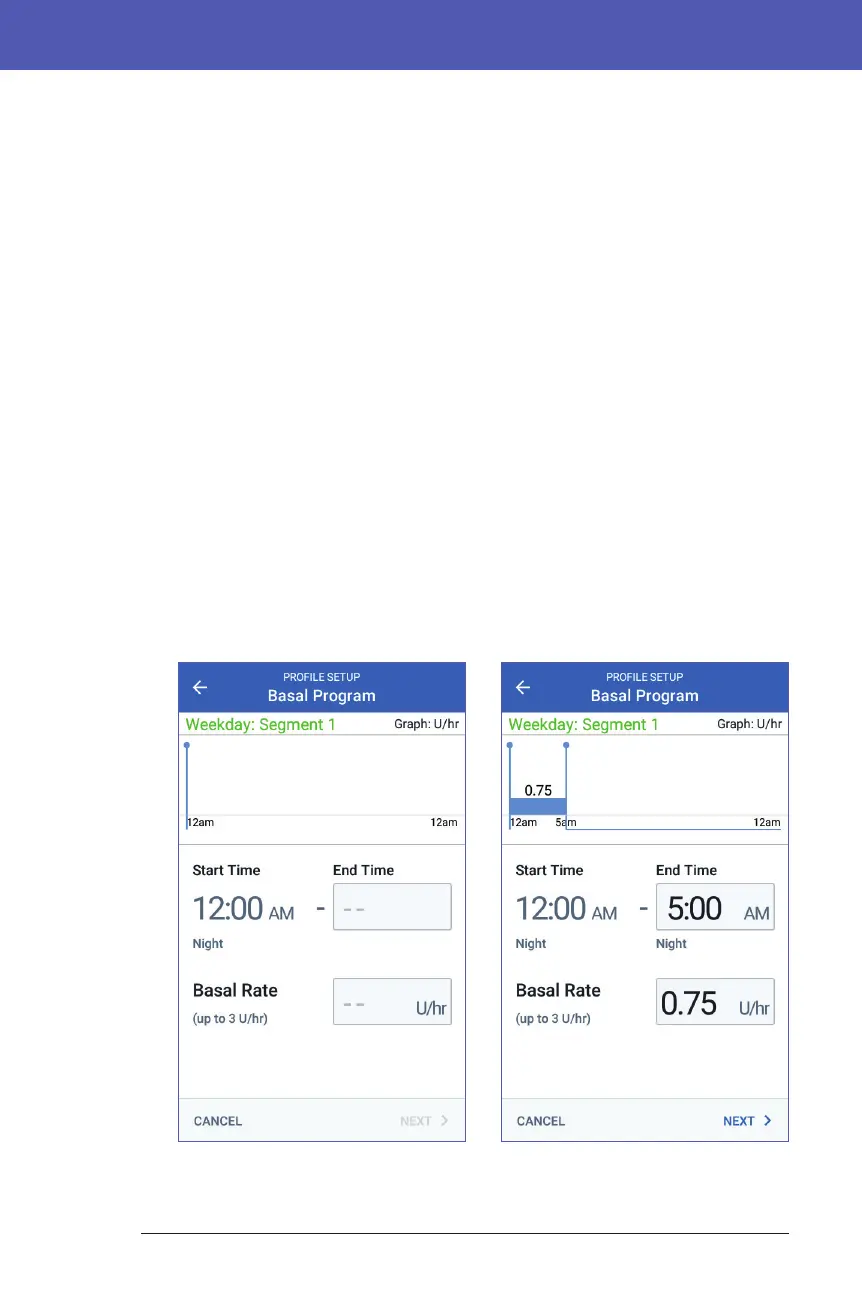
Dene the rst segment
1. e Start Time for the rst segment is always midnight. Tap the End Time
eld and scroll to select the desired end time.
2. Tap the Basal Rate eld and scroll to select the basal rate for the segment.
e Maximum Basal Rate that you entered earlier is displayed under the
Basal Rate text. You cannot enter a basal rate greater than this number.



 To Next Page