Initial PDM Setup 2
34
2 Initial PDM Setup
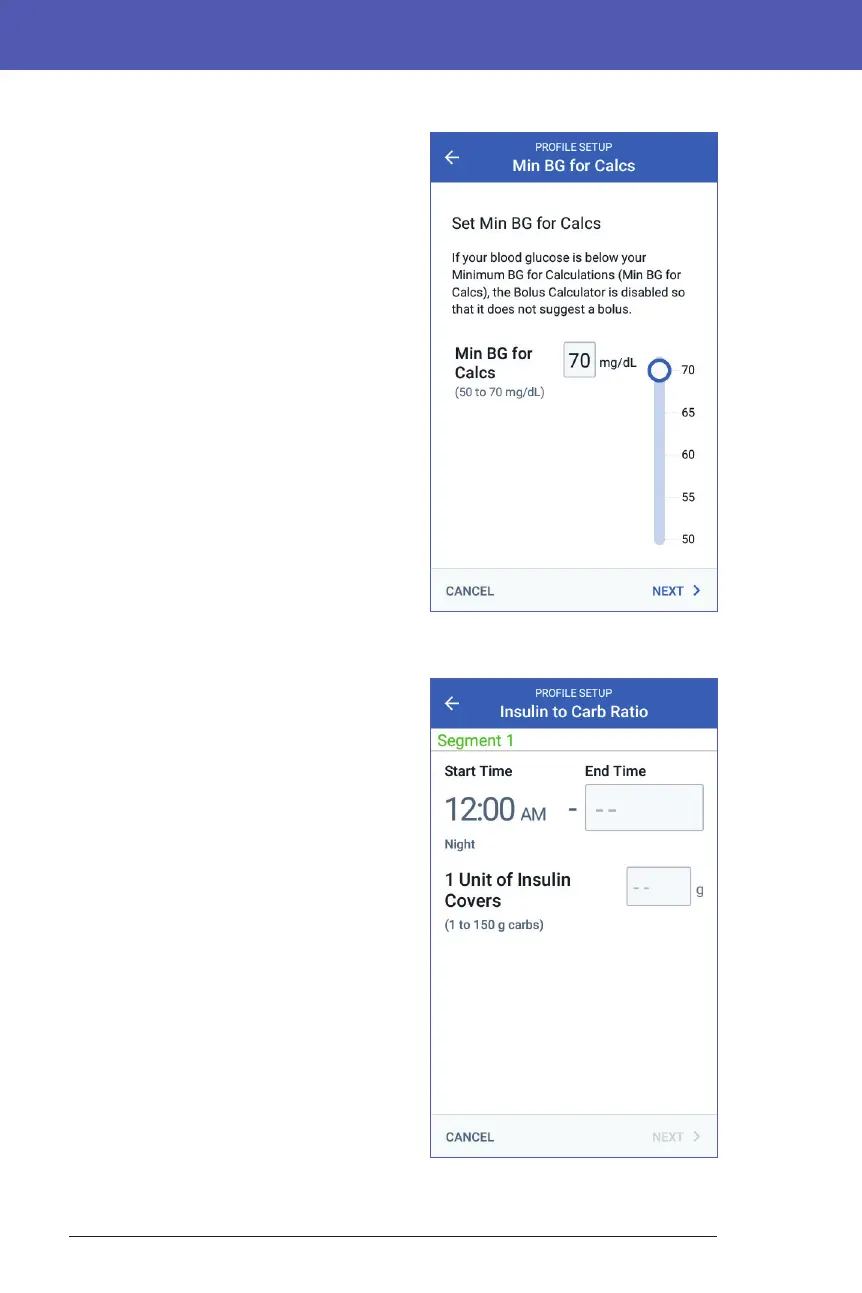
Minimum BG for Calcs
If your blood glucose level is below the
Minimum BG for Calcs that you specify,
the Bolus Calculator is disabled (see "e
Bolus Calculator" on page 156).
1. To enter your Minimum BG for Calcs,
tap the Min BG for Calcs eld and
enter the number on the number pad.
Tip: Alternatively, touch the blue circle
and slide it to the desired number.
2. Tap NEXT.
Insulin to Carb Ratio
Your Insulin to Carbohydrate Ratio, or "IC
Ratio," denes how many carbohydrates
are covered by one unit of insulin. e
Bolus Calculator uses the IC Ratio to
calculate the meal portion of a suggested
bolus. You can create up to eight IC Ratio
segments per day.
1. Review the description of IC Ratio,
then tap NEXT.
2. Enter the end time.
3. Enter the IC Ratio value in the 1 Unit
of Insulin Covers eld.
4. Tap NEXT.
5. Add additional segments as necessary
until the nal end time is midnight.
6. Review your 24-hour IC Ratio
segments. Tap any entry to correct it.
7. When the segments and values are
correct, tap SAVE.



 To Next Page