LVS-7500 External System Operations Manual
LVS-7500 External System Operations Manual Page 55 of 129
Preset Configuration Settings
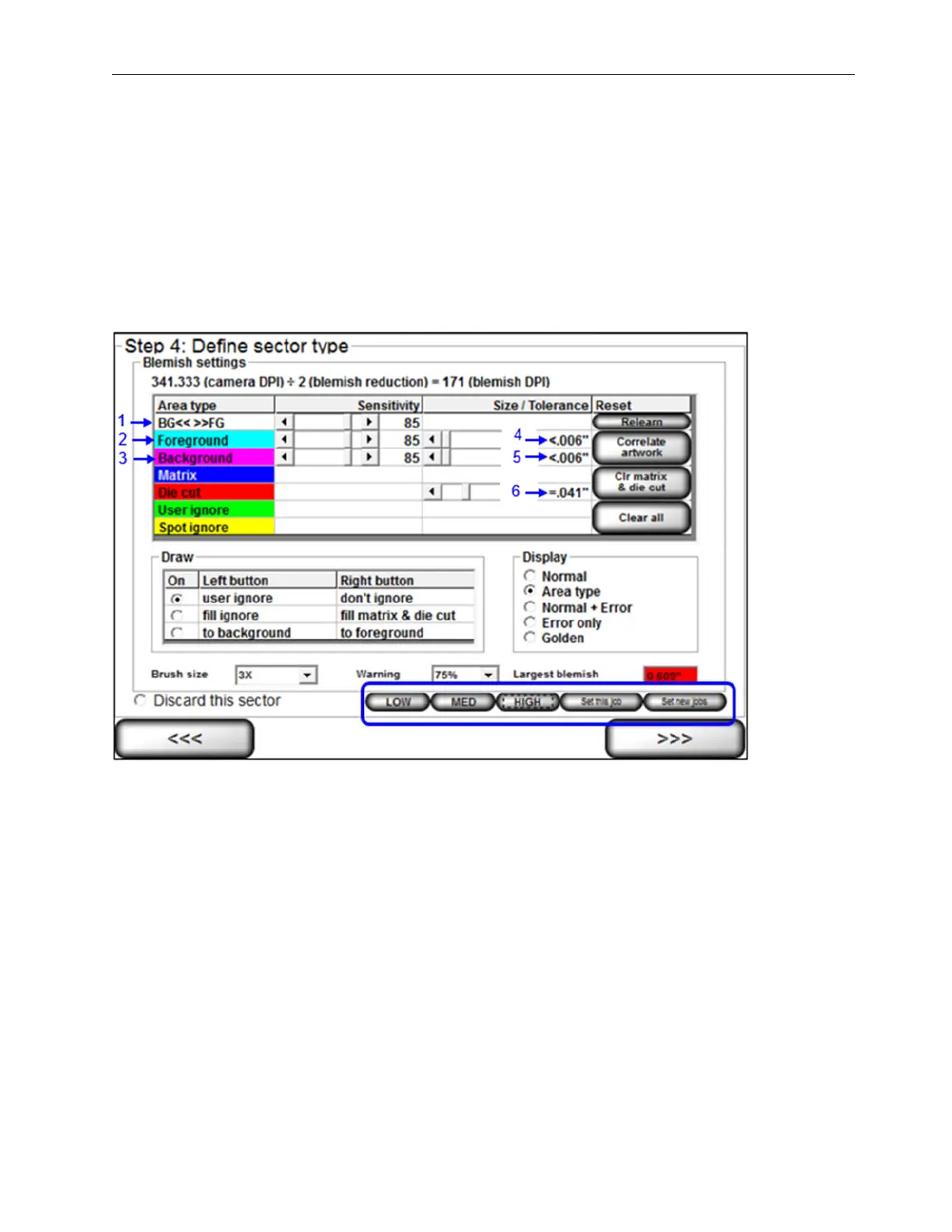
The preset configuration settings allow a user to adjust the following six blemish settings on the “Step 4: Define
sector type (Blemish settings)” screen:
1. BG<< >>FG sensitivity
2. Foreground sensitivity
3. Background sensitivity
4. Foreground Size/Tolerance
5. Background Size/Tolerance
6. Die Cut Size Tolerance
The functionality of the preset configuration settings varies based on user permissions.
• Users with administrator rights can configure the preset configuration settings and apply the settings to a
particular job or to all new jobs created. See the “Permissions” section for more information on administrator
permissions (“Welcome Screen Overview” section > “Administration” section > “Operators” section >
“Permissions” section).
• Users without administrator rights cannot configure preset configuration settings and can only select the
“Low,” “Medium,” and “High” preset buttons to adjust the blemish settings on the “Step 4: Define sector type
(Blemish settings)” screen.
See the sections below for more information on configuring and using the preset configuration settings.
Note: The preset configuration settings buttons are enabled in the LVS7500.ini file > [Preset] section >
UseFeature setting.
• UseFeature=0 (default) – Disables the preset configuration settings buttons
• UseFeature=1 – Enables the preset configuration settings buttons



 To Next Page