9.Appendix 1 Details on Remote I/O Communication Settings
9. Appendix 1 Details on Remote I/O Communication Settings
This section explains the details on the settings necessary to perform remote I/O
communications of DeviceNet that is set in this document.
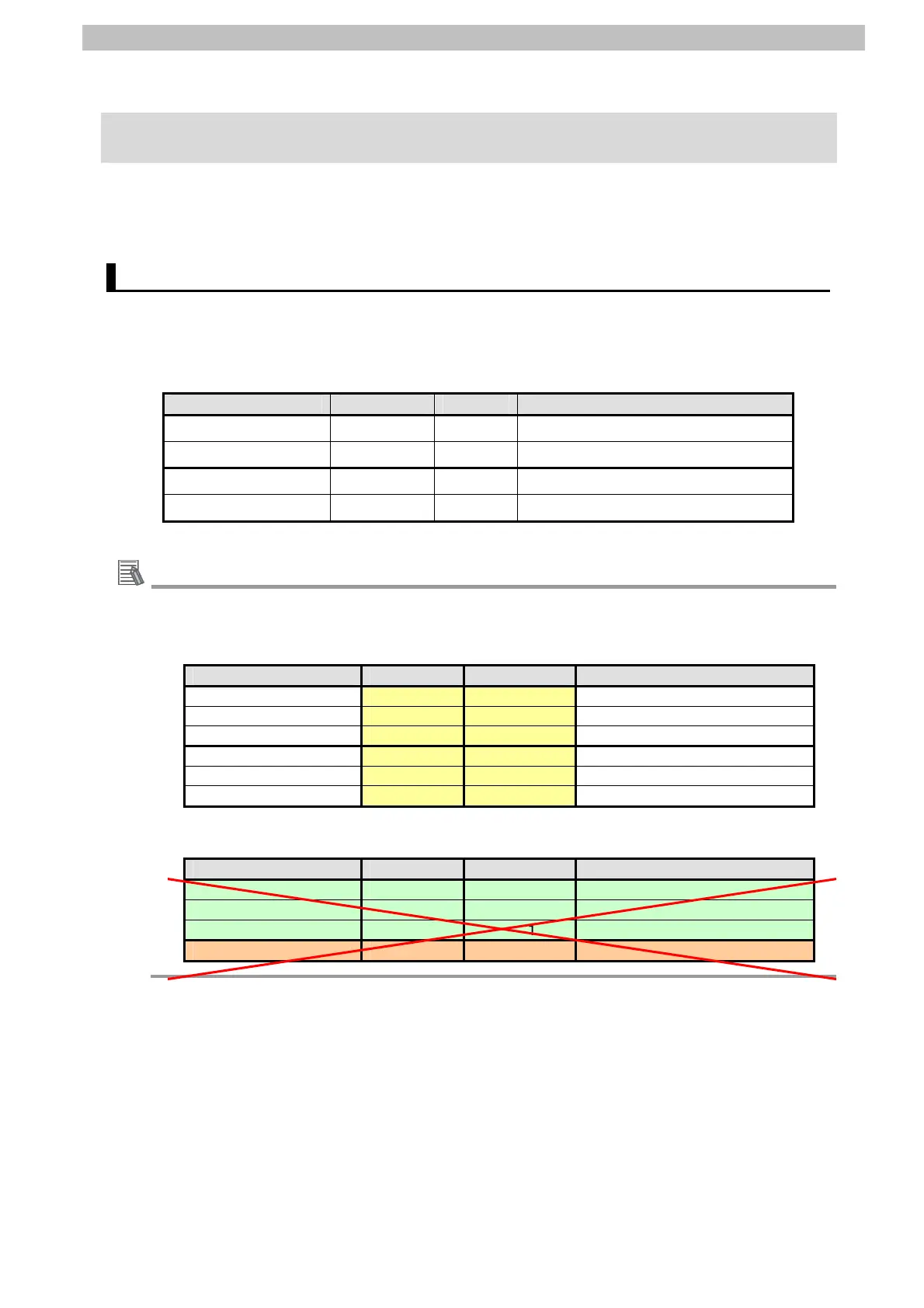
9.1. Global Variable Table
The Controller accesses the remote I/O communications data as global variables. The
settings of the global variables are shown below. Use the Sysmac Studio to register a global
variable table.
Name Data type AT Destination device allocation
DN00_CMD_OUT BOOL[16] %3200 Command
DN00_DATA_OUT WORD %3201 Rotation Speed Reference
DN00_STA_IN BOOL[16] %3300 Status information
DN00_DATA_IN WORD %3301 Rotation Speed Monitor
Additional Information
Set the AT to the values in memory used for CJ-series Units, which were allocated to the
slaves using the CX-Integrator. With the Sysmac Studio, add the prefix "%" to each address
to indicate the memory used for CJ-series Units. To allocate a bit address, set the data type
to BOOL and set the AT to %3200.00 as shown below.
Name Data type AT Destination device allocation
DN00_OUT_Bit00 BOOL %3200.00 Bit 00 Output
:
DN00_OUT_Bit15 BOOL %3200.15 Bit 15 Output
DN00_IN_Bit00 BOOL %3300.00 Bit 00 Input
:
DN00_IN_Bit15 BOOL %3300.15 Bit 15 Input
Do not specify the same area for the bit and word addresses as shown below.
Name Data type AT Destination device allocation
DN00_OUT_Bit00 BOOL %3200.00 Bit 00 Output
:
DN00_OUT_Bit15 BOOL %3200.15 Bit 15 Output
DN00_OUT WORD %3200 Bits 00 to 15 Output (2 bytes)
42



 To Next Page
 Loading...