BN75R/BN150R/BN300R
7
46
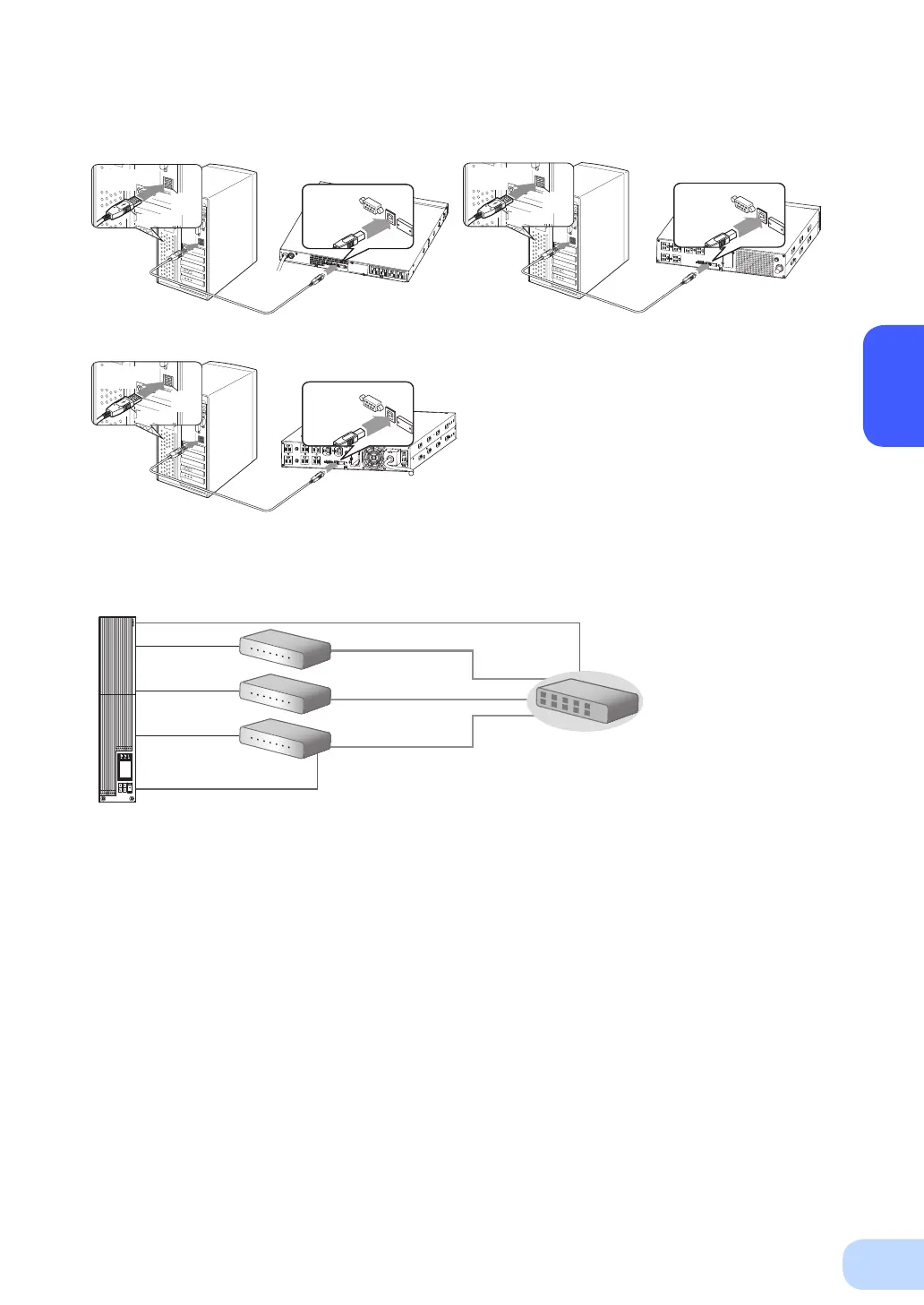
Included connection cable (USB)
Connect to
USB port
USB
port
Connector
Connect to
USB port
Connector
Included connection cable (USB)
Connect to
USB port
USB
port
Connector
Connect to
USB port
Connector
Included connection cable (USB)
RS-232C端子
に接 続する
Connect to
USB port
コネクタUSB
port
Connector
Connect to
USB port
Connector
BN75R
BN150R
BN300R
<USB>
2. Install the included “PowerAct Pro 4.x” or “Simple Shutdown Software” to
the PC you want to shutdown.
Installation method:
For “PowerAct Pro 4.x”, refer to the installation guide (for Windows) in the CD-ROM, or the sepa-
rate “Quick Installation Guide for UPS Monitoring Software”.
Refer to the manual in the CD-ROM for “Simple Shutdown Software.”
* When connecting 2 or more computers to the UPS ((Only when using PowerAct Pro)
UPS
Switching hub
PC server 3
Power cable
Power cable
Power cable
LAN connection
Remote connection
The Included connection cable (RS-232C)
Power cable
PC server 2
PC server 1
Network
BN150R



 To Next Page