23
4.3 Disabling/Enabling Bluetooth
• This product emits radio frequencies (RF) in the 2.4 GHz band. DO NOT use this
product in locations where RF is restricted, such as on an aircraft or in hospitals.
Disable the Bluetooth feature in this monitor, or remove the batteries and unplug
the AC adapter when in RF restricted areas. For further information on potential
restrictions refer to documentation on the Bluetooth usage by the FCC.
Bluetooth is enabled as default.
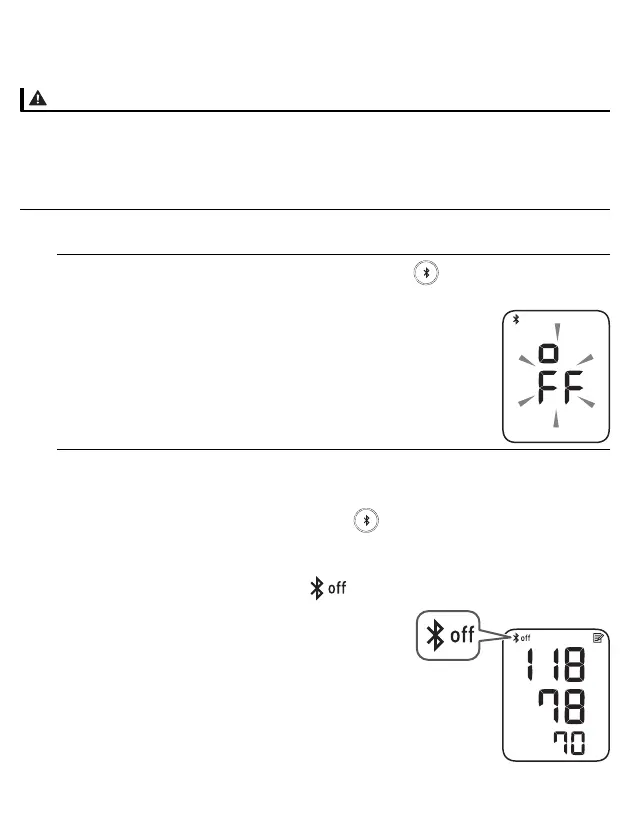
1. When your monitor is off, press and hold the button for more than
10 seconds.
“oFF” flashes 3 times.
2. Press the [START/STOP] button to turn your monitor off.
• To enable Bluetooth, press and hold the button for more than 3 seconds.
“on” appears on the display.
• Your monitor automatically turns off 10 seconds after the completion.
• When Bluetooth is disabled, the “ ” symbol appears.


 To Next Page