EN5
EN
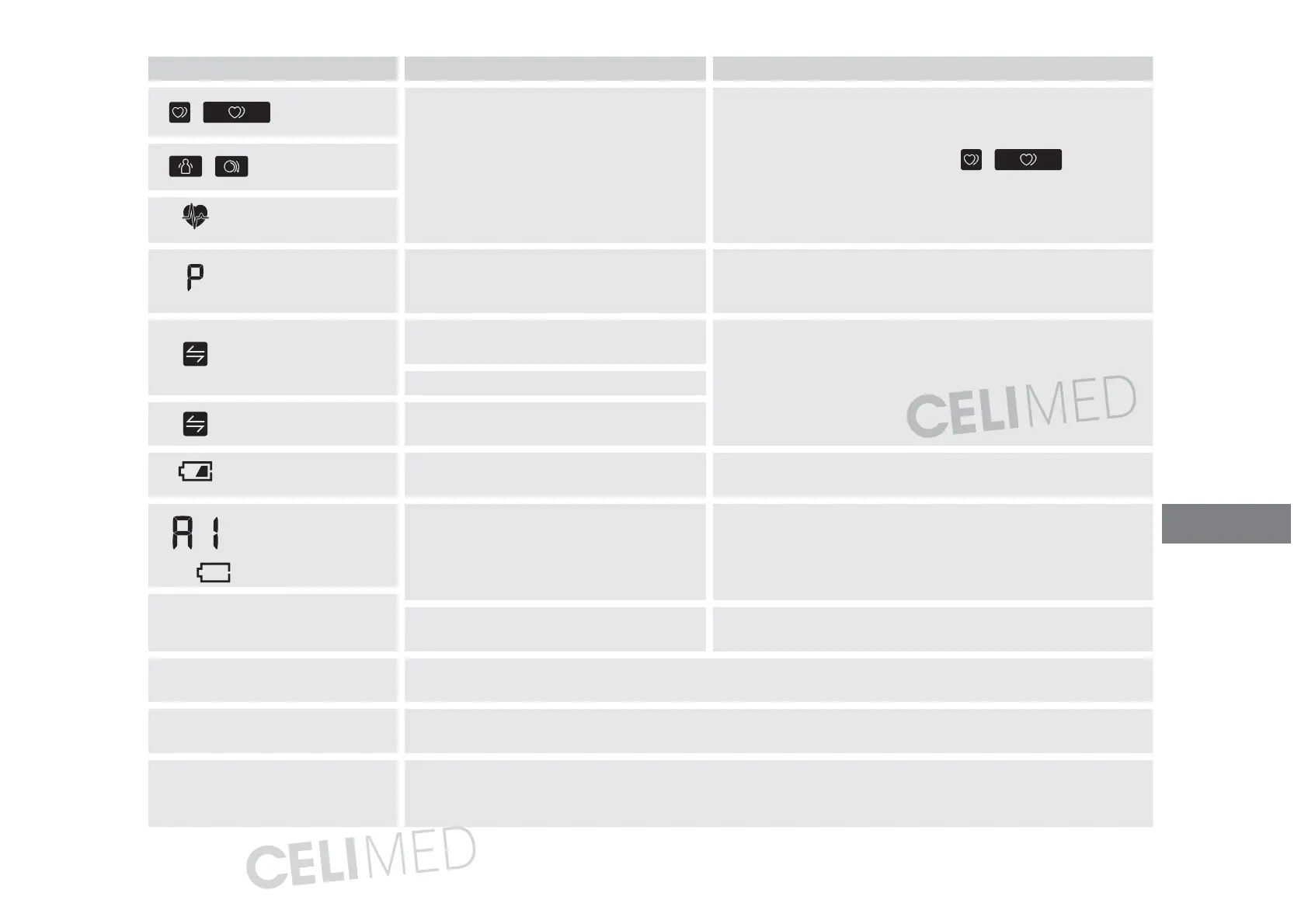
Display/Problem Possible Cause Solution
/ appears
The pulse rate is not detected correctly. Apply the arm cuff correctly, then take another
measurement. Refer to section8 of instruc tion manual 2.
Remain still and sit correctly during a measurement.
If the irregular heartbeat symbol “
/ ” continues
to appear, it is recommended that you consult with your
physician.
/ appears
does not flash during
a measurement
flashes
The monitor is waiting for pairing with
the smart device.
Refer to section5 of instruction manual 2 for pairing your
monitor with your smart device, or press the [START/STOP]
button to cancel pairing and turn your monitor off.
flashes
There are more than 80 readings stored
in memory.
Pair or transfer your readings to the “OMRONconnect”
app so you can keep them in memory in the app, and this
symbol disappears.
The date and time is not set.
appears
100 readings are stored in memory, and
new readings will replace the old readings.
flashes
Batteries are low. Replacing all 4 batteries with new ones is recommended.
Refer to section4 of instruction manual 2.
and
appears, or the
monitor is turned off
unexpectedly during
a measurement.
Batteries are depleted. Immediately replace all 4 batteries with new ones. Refer to
section4 of instruction manual 2.
Nothing appears on the display
of the monitor.
Battery polarities are not properly
aligned.
Check the battery installation for proper placement. Refer to
section4 of instruction manual 2.
Readings appear too high or too
low.
Blood pressure varies constantly. Many factors including stress, time of day, and/or how you apply the
arm cuff, may affect your blood pressure. Review sections 2, 8 and 9 of instruction manual 2.
Any other communication issue
occurs.
Follow the instructions shown in the smart device, or visit the “Help” section in the “OMRONconnect”
app for further help. If the problem still persists, contact your OMRON retail outlet or distributor.
Any other problem occurs.
Press the [START/STOP] button to turn the monitor off, then press it again to take a measurement. If
the problem continues, remove all
batteries and wait for 30seconds. Then re-install the batteries. If the
problem still persists, contact your OMRON retail outlet or distributor.
EN





 To Next Page