EN43
7. Error Messages and Troubleshooting
appears
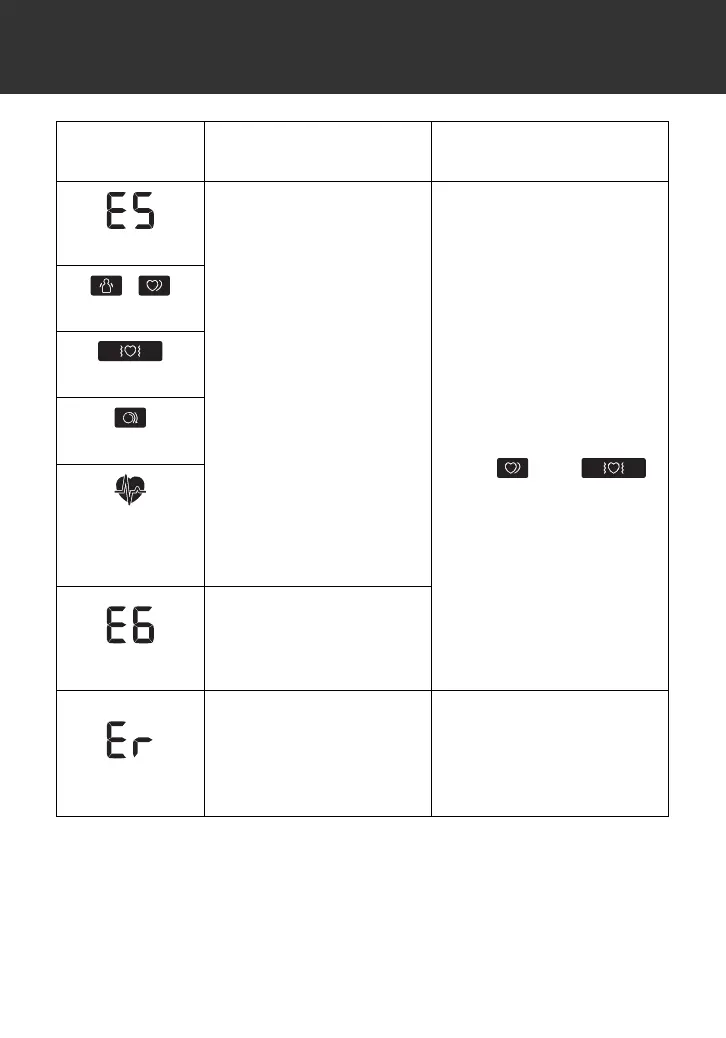
The pulse rate is not
detected correctly.
Apply the arm cuff
correctly, then take
another measurement.
Refer to sub-section 2.5.
Remain still and sit
correctly during a
measurement.
If the “ ” or “ ”
symbol continues to
appear, we recommend
you to consult with your
physician.
/
appears
appears
appears
does not flash
during a
measurement
appears
Blood pressure
measurements were not
taken correctly in an Afib
mode measurement.
appears
The monitor has
malfunctioned.
Press the [START/STOP]
button again. If “Er” still
appears, contact your
OMRON retail outlet or
distributor.
Display/
Problem
Possible Cause Solution
2895901-4A_HEM-7361T-ALRU_IM.fm Page 43 Wednesday, October 26, 2022 10:46 AM




 To Next Page