7. Error Messages and Troubleshooting
EN44
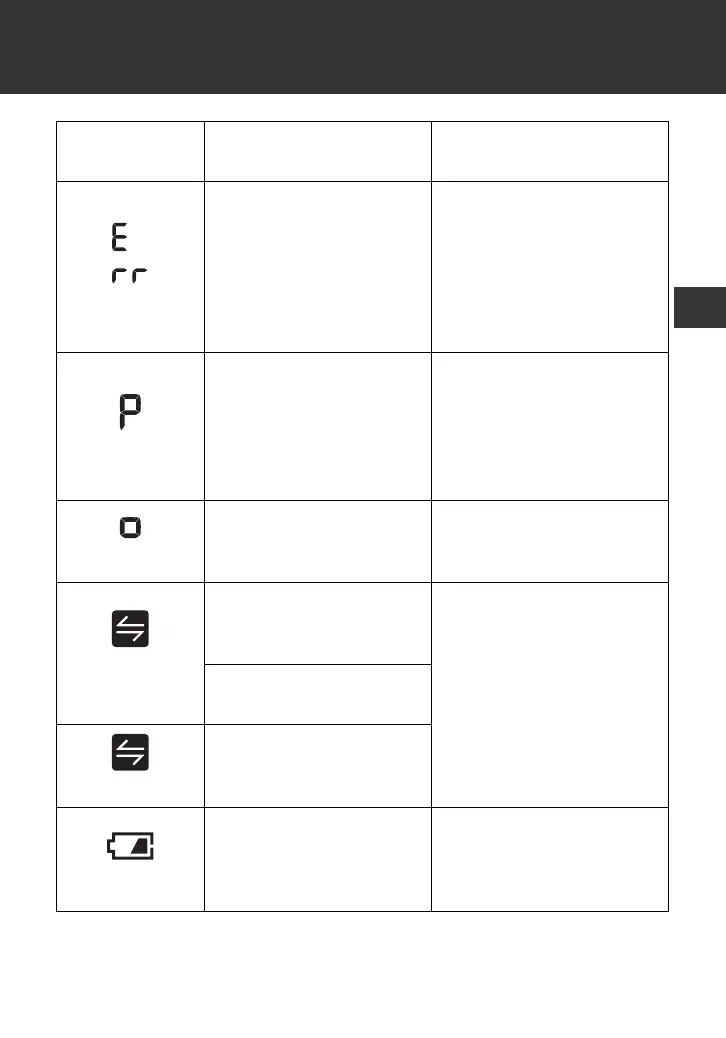
appears
The monitor cannot
connect to a smart
device or transmit data
correctly.
Follow the instructions
shown in the “OMRON
connect” app. If the “Err”
symbol still appears after
checking the app, contact
your OMRON retail outlet
or distributor.
flashes
The monitor is waiting
for pairing with the smart
device.
Refer to sub-section 4.1
for pairing your monitor
with your smart device, or
press the [START/STOP]
button to cancel pairing
and turn your monitor off.
flashes
The monitor is ready to
transfer your readings to
the smart device.
Open the “OMRON
connect” app to transfer
your readings.
flashes
There are more than 80
readings in memory to
be transferred.
Pair or transfer your
readings to the “OMRON
connect” app so you can
keep them in memory in
the app, and this error
symbol disappears.
The date and time is not
set.
appears
There are 100 readings
in memory to be
transferred.
flashes
Batteries are low.
Replacing all 4 batteries
with new ones is
recommended. Refer to
sub-section 2.1.
Display/
Problem
Possible Cause Solution
2895901-4A_HEM-7361T-ALRU_IM.fm Page 44 Wednesday, October 26, 2022 10:46 AM




 To Next Page