Page 20 of 31
Figure 20. Calibration Update Pop-up Window
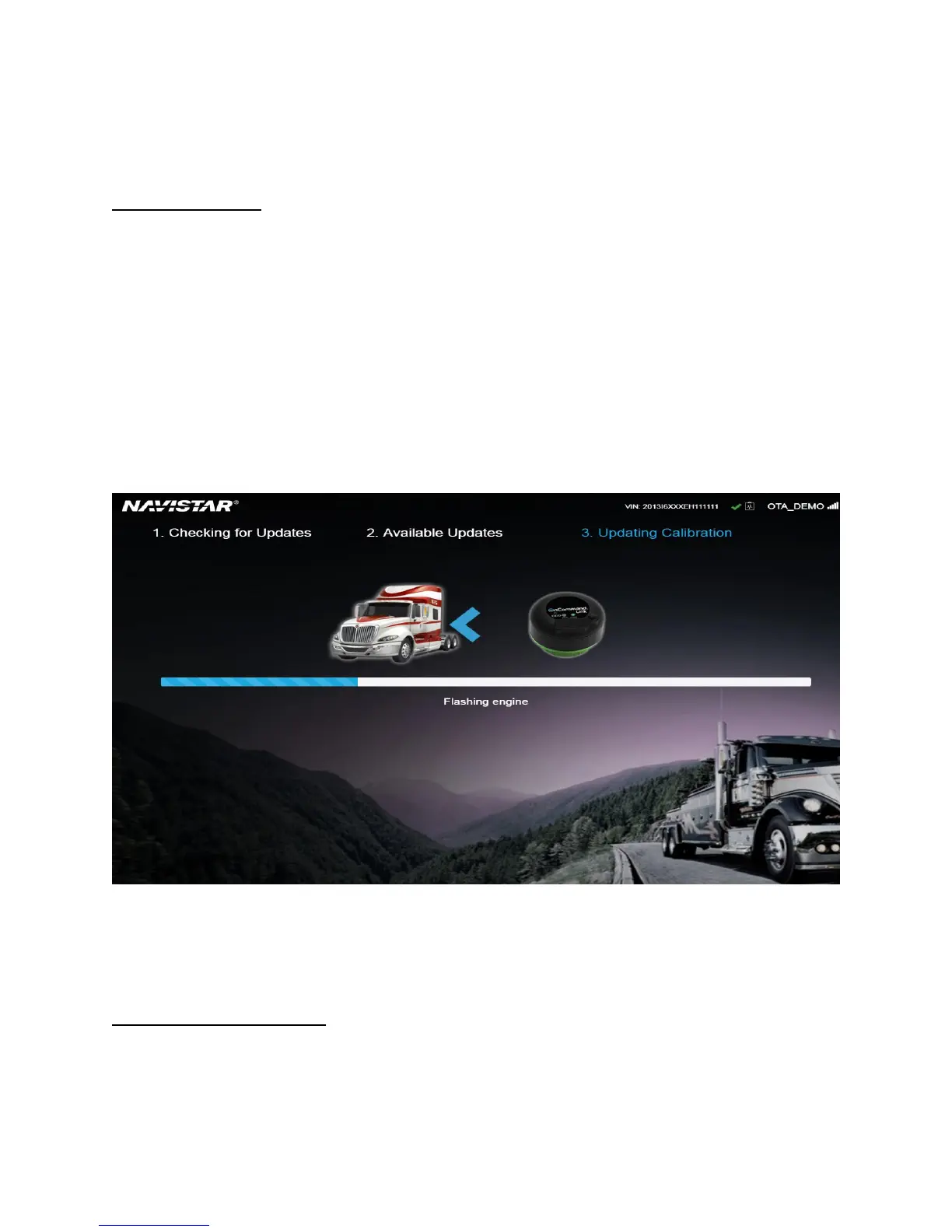
Updating Calibration
This message indicates that the OnCommand® Link is performing the calibration update operation,
including saving parameters, downloading the new calibration file, installing the new calibration file, and
restoring parameters.
A white/gray progress bar will be displayed and will start to fill in with blue as the update progresses.
The update will take from 15 to 25 minutes to complete. The progress bar represents an estimate of the
actual status of the calibration update.
Expect a series of beeps and flashing lights during the calibration update process at different times
based on certain operations performed by OnCommand® Link device. You may also see an Electrical
Fault on the dash, which is normal if it occurs during an update.
Figure 21. Updating Calibration Screen
Note: You will need to perform Key ON/Key OFF a few times during the calibration update process
whenever prompted on the application page.
Engine Calibration Up-to-Date
This message means the OnCommand® Link has read the CAN bus and the ECM calibration is up-to-date.
This message is also displayed after a completed OTA programming operation.


 To Next Page