Page 8 of 31
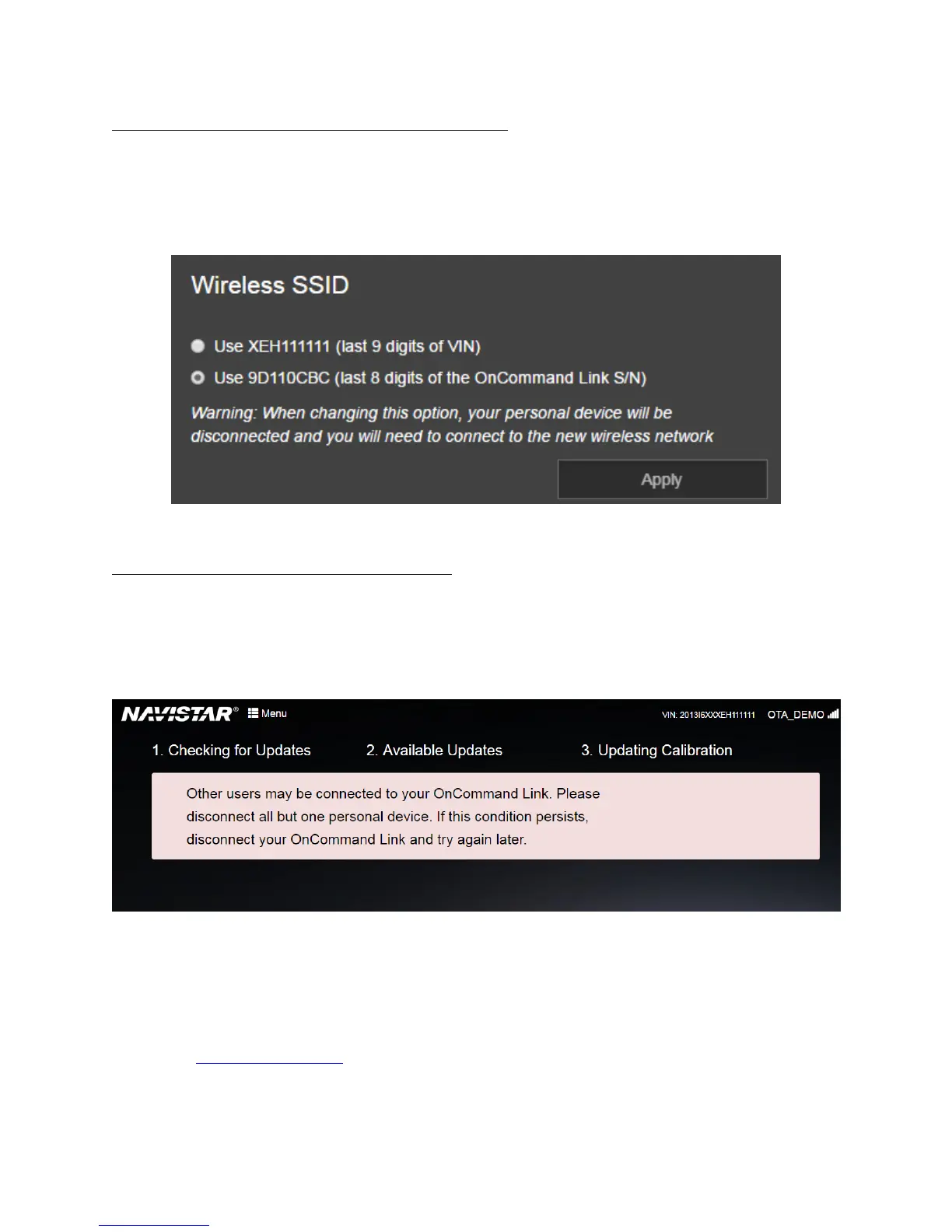
Changing the SSID to match the last 9 digits of your VIN
If you want to change the OnCommand® Link device’s SSID to match the last 9 digits of the VIN it is
connected to, go to MENU in the application and select last 9 digits of VIN, and click Apply.
Example: For a device with a Serial Number of 00:40:9D:8E:D4:DC, the SSID will be “9D8ED4DC” by
default. You will need to reconnect your personal device to the OnCommand® Link after changing the
SSID option in the Change SSID window (below).
Figure 4. Change SSID
Multiple users connected to OnCommand® Link
As a security measure, OnCommand® Link does not allow connections from multiple user devices at a
given time. If an attempt is made to connect to OnCommand® Link from multiple user devices,
application page shows the below error to all the connected user devices. The error goes away
automatically as soon as all but one user device remain connected.
Connecting OnCommand® Link to Internet
1. Open a supported browser window on the personal user device (smartphone, tablet or laptop).
2. Type in the following URL in the browser address field to open the device application page:
http://192.168.100.1


 To Next Page