Page 27 of 31
Troubleshooting
The OnCommand® Link SSID does not
appear in personal device’s Network
Settings, or is not connected to the personal
user device
Repeat Steps 1 through 5 under Section Connecting
Personal User Device to OnCommand® Link
If you cannot see the last 8 digits of SSID on the label
in your personal device’s network settings, your device
might be setup to select last 9 of VIN as SSID. Check if
you can see last 9 of VIN in your personal device’s
network settings
Two beeps have not sounded, or the amber
APP light is not illuminated after connecting
the OnCommand® Link to the vehicle
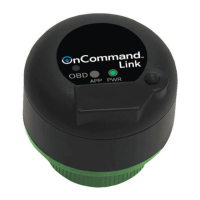
• Pull out the OnCommand® Link.
• Plug the OnCommand® Link back in and make sure
the green power light is on
• Repeat Steps 1 through 4 under Section Installing
OnCommand® Link on a Vehicle
Checking for Updates … takes longer than 3
minutes
Updating… does not appear after clicking
the Update Calibration button
Progress bar freezes during update
• Refresh the web page
• Make sure the ignition key is in the ON position
• Make sure you are connected to the
OnCommand® Link device.
Refreshing the web page does not complete
the Checking for Updates … operation
Refreshing the web page does not unfreeze
the progress bar
• Disconnect and reconnect the OnCommand® Link
to the vehicle.
• Wait for both green and amber lights
• Follow instructions from ‘Connecting
OnCommand® Link to Internet’ to connect to Wi-Fi
network
Message: “No Internet connection detected”
• This could be due to non-availability of internet
connection. Please follow instructions in
‘Connecting OnCommand® Link to Internet’
Message: “Battery Voltage not in range
(10.5V to 15.5V)”
• Vehicle voltage too low or too high to perform the
update
Message: ‘Lost connection to OnCommand®
Link’ popup appears on the application page
Move closer to OnCommand® Link device.
Repeat ‘Connecting Personal User Device to
OnCommand® Link’
Message: ‘Failed to exit Write-up tool mode’
Unplug the device and plug it back into the truck.
Please follow instructions in:
‘Switching between Write-up tool mode and OTA
mode’
If fault codes are noticed on the dash after
calibration update is completed.
Perform Key cycle (Key OFF followed by Key ON)
and confirm that no more faults are seen.


 To Next Page