Page 9 of 31
(If your browser prompts for authentication, that may be because your OnCommand® Link
Application version is old (1.2.xx or earlier). Try using http://192.168.100.1/navistar)
If the OnCommand® Link is already connected to a Wi-Fi network, the SSID will be displayed in the top
right corner of the device application page. At this point, skip the remaining part of this section and
follow procedure under ‘Programming with OnCommand® Link’ (For Navistar Engines) Or ‘Programming
Cummins Engine with OnCommand® Link’(For Cummins engines).
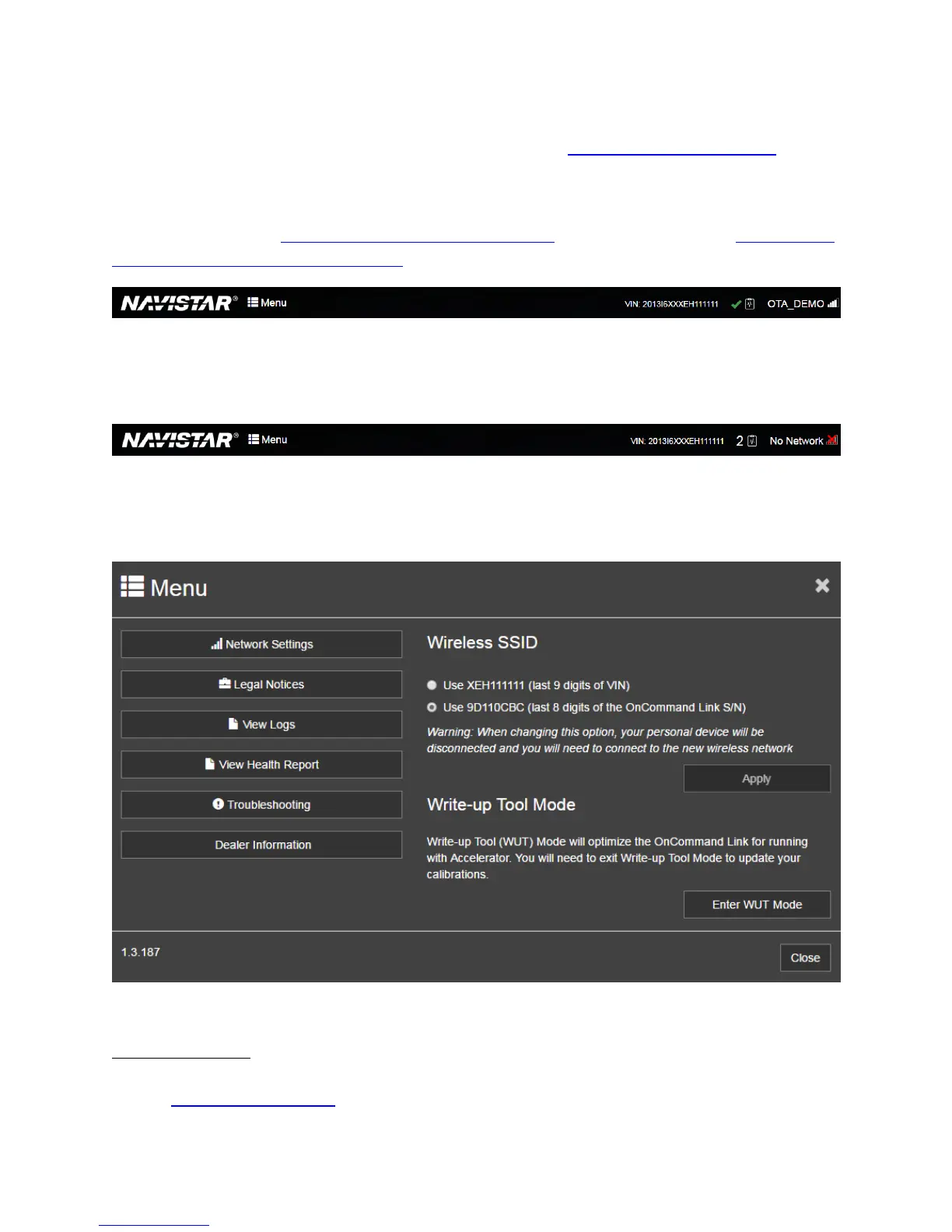
Figure 5. Connected to Wi-Fi network
If the OnCommand® Link is not already connected to a Wi-Fi network, No Network is shown at the top
right corner...
Figure 6. Not connected to Wi-Fi network
…. click the MENU button and then Network Settings to configure an available Wi-Fi network.
Figure 7. Application Menu
View Health Report
Click View Health Report under MENU, to view the latest health report on your personal user device.
Look at ‘Standard Health Report’ for more details on Health reports.


 To Next Page