78 Infotainment system
Infotainment sy stem
Brief ov erview.. .............. .... ......... .... ..... 78
General inform ation ..... ......... .... ......... 80
Operation ........ ..... .... ......... ..... ............. 81
Main menu ...... ..... ......... .... ..... ........ ..... 82
Sound settings ..... .... ..... ......... .... ......... 84
Radio .. ..... ........ ..... .... ......... ..... .... ......... 86
CD/MP3 player ..... ......... .... ..... ........ ..... 90
Troub leshooting... ......... .... ......... .... ..... 97
General advic e..... .... ..... ......... .... ......... 98
Glossary... .... .... ......... ..... ............. .... ..... 100
Radio reception ... ......... .... ..... ........ ..... 101
Mobile telephones a nd radio
equipment (CB) 3 . ..... ............. .... ..... 101
Brief overview
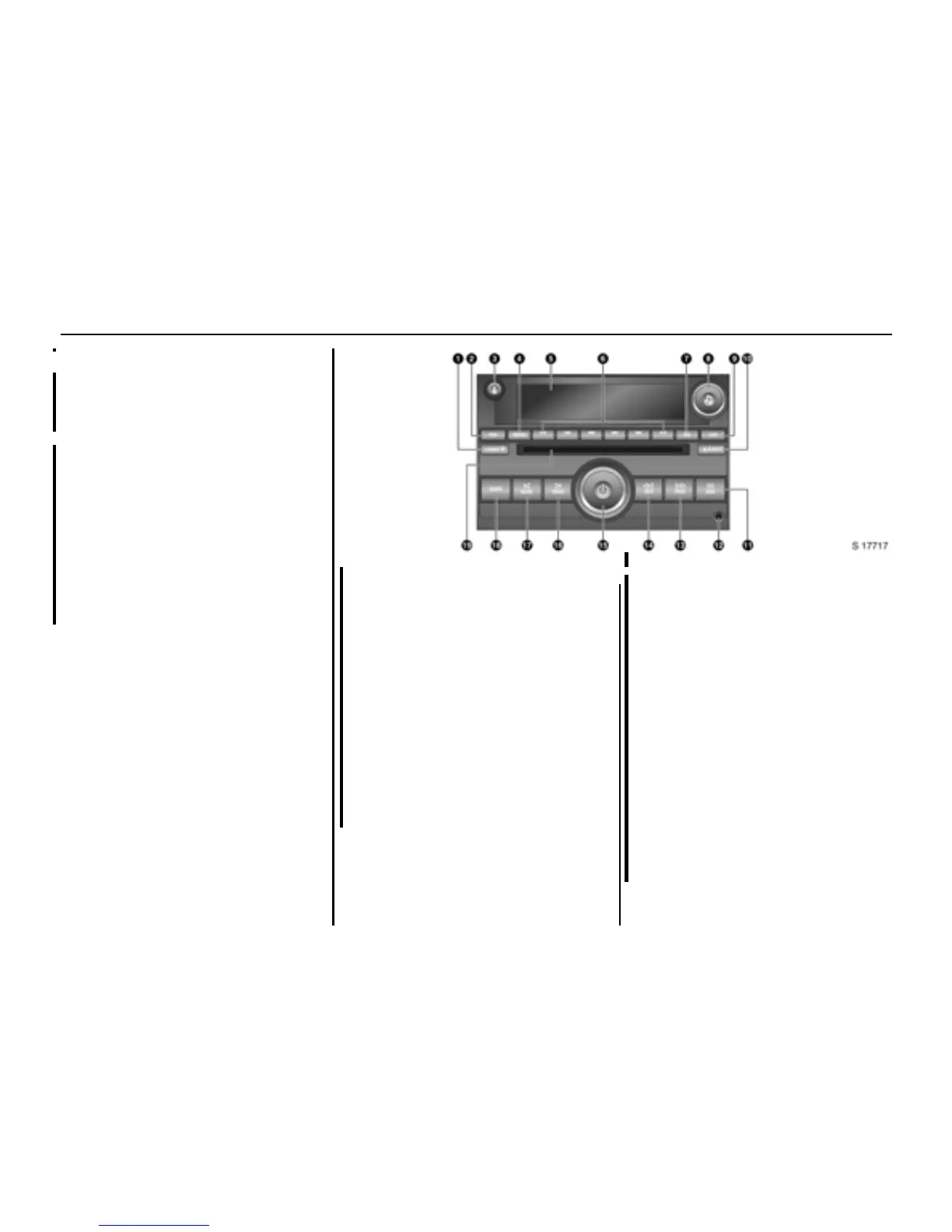
Operating elements
1 LOAD Loading discs with six-disc
CD pla yer 3: Press
- or -
C Setting tim e/date: Press
2 FAV Vie w and s ave
favourite stations: Press
3 B
BB
B Display additional text
information for
RDS stations or MP3 files:
Press
4 MENU Display menus
5 Display panel
6 1... 6 Preset buttons 1 to 6
Select options in
corresponding display
pa nel labels
Radio:
View and save
favourite stations
7 EQ S ele ct preset
equalisation settings:
Press
8 K Adjust sound settings:
Press and turn
CD: Select track; turn
Rad io: Se lect station; turn
9 CAT Change category
CD: Toggle betw een
CD audio and MP3 files






 To Next Page