97Infotainment system
Troubleshooting
If your Infotainment system does not
func tion as you would expect, plea se read
these Ope rating Instructions ca refully an d
go t hro ug h t he fo llowing ch ecklis t be fore
contacting Customer Services.
If you cannot find a solution to the
problem, we recommend that you consult
an Opel Service Partner.
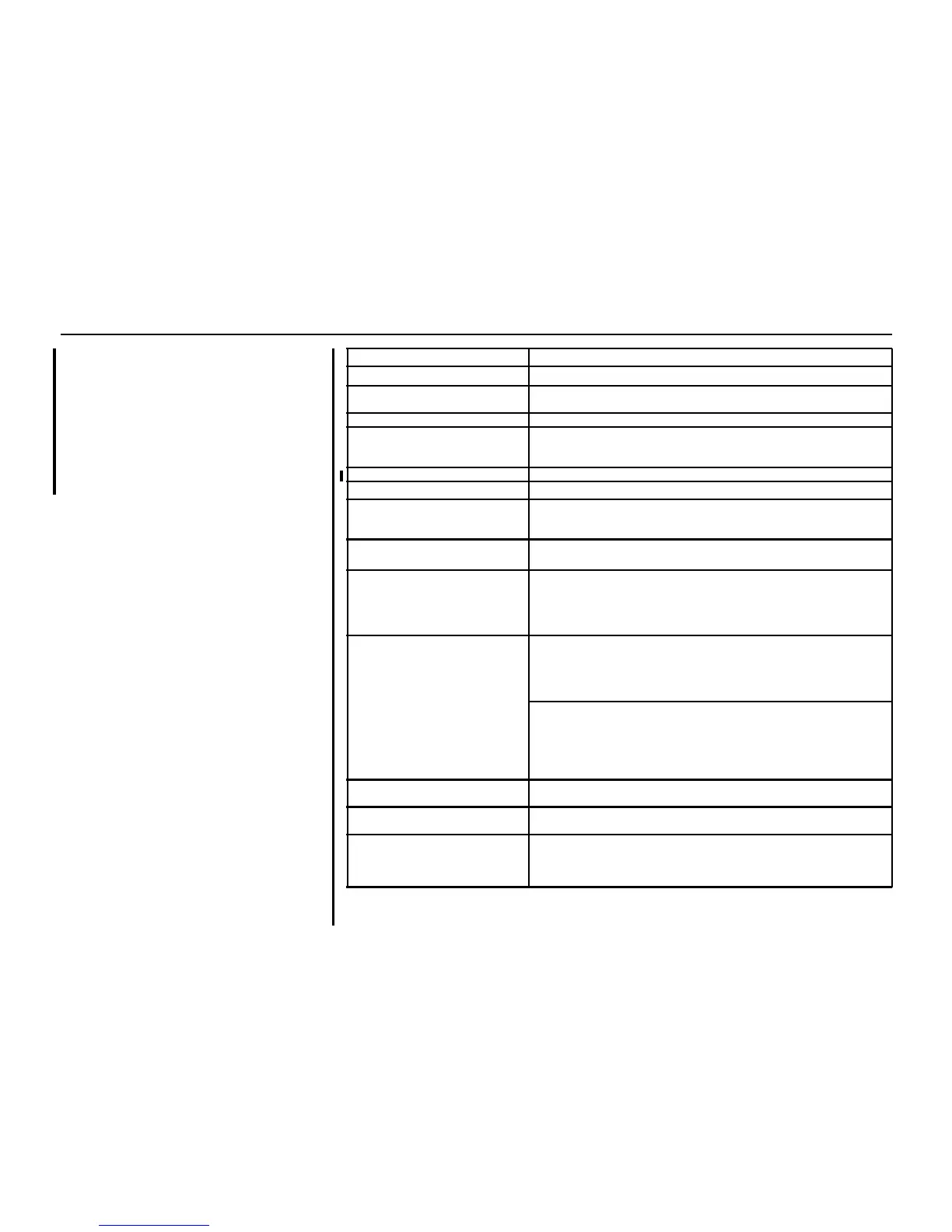
Error message / symptom Possible cause / remedy
Ge n e ra l
Display is dark. Vehicle’s battery is weak (if operated without the eng ine running);
See page 159.
Display is difficult to read. Instrument illumina tion i s set incor rectly; See page 76.
Infotainment system cannot
be switched on either with the
X e knob or with the ignition key.
Infotainment system fuse or vehicle fusebox is defective.
Incorrect t ime on the disp lay Set t ime as specified on page 82.
Audio
Aud io playback volume consta ntly
decreases and cannot be adjusted.
Infotainment system is ov er heat ing. Internal temper ature regulator is
ac ti ng to prote ct the Infot ainme nt system.
Recommend ation: switch the Infotainment system off.
Stored station cannot be selected
with the appropriate button
6.
No recept ion for st ation curr ent ly.
Stored station not stored with
station name.
Broa dcast ing or ganisa tion oc casionally sends add itional information.
Try t o store it a gain when the station name appears on the disp lay.
Poor reception when storing (frequency is displayed).
Broadcasting organisation is not transmitting RDS information
(frequenc y is disp layed ).
“CHECK DISC” appears on the
disp lay.
After loading a CD:
CD incorrectly inserted. CD label may be caught in the player.
Incompatible audio CD inserted (DVD etc.).
CD scratched or ot her wise da maged.
Inser t an unda maged, c ompatibl e CD wi th the pr inted side upwa rds.
During CD playback:
Temperature of Infotainment system too high.
Wait until the temperature of the unit has returned to normal.
Air is too humid. Wait for conditions to improve.
Road sur fac e is uneven. When road sur face becomes smoother, CD
should p lay aga in.
“Ca libration Err or” appear s on the
disp lay
Infotainme nt system has not been cal ibrated cor re ctl y. Ret urn vehic le to
your retailer for service.
“Locked” appears on the display. Electronic theft-deterrent feature has locked up the Infotainment
system. Return v ehicl e t o y our retailer for serv ice.
An ejected CD that has not been
accepted is r et rac ted again by the
unit when the ignition/unit is
switc hed off.
No error.
Remove the CD bef ore switching off the ignition/ Infotainment system.








 To Next Page