INSTALLATION
22
Original Content
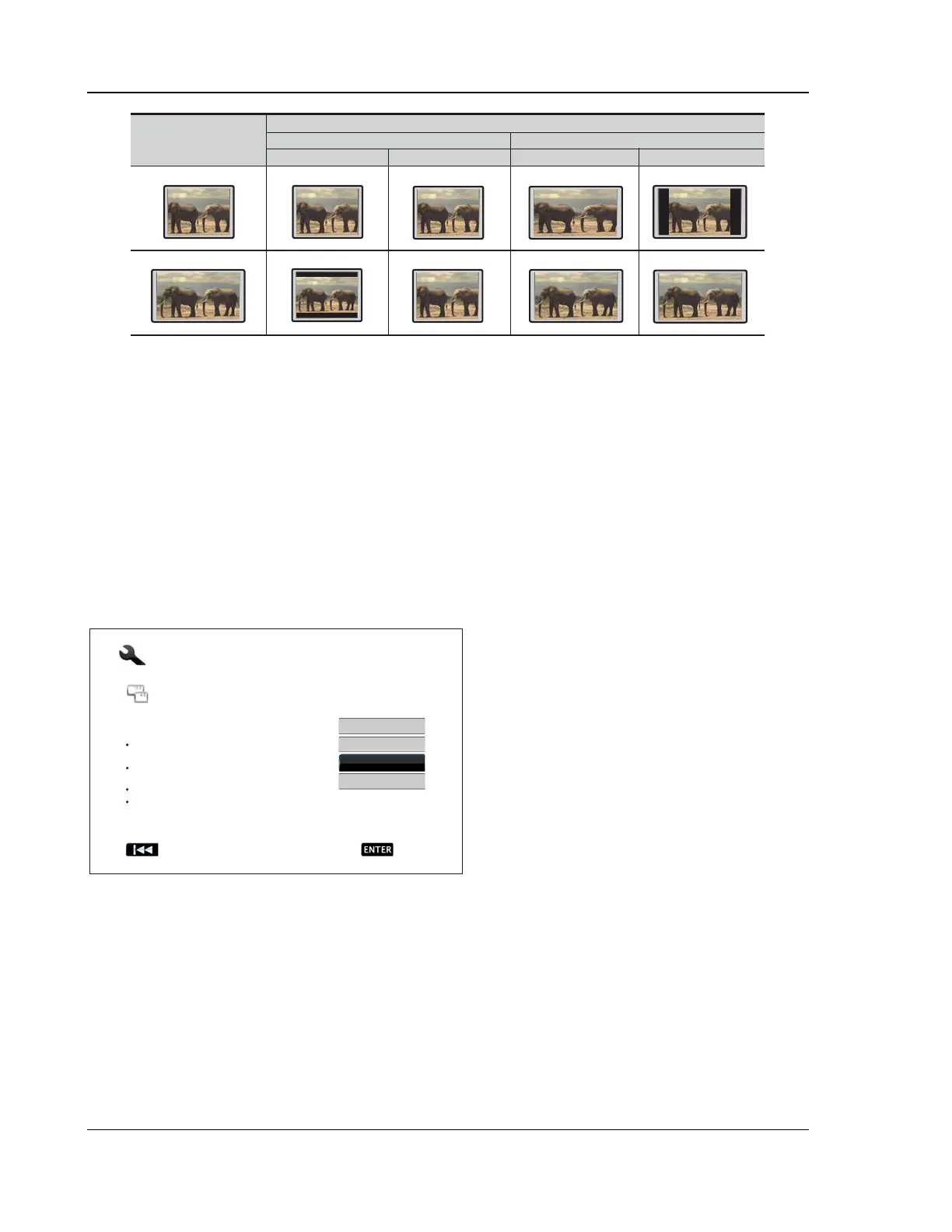
TV Screen Appearance
16:94:3
Pan & ScanLetterbox
16:9
4:3
Wide Wide/Auto
If you have a 4:3 or standard definition screen, select one of these options:
• 4:3 Letterbox – 4:3 TV Letterbox. Choose when the display is 4:3. Widescreen image is
displayed in “letterbox” format with black borders on top and bottom (preferred).
• 4:3 Pan & Scan – 4:3 TV Pan and Scan. Choose when the display is 4:3. Both sides of a
widescreen image are clipped (you lose about 30% of the picture).
If you have a widescreen (16:9) display, select one of these options:
• 16:9 Wide – 16:9 (widescreen) sources will be displayed in their native aspect ratio, and 4:3
sources will be horizontally stretched.
• 16:9 Wide/Auto – 16:9 (widescreen) as well as 4:3 sources will be displayed in their native
aspect ratio. Please note that in this mode 4:3 sources will be displayed with black borders on
both left and right sides to maintain the correct 4:3 aspect ratio.
Press the UP/DOWN ARROW buttons to select
the proper aspect ratio for your TV, then press the
ENTER button.
Easy Setup
Previous Next
Step: 4/6
Choose the desired Aspect Ratio for your TV.
4:3 Letterbox: For 4:3 TV. Wide screen content
will be displayed in a letterbox.
4:3 Pan & Scan: For 4:3 TV. Wide screen
content may be cropped on the sides.
16:9 Wide: For 16:9 TV.
16:9 Wide/Auto: For 16:9 TV. 4:3 content will be
displayed with side borders.
4:3 Pan & Scan
16:9 Wide
4:3 Letterbox
16:9 Wide/Auto



 To Next Page