INSTALLATION
15
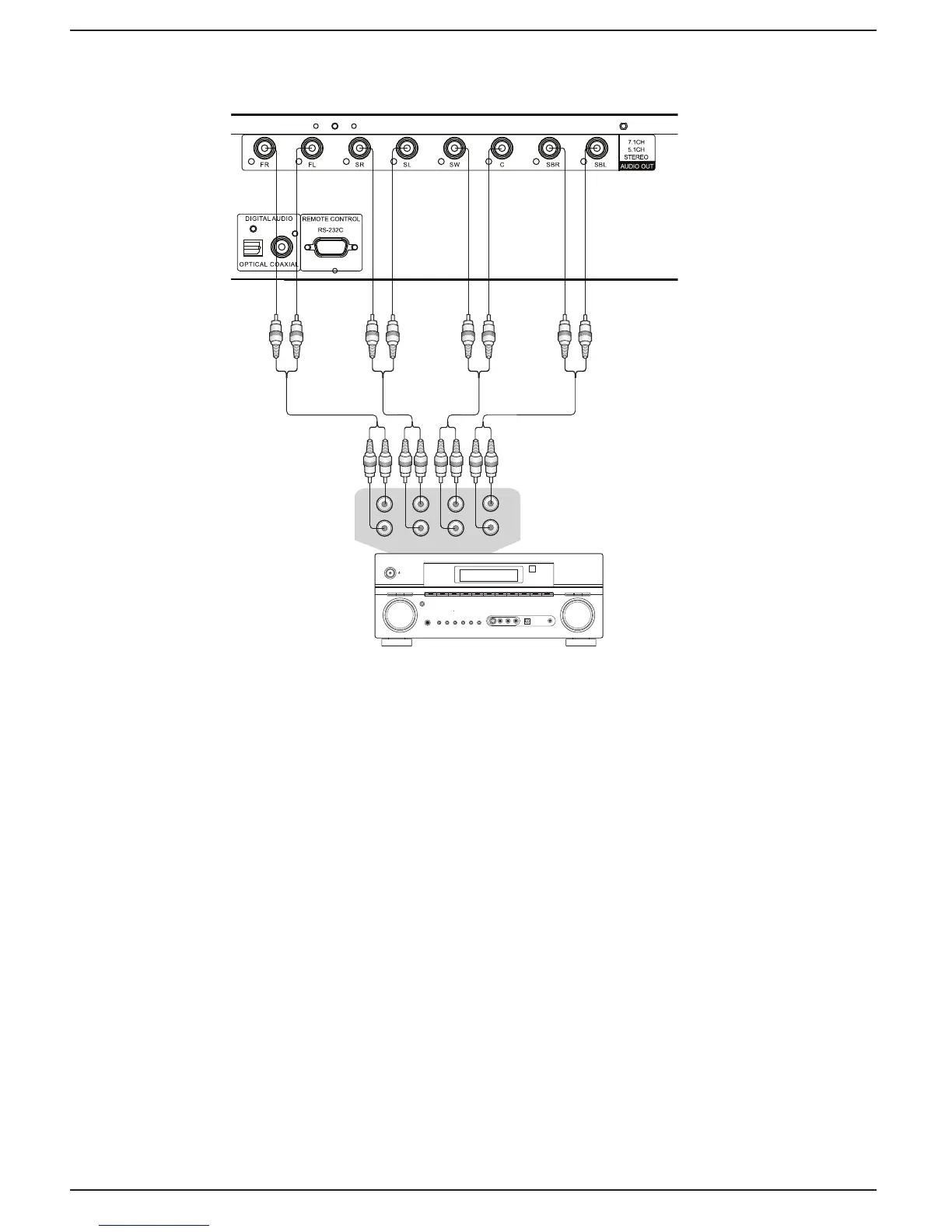
Connecting to a Receiver/Amplifier with 7.1ch/5.1ch Audio Input
Audio Interconnect Cables
Rear Panel
AUDIO/VIDEO MULTI- CHANNEL
RECEIVER
Receiver/Amplifier with 7.1ch Audio Input
FRONT SURROUND SUBWOOFER S. BACK
L
R
L
R
L
R
CENTER
Method 5 – 7.1ch Analog Audio Connection
x Please use 8 RCA-style audio interconnect cables (not included) to connect the FL (Front Left),
FR (Front Right), SL (Surround Left), SR (Surround Right), C (Center), SW (SubWoofer), SBL
(Surround Back Left) and SBR (Surround Back Right) analog output terminals of the OPPO Blu-
ray Disc player to the corresponding multi-channel analog audio input jacks of your A/V receiver
or amplifier.
x If the A/V receiver or amplifier only has 5.1ch audio input, do not connect the SBL (Surround
Back Left) and SBR (Surround Back Right) terminals.



 To Next Page