Connecting a Standard TV
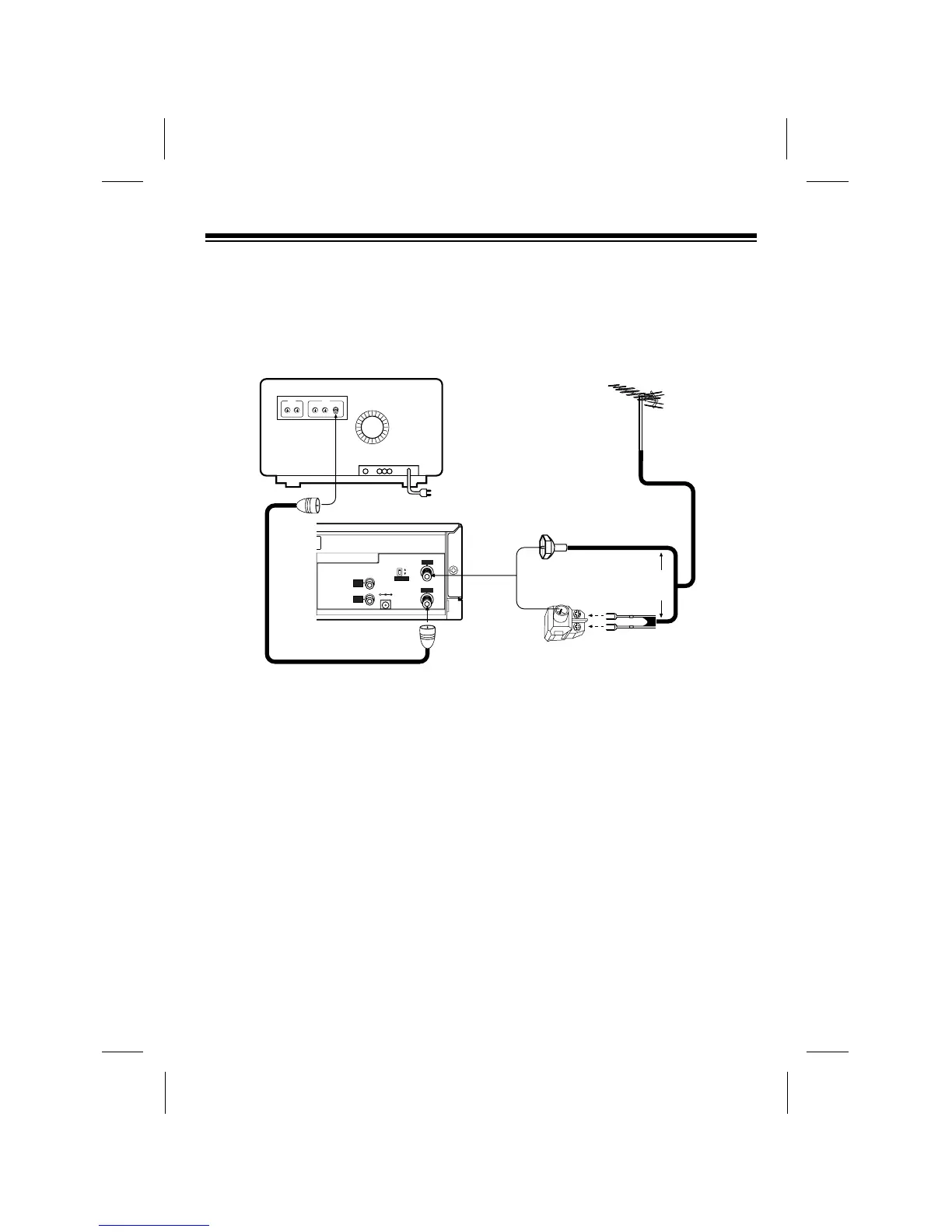
Follow these steps to connect the VCP to a standard TV that has a 75-ohm cable jack
(but does not have separate audio and video input jacks).
1. Make sure the TV is off, then disconnect the antenna or cable wire from your TVÕs
VHF antenna terminal and connect it to the VCPÕs ANT.IN terminal.
Notes:
¥ If your antenna has a 300-ohm wire, connect the wire to the 300-ohm screw
terminals on the supplied 300-to-75-ohm adapter. Then connect the adapterÕs
75-ohm connector to the VCPÕs ANT.IN terminal.
¥ If you have a VHF/UHF splitter connected to your TV, disconnect the antenna
wire from the splitterÕs input terminal and leave the splitter connected to the TV.
¥ If you have a separate UHF antenna, leave the UHF antenna wire connected to
the TV.
2. Using the supplied 75-ohm coaxial cable, connect the VCPÕs RF.OUT terminal to
the TVÕs VHF antenna terminal (or the splitterÕs input terminal).
9



 To Next Page