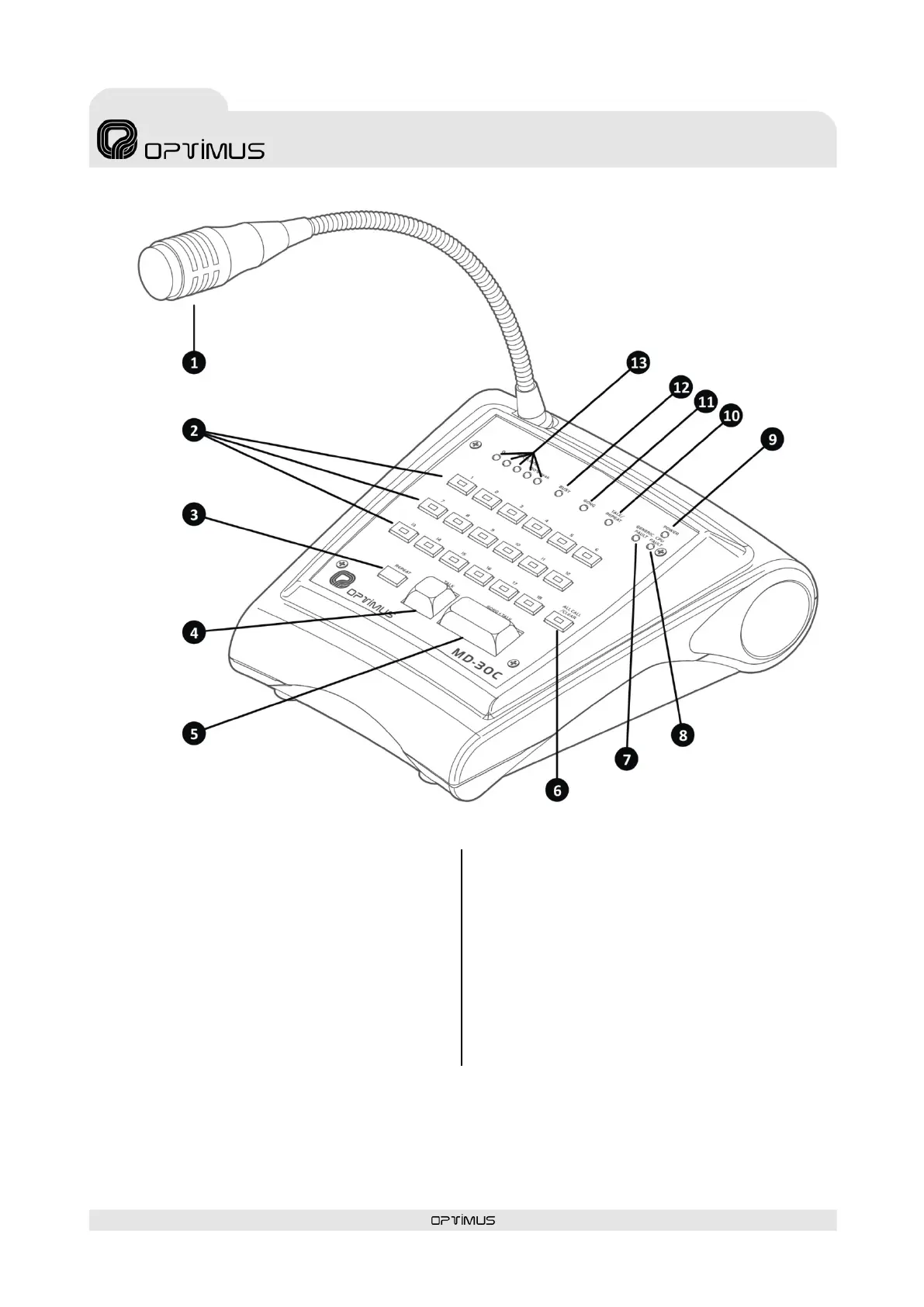
Microphone desk
(7) GENERIC FAULT indicator
Al arm indicator i n the s ystem, microphone ca ps ule error or
communication error with audio matrix.
(8) CPU FAULT indicator
Internal error indicator of the application.
(9) POWER indicator
Indicates that power is applied to the paging desk.
(10) TALK / REPEAT indicator
Il l uminates when TALK or GONG+TALK i s pressed, i ndicating
that you can begin s peaking. When the REPEAT key is
pressed, it indicates that the repeat message is playing .
(11) GONG indicator
When illuminated, it indicates that the paging desk is
generating the GONG.
(12) BUSY indicator
When lit, i t indicates that the system is busy. Announcements
cannot be sent while it is illuminated.
(13) MIC LEVEL indicator
Indicates the audio level of the microphone or the repeat
message that is playing. The LED marked as Peak indicates
that the signal is saturated. This LED should never illuminate.
Figure 1



 To Next Page