English
45
USING THE PROJECTOR
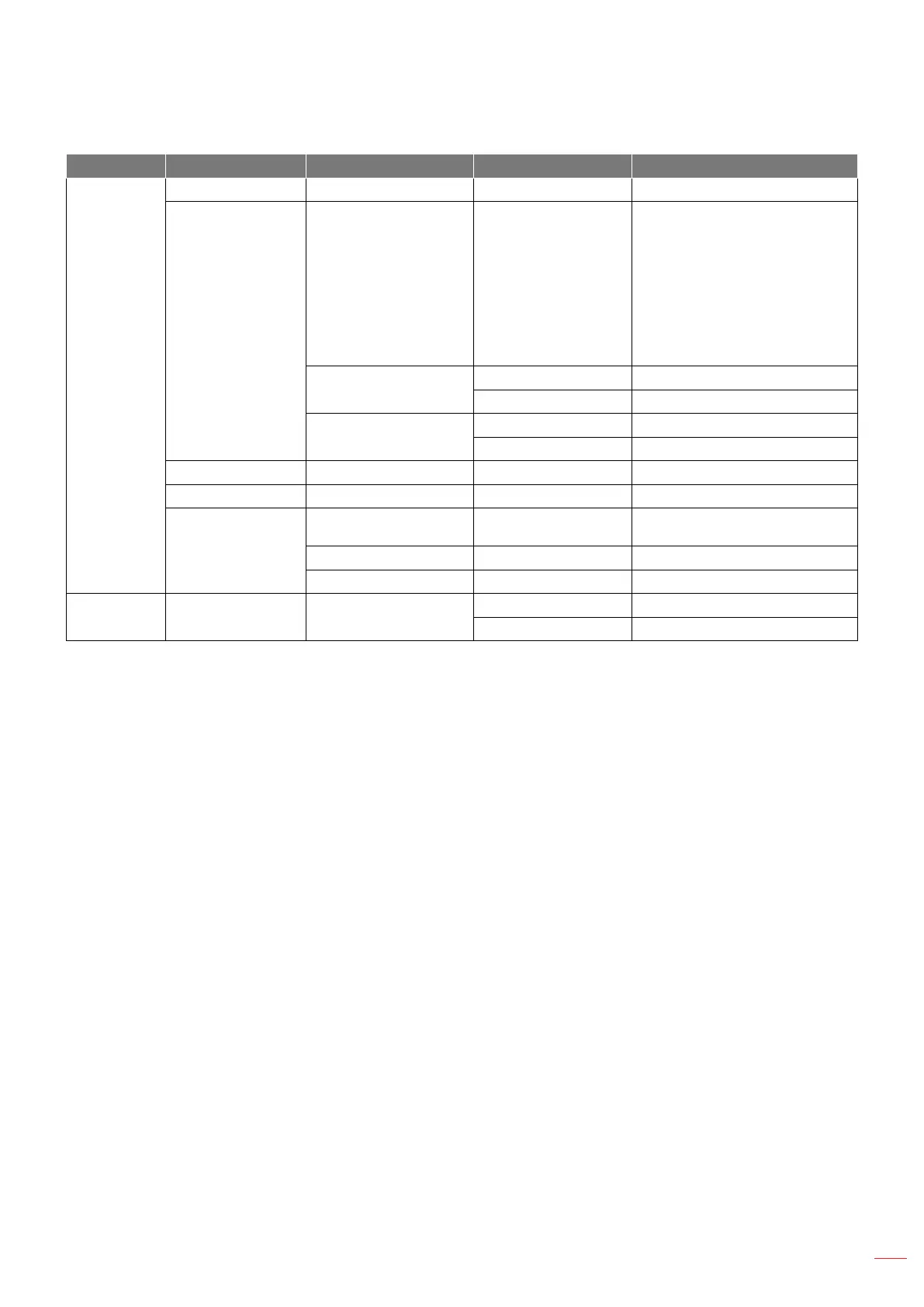
Level 1 Level 2 Level 3 Level 4 Value
System
Keyboard
Date and Time
Settings
Select time zone
-12:00, -11:00, -10:00, -09:30,
-09:00, -08:00, -07:00, -06:00,
-05:00, -04:00, -03:30, -03:00,
-02:00, -01:00, 00:00, +01:00,
+02:00, +03:00, +03:30, +04:00,
+04:30, +05:00, +05:30, +05:45,
+06:00, +06:30, +07:00, +08:00,
+08:30, +8:45, +09:00, +09:30,
+10:00, +10:30, +11:00, +12:00,
+12:45, +13:00, +14:00
Daylight Saving Time
On
O [Default]
Use 24-hour format
On
O [Default]
System Update
Internal Storage
Legal
Terms and Conditions of
Use
Privacy Policy
Cookies Policy
Control LAN Control Smart Home
O [Default]
On
Note:
Functions vary depending on model denition.
Disabling Smart Home will disable the ability to power on the projector using Alexa Smart Home or
Google Action “power on” command (Example: Alexa, turn on projector).


 To Next Page