16
Area part arming
Zones can be grouped together to make ‘Area Sets’. Area Sets are often used in multi tenanted
houses where there is a communal entrance and separate living spaces. Users can arm
individual or multiple area sets. To part arm selected areas, please proceed as follows:
1. Enter your code or present tag to select the user menu.
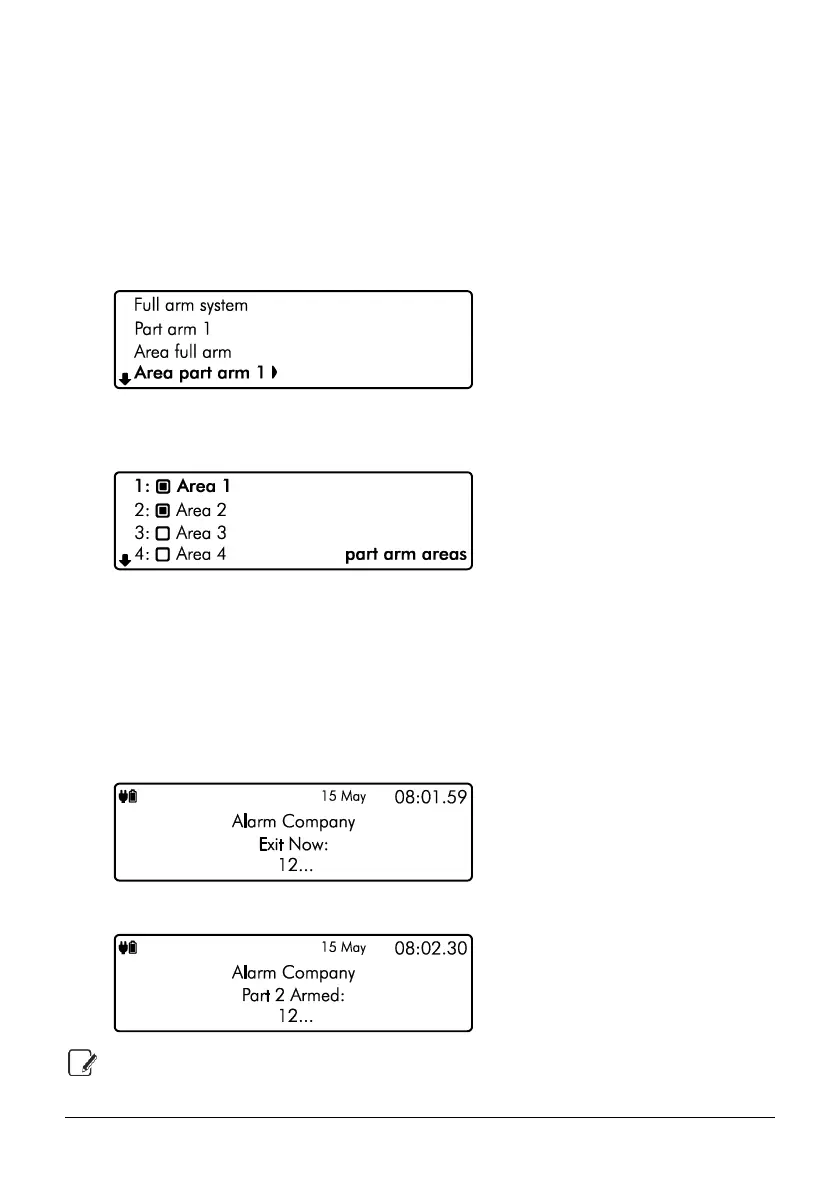
2. From the user menu, use the U/ u and D/ p keys to scroll to ‘Area part
arm 1’:
3. Use the L/ o and R/ r keys to change the part arm mode (1, 2 or 3), then
press E or k to select, the ‘part arm areas’ menu is now displayed:
` Area will be part armed
a Area will remain unarmed
4. Use the U/ u and D/ p keys to select the ‘Area’. Then use the L/ o
and R/ r keys to toggle the selected area on or off. Once you have selected the
areas that you would like to part arm, press E or k to confirm.
5. The exit tone will start and the keypad will instruct you to exit the protected area:
6. The keypad will then indicate that the areas that are part armed:
Part arm settings will be pre-programmed by your installation company.



 To Next Page