DSPEC 50
®
and DSPEC 502
®
Digital Gamma-Ray Spectrometer User’s Manual 932502G / 0618
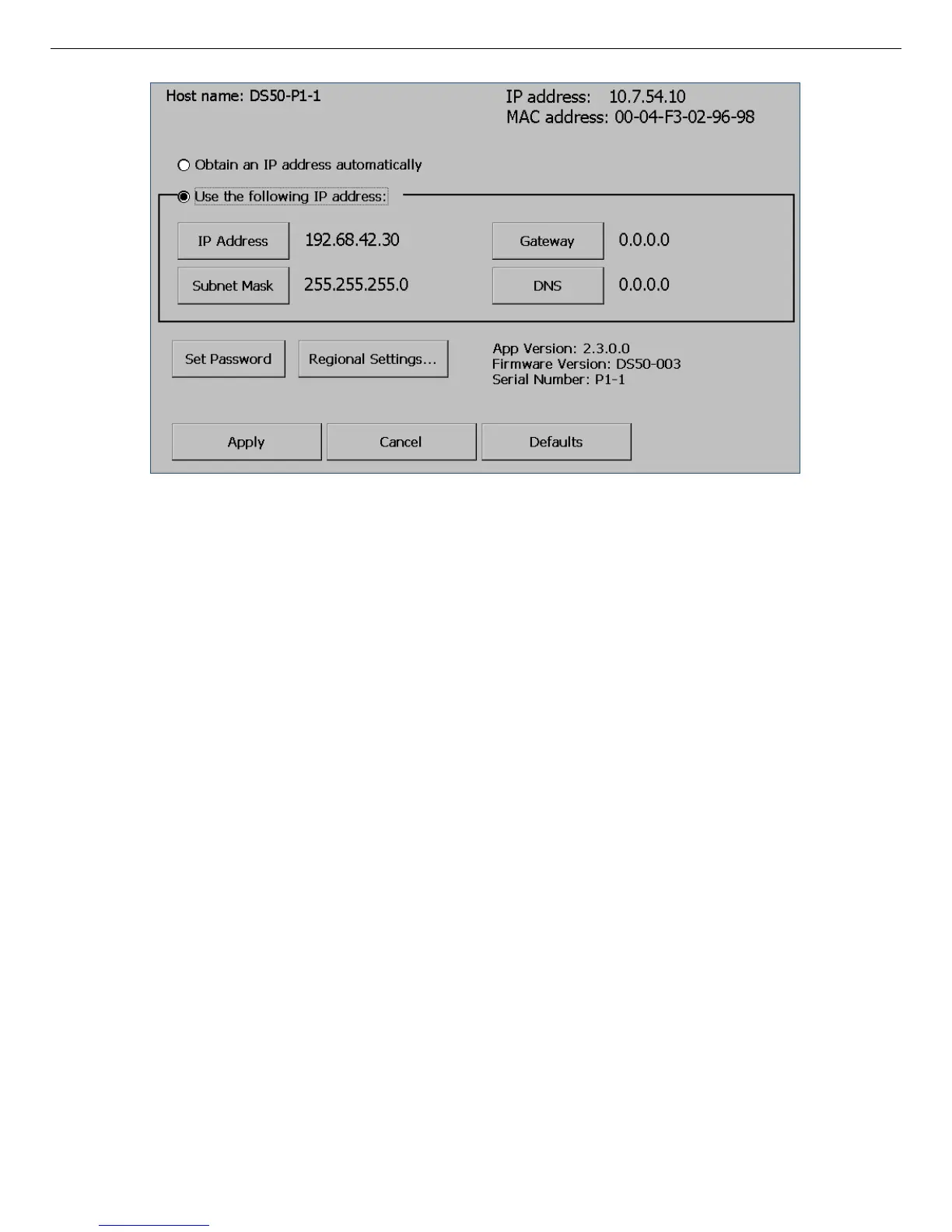
Figure 51. Static IP Addressing: Tap the “Defaults” Button, Then “Use the
following IP Address,” Then “Apply.”
2. For the first DSPEC 50, the factory default IP address and subnet mask can be used as-is.
Tap Apply to close the Communication Center dialog.
To assign a different IP address, tap the IP Address button. This will open a soft keyboard
over the bottom section of the screen. Tap the soft keyboard digits, separating each of the
four sections by tapping the “decimal point” button (.) button.
IMPORTANT Do not enter leading zeroes in any of the four sections (e.g., enter 10, not
010). Also, be sure to insert the decimal-point demarcator between
sections.
Tap OK to accept the completed IP address, then tap Apply to close the Communication
Center dialog.
As noted above, the same Subnet Mask must be assigned to the computer and all
DSPEC 50s that will communicate with it. If the DSPEC 50's subnet mask does not match
the mask assigned to the computer, tap Subnet Mask and change the DSPEC 50 subnet
mask to match the computer setting.
3. Connect the DSPEC 50 to the Ethernet port on the host computer, open the computer’s
Network Connections utility, and assign a (version 4) IP address that does not match any
address currently in use, and is valid according to Section A.1.
124



 To Next Page