OSAKA – F 1 – User’s Manual – v1 – PAG. 5
= 0 – Inactive digital input (no function)
= 1 – Opening of the chamber through open contact: when the
input closes the controller will show in the display oP, alternating it
with the variable established in the “i.dS” parameter. With this
operation mode, the action of the digital input also activates the
time programmed in the “A.oA” parameter, and after the time is up
an alarm will go off to signal that the door is open.
Once the door is open, the controller will go back to its normal
operation if it were to be in Eco mode and if the automatic function
of the Eco mode were to be activated, through the parameter “i.Et”.
= 2 – Similar to “i.Fi = 1”
= 3 – Opening of the chamber’s door with blocking of the control
exit through open contact: similar to “i.Fi = 1” but with exit blocking
(control exit). If open door alarms are generated (after the time has
passed “A.oA”) the exit will be deactivated.
= 4 - Signaling of external alarm with open contact: when the digital
contact closes and the programmed time in “i.ti” has passed, an
alarm will be activated and in the display it will show AL alternating
it with the variable established in the “i.dS” parameter.
= 5 – Signaling of external alarm with the deactivation of the control
exit through open contact: When the input closes (and the “i.ti”
time has passed) the exit control will be deactivated, the alarm will
be activated and the controller will show AL alternating it with the
variable established in the “i.dS” parameter.
= 6 – Normal / Economic mode selection with open contact: When
the input is closed you will be selecting the Economic mode. When
the input is opened, you will be selecting the Normal mode
= 7 – Turn ON / OFF (Stand-by) the controller through open
contact: once the input is closed (and after the “i.ti” time has
passed) the controller will turn on. On the other hand, when the
contact opens it switches to Stand-by mode.
= 7 – DO NOT USE.
= -1, -2, -3, etc.. – Identical functions to the previous points but with
an inverse functionality logic. It activates when the digital input’s
contact opens.
4.5 – TEMPERATURE REGULATION
The regulation mode of the controllers is an ON/OFF type over the
control output according to the measurement of the Pr1 probe, to
the active Set Point “SP” (or “SPE”), to the regulator differential
“r.d” (or “r.Ed”) and to the operation mode “r.HC”.
Referring to the operation mode programmed in the “r.HC”
parameter, the controller automatically considers the differential
with a positive value for a refrigeration control (“r.HC” =C) or with a
negative value for a heating control (“r.HC”=H).
If there was a probe error it is possible for the control output to work
cyclically according to the time programmed in the “r.t1” and
(activation time) and “r.t2” (deactivation time) parameter during the
error.
By programming “r.t1” = oF the output which has a probe error will
always remain turned off.
By programming “r.t1” to any value and “r.t2” = oF the output which
has a probe error will remain turned on.
It is reminded that the operation of the temperature regulator can
be affected by the following functions:
“Compressor protection”, “Starting delay” and “Defrosting”
4.6 – COMPRESSOR PROTECTION AND STARTING DELAY
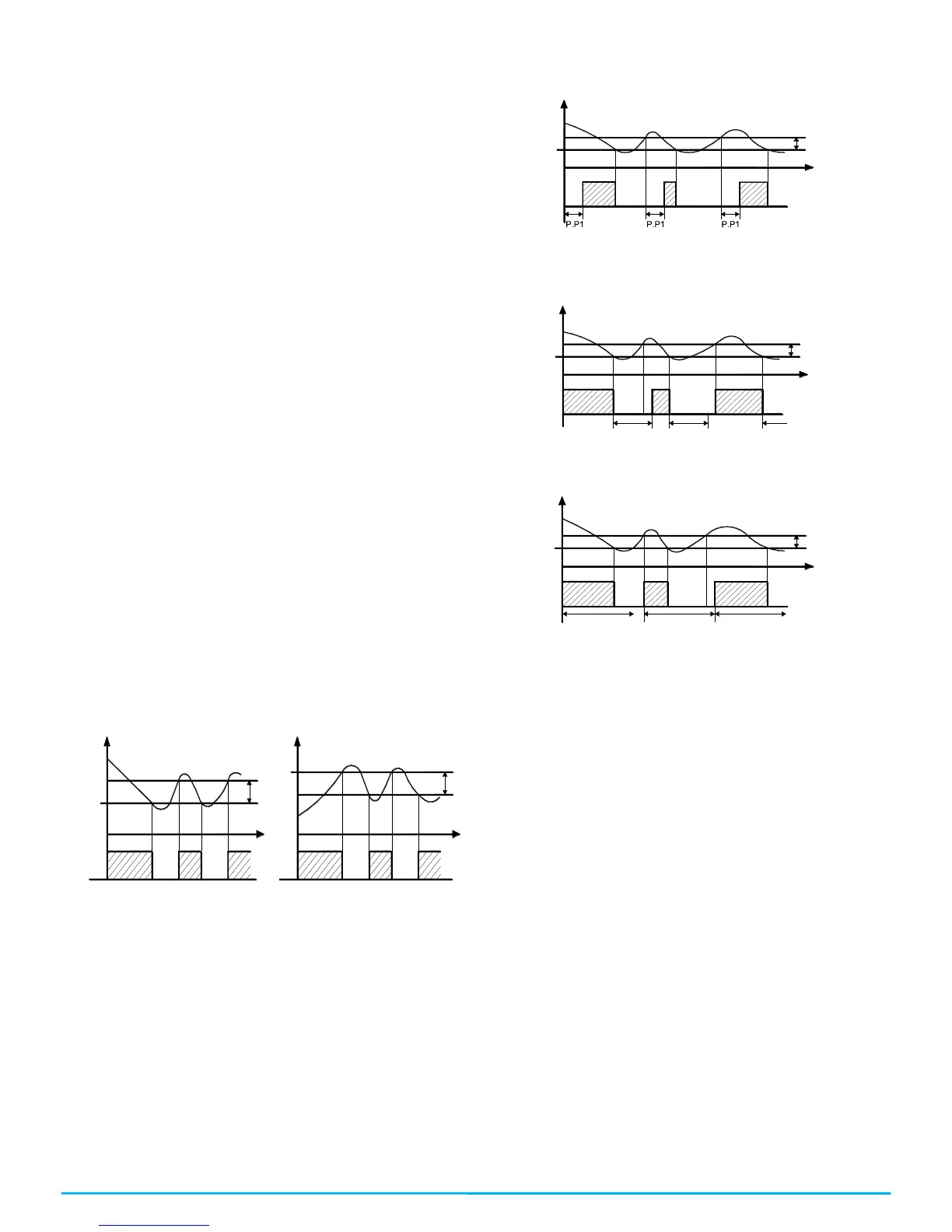
The compressor protection function helps you to avoid pretty
frequent starts of the compressor or it can also be useful to make a
time control for the relay output destined to an actuator or load.
Such function expects to activate up to 3 types of timing that you
can choose according to the appropriate system regulation.
The protection consists in avoiding various starts during the
protection time.
The first Time foresees a delay in the activation of the output
according to the time programmed in the “P.P1” parameter (starting
delay).
The second Time expects a delay in the control relay, so that it
assures a minimum time in between the stoppage and the start of
the relay’s parameter: “P.P2” (delay after stoppage or minimum
stoppage time).
The third Time expects to not allow it to start if it hasn’t exceeded
the programmed time between consecutive starts. “P.P3”
parameter (delay after consecutive starts).
If the protection is acting, preventing the start of the relay by the
programmed time, the output relay’s Led (Cold or hot) will be
flashing.
It is also possible to activate a starting delay of the regulation when
the power supply reaches the thermostat. “P.od” parameter is very
appropriate when there are various thermostats so that it doesn’t
start at the same time as the loads and so that it allows the power
line to have a smoother start.
During this delaying phase we will see od alternating with the
normal programmed visualization.
The “od” delay function is deactivated by programming it as = oF.
4.7 – AUTOMATIC DEFROSTING CONTROL
The defrosting can be activated automatically with different options:
- Defrosting by time intervals.
- Defrosting by the temperature of the evaporator.
- Defrosting by continual time of the compressor’s
operation.
In order to avoid unnecessary defrosting when the temperature of
the evaporator is high, the “d.tS” parameter establishes the
temperature given by the evaporator probe Pr2 (EP) below the
temperature of which the defrosting is enabled.
Thus, if the temperature measured in the Pr2 probe (as EP) is
higher than the one programmed in “d.tS” the defrosting will not be
enabled.
4.7.1 – DEFROSTING BY TIME INTERVALS
With the “d.di” parameter the time in between the defrosting is
configured (the interval of time between finishing one defrosting
and the beginning of another one).
It is possible to configure the first defrosting at the start of the
controller with a different time interval in the “d.Sd” parameter. If
you want to make a defrosting in each start of the controller,
program the parameter as “d.Sd” = oF. If otherwise you do not want
to make defrosting at the start of the controller, configure “d.Sd” =
“d.di”


 To Next Page
 Loading...