OSAKA – F 1 – User’s Manual – v1 – PAG. 6
If the parameter “d.di” = oF is programmed, the time intervals are
disabled and there will only be defrosting when the evaporator
probe orders it.
In the “d.PE” parameter you can choose the way in which you will
finish the defrosting, wither by time or by temperature.
“d.PE” = oF finishing by time.
The end of the defrosting is given by the configured time in the
“d.dE” parameter.
If the parameter “d.dE” = oF, the defrosting will be disabled.
“d.PE” = EP finishing by evaporator’s temperature.
With the “d.tE” parameter the finishing of the defrosting can be
according to the evaporator’s temperature. When the temperature
is not reached in the time selected in the “d.dE” parameter, the
defrosting finishes because the time is up.
If the temperature measured in the evaporator probe exceeds the
chosen temperature in the “d.tE” parameter, the defrosting is
disabled.
“d.PE” = P1 finishing by the room’s temperature.
With the “d.tE” parameter the finishing of the defrosting can also be
done according to the room’s temperature. When the temperature
is not reached in the time selected in the “d.dE” parameter, the
defrosting finishes because the time is up.
If the temperature measured in the room’s probe exceeds the
chosen temperature in the “d.tE” parameter, the defrosting is
disabled.
By programming “d.dE” = oF the defrosting by time interval or
manual defrosting will be disabled.
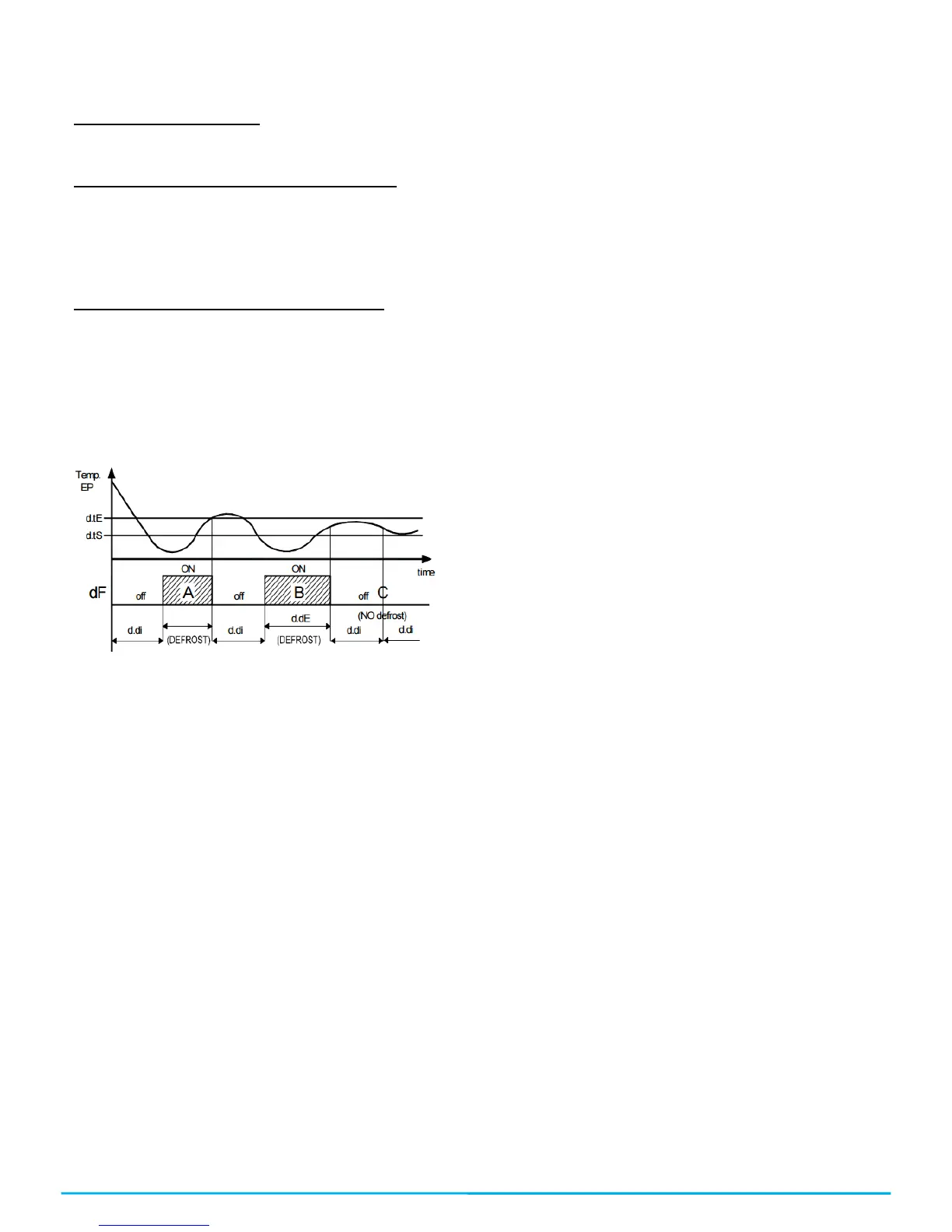
Defrosting operation example: the defrosting indicated as A
finishes when it reaches the “d.tE” temperature, the defrosting B
finishes because it reaches the established time without exceeding
the “d.tE” temperature, the defrosting C doesn’t start since it is
above the “d.tS” temperature, which is the one that enables the
defrosting.
An ongoing defrosting is signaled through the DEF led.
4.7.2 – DEFROSTING BY THE TEMPERATURE OF THE
EVAPORATOR.
The controller forces a defrosting cycle when the evaporator’s
probe (Pr2 probe configured as EP) goes down the value
programmed in the “d.tF” parameter and the “d.tS” delay time has
passed in order to guarantee that the evaporator truly is at a very
low temperature and it needs a defrosting (this usually is a
symptom of a low thermal interchange regarding the normal
conditions of operation).
If a delay in the function is not desired, program “d.St” = oF, when
establishing “d.tF” = -99.9 it is as if the function was actually
disabled.
4.7.3 – DEFROSTING BY THE CONTINUAL TIME OF THE
COMPRESSOR’S OPERATION.
The controller initiates a defrosting when the compressor has been
working uninterruptedly for the programmed time in the “d.cd”
parameter.
Such a function is often used when the compressor works
uninterruptedly for long periods of time, which is often a symptom
of a low interchange of temperature which is normally cause when
the evaporator freezes.
By configuring “d.cd” = oF this function will be disabled.
4.7.4 –MANUAL DEFROSTING
To activate a manual defrosting cycle press the “UP” / “DEFROST”
key for 5 seconds and the Def led will turn on and the defrosting will
start. To interrupt a defrosting cycle while it is ongoing, press the
UP key again for 5 seconds.
4.7.5 – INTERVALS AND DURATION OF THE DEFROSTING
WITH EVAPORATOR PROBE ERROR
If there was an evaporator probe error, the defrosting will be done
with time interval “d.Ei” and with a “d.EE” duration. If there was a
probe error during the passed time for the start of a new defrosting
(“d.di”) or for the finishing of a defrosting (“d.dE”) in normal
conditions, if it were lower than the configured values in the relative
parameters under broken probe conditions (“d.Ei” equals “d.di” in
an error state and “d.EE” equals “d.dE” in an error state) the start
or finish of a defrosting with the lower time value.
These functions are available when the evaporator’s probe is used,
the length of time of the defrosting is usually higher as a safety
measure ( the evaporator probe allows you to finish the defrosting
earlier if the conditions are appropriate).
4.7.6 – LOCKING OF THE DISPLAY DURING THE DEFROSTING
Through the “d.dL” and the “A.dA” you can establish the behavior
of the display during the defrosting.
The “d.dL” parameter blocks the last temperature before the
defrosting over the display (“d.dL”=on) until the finishing of the
defrosting and the temperature doesn’t go under the value of the
last memorized temperature or the condition [“SP” + “r.d”] or
exceeds the locking safety time “A.dA”. It also allows you to see
the letters which indicate the defrosting “dEF” (“dL”=Lb) and after
the defrosting is over the letters “PdF” which indicate that the
defrosting time is over but the cold temperature has not been
recovered to the regulation value [“SP” + “r.d”] or exceeds the
locking safety time “A.dA”.
Another possibility is to indicate the real temperature of the room or
cold furniture during the defrosting (“d.dL” = oF)
4.8 – ALARM FUNCTIONS
The alarm conditions of the regulator are as follows:
-Probe error: “E1”, “-E1”
-Temperature Alarm: “Hi”, “Lo”
-External Alarm: “AL”
-Open door alarm: “oP”
Any alarm condition is indicated with the ALARM led whereas the
pre-alarm condition (i.e. alarm with delay) is indicated with a
flashing led.
4.8.1 – TEMPERATURE ALARMS
The temperature alarm function works according to the reading of
the Pr1 probe, and to which type of alarm was programmed, and to
the “A.Ay” parameter, and to the “A.HA” parameter (max. alarm)
and to “A.LA” (min. alarm) and to the “A.Ad” differential (for relative
as well as absolute alarm)
Through the “A.Ay” parameter it is possible to establish whether the
“A.HA” and “A.LA” alarm sets must be considered absolute or
relative in regards to the active Set Point, if the sets must be shown
in the display as “Hi” (max. alarm) or “Lo” (min. alarm) when alarms
enter or not.
According to the selected value in the “A.Ay” parameter you can
obtain the following functions:
=1: Absolute relating to Pr1 with visualization. Display (Hi – Lo)
=2: Relative relating to Pr1 with visualization. Display (Hi – Lo)
=3: DO NOT USE
=4: DO NOT USE
=5: Absolute relating to Pr1 without visualization.
=6: Relative relating to Pr1 without visualization.
=7: DO NOT USE
=8: DO NOT USE
Through some parameters it is possible to delay the activation, just
in case the situation is cancelled and the ideal conditions are
recovered without it being an alarm. Those parameters are:
“A.PA” – Delay time when receiving power supply and turning the
regulation controller on if it is in an alarm situation.
“A.dA”- Delay time after a defrosting.
“A.At” – Acting delay time of the temperature alarm.


 To Next Page
 Loading...