11
3. Remove all the packing materials.
4. Using the supplied Allen keys, make sure the steering stem is in the forward facing
posion and ghten the top and side bolts securely and evenly to 12nm.
Secure the handlebars ghtly in the steering stem. Double check ghtness and
alignment. Adjust the brake lever posions and reach to suit the rider.
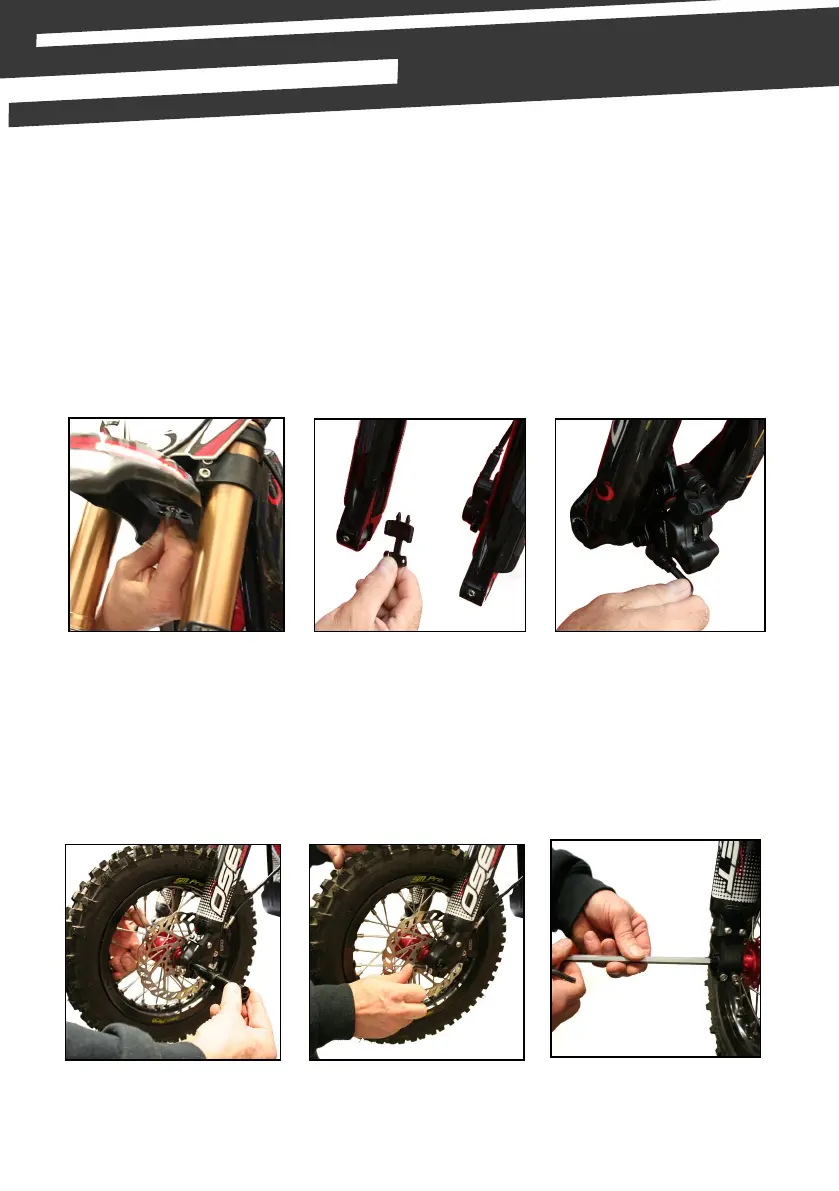
5. Fit front mudguard using the bolt & washers provided (picture 1).
6. Fing Front Wheel.
Remove disk pad spacer (picture 2 - this item is used for transport only, keep this if
you are likely to leave the bike without the front wheel ed).
(1.) (2.) (3.)
7. Loosen top calliper Allen bolts (picture 3 - using 5mm wrench) - so it will move side to
side so as to aid ng of wheel.
8. With one axle bolt already screwed into the axle, hold the front wheel in the fork
lowers & slide the axle in through the hub. (picture 4 - ensure the pinch bolts on the
front of the forks are already loose).
9. Tighten the two pinch bolts on the side of the fork from which you inserted the axle
(picture 5).
(4.) (5.) (6.)
10. Replace locking bolt on the other side of the axle & ghten (picture 6).


 To Next Page