20
• Ensure power is turned o, and remove the key.
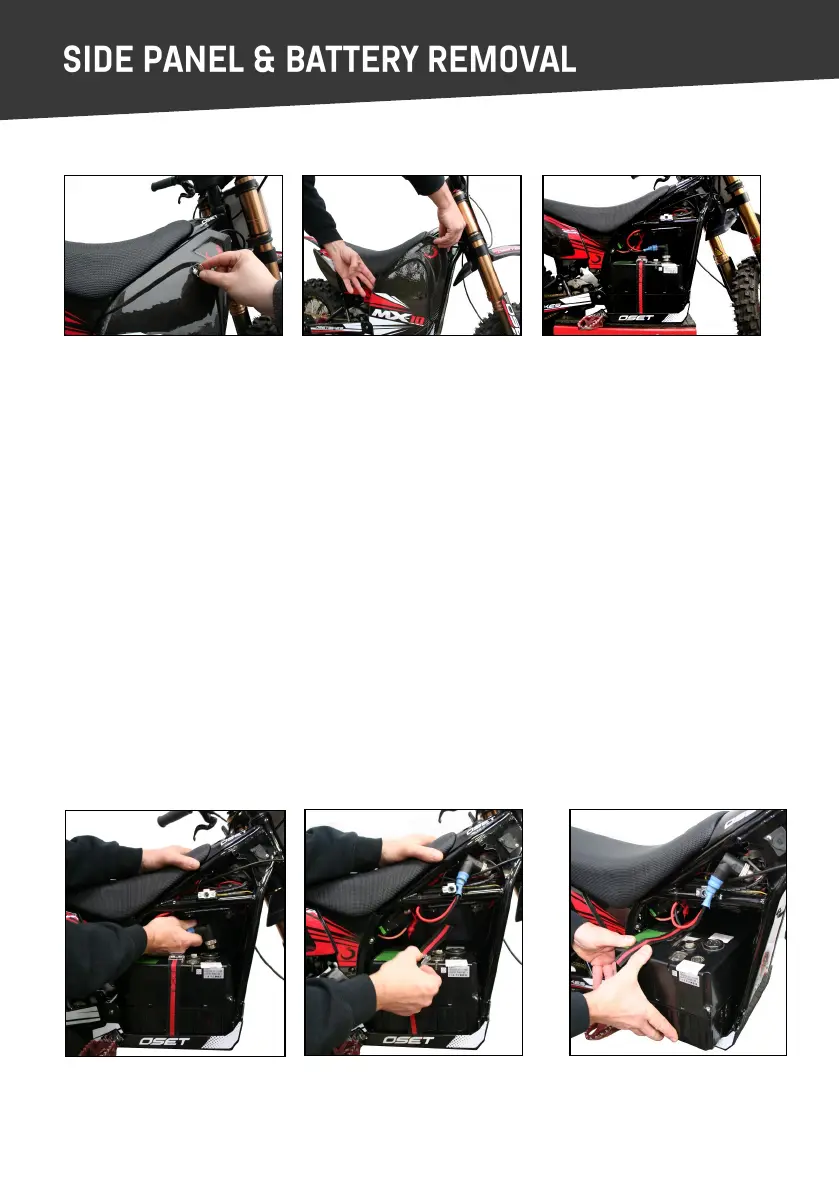
• With the side panel already removed, unscrew & disconnect the power lead (image 4).
• Next, release the baery retaining strap (image 5).
• Finally, carefully li the baery box out of the bike (image 6).
To reinstall baery, reverse the procedure above.
REMOVING THE SIDE PANEL
(1.) Twist fastener (2.) Li side panel clear (3.) Side panel removed
To reinstall the side panel, reverse the procedure above. Ensure fastener is ghtened securely.
BATTERY REMOVAL
(4.) (5.) (6.)
Please Note:
This secon of the user manual only applies to bikes supplied with an ocial OSET lithium
baery pack & charger. For bikes supplied with other baeries, please see the suppliers
instrucons for baery removal & charging.


 To Next Page