21
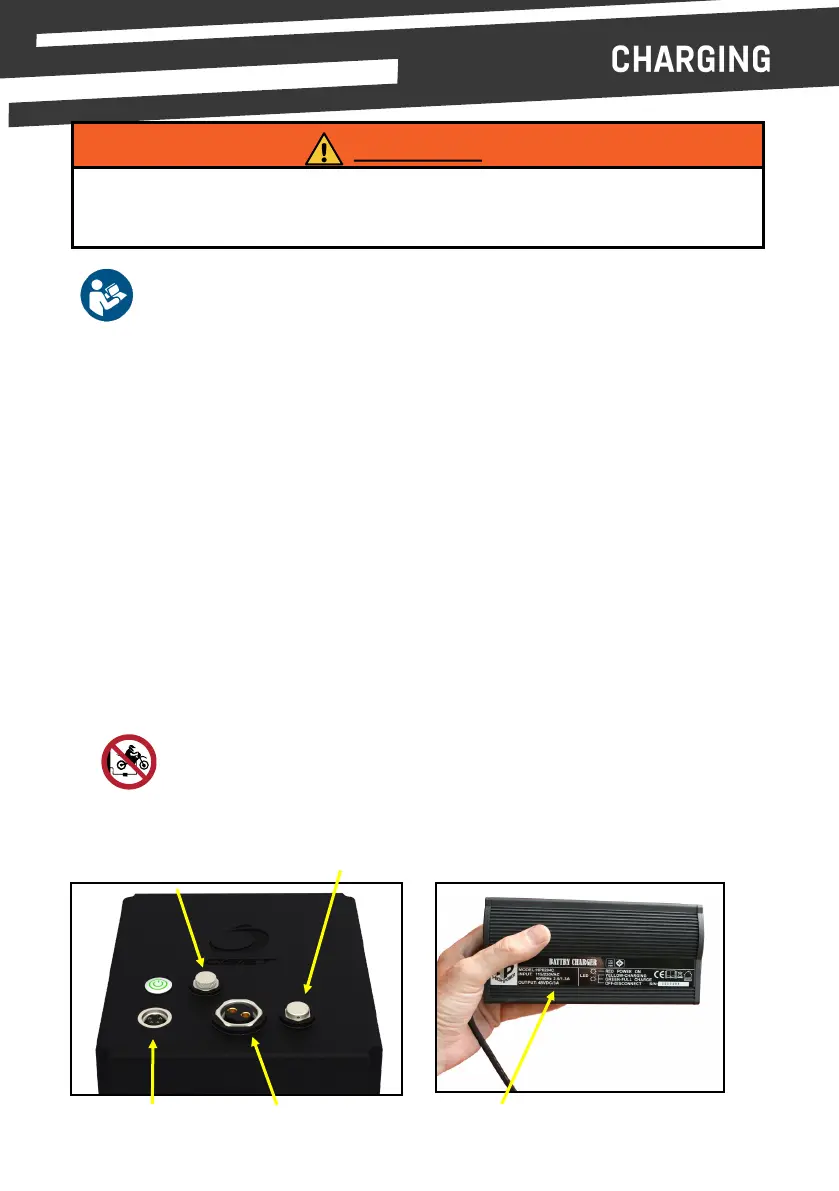
• Ensure that the key switch on your OSET is switched OFF & the baery discharge plug is
disconnected before connecng the charger to the baery’s charge port (see guide below).
• Carefully align the connector pins and connect the charger to the baery by plugging the
connector into the charger receptacle. Twist the lock ring to secure the charger lead to the
baery.
• Plug the charger into the wall outlet.
• Switch the charger on.
• LED Indicaons:
- The LED will illuminate RED when the charger is plugged into a wall outlet.
- The Indicator LED will illuminate YELLOW while the charger is charging the baery.
- The Indicator LED will change to GREEN when the baery is fully charged.
• When charging is complete (the Indicator LED is GREEN), switch the charger o, then
carefully unplug the charger from the wall socket, then from the baery by twisng the lock
ring and pulling the connector out of the charging port.
• Reconnect the baery to the bike and your OSET electric bike is now ready for use.
Use only the baery charger supplied. Using any other baery charger will void your war-
ranty, may damage the baeries and could cause a re that may result in property damage
and/or possible injury.
WARNING!
Charging Port Discharging Port OSET Charger
Diagnosc Port
(OSET Technicians only)
Baery Vent, Sealed
non serviceable.
Read the instruction booklet that comes with the OSET lithium battery
pack before use.
Ensure charger is disconnected from bike before riding.
Failure to do so will cause damage to the bike and could result in injury.



 To Next Page