EasyManua.ls Logo

oset TXP 24 - Changing Pin

oset TXP 24
38 pages
Print Icon
To Next Page IconTo Next Page
To Previous Page IconTo Previous Page
Loading...
52 53
CONTROLS
PIN RESET
CONTROLS
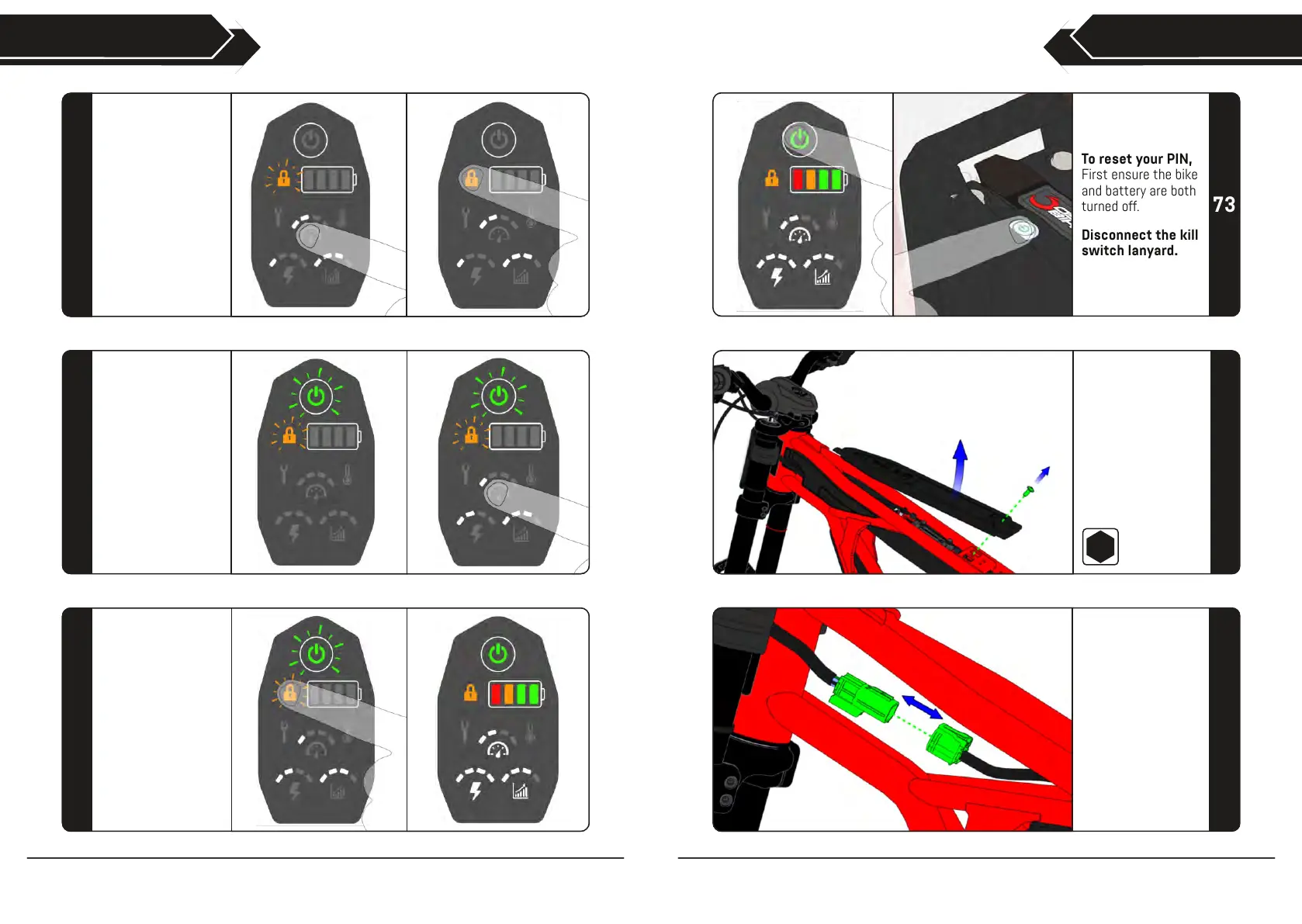
CHANGING PIN
Use the drive setting
buttons to enter your
existing PIN.
Press the lock
button again to enter
the PIN.
70
In PIN editing mode,
the power and lock
buttons will flash
alternately.
Use the drive setting
buttons to enter your
new PIN.
71
Press the lock button
to save your new PIN
and return to the
default locked
screen.
The bike will now be
ready to ride.
72
To reset your PIN,
First ensure the bike
and battery are both
turned off.
Disconnect the kill
switch lanyard.
73
With the tank cover
removed, access
and disconnect
the throttle cable
connector.
75
Follow steps 33-38
to remove the seat
unit and access the
tank cover bolt.
Remove the
M6x16mm flanged
bolt and the tank
cover.
74
4