CHAPTER THREE
Getting started
40
Getting started
3.6.7 Deleting characters
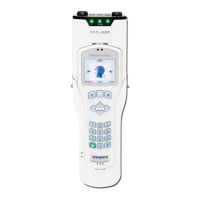
The bottom right hand key shown above is used as a delete key. If the
cursor is at the end of a row of characters, press this key to delete the last
character.
Left and right arrow keys can be used to scroll back through the text. The
selected blinking character can be replaced using the keypad data entry
keys or deleted with the delete key. Continue to press the delete key to
erase characters to the right of the cursor.
3.6.8 Backlight
The screen and keypad are backlit to assist in testing in dimly lit
environments. The backlight stays on for 7 seconds following any key
press and remains on during testing. The backlight can be congured (see
chapter 8 Conguration).
3.6.9 Stimulus and Noise OK indicators (blue LEDs)
The two blue LEDs above the screen on the Otoport give an indication of
whether stimulus and noise levels are acceptable for data collection.
The Stimulus LED is marked with an S. It is lit when the stimulus level
recorded by the probe microphone is within the expected range.
The Noise OK LED is marked with an N. It is lit when the noise level
recorded by the probe microphone is below the set noise reject level (see
chapter 11 Conguration).
3.6.10 Hard reset
In the unlikely event that the Otoport fails to respond to user control, hold
the On/O key
down for 10 seconds, in order to reset the device. You
may then switch on the device as normal.



 To Next Page