Page 10
Service Instructions B500
Replacing or removing the drive bracket
- Turn off the B500, and pull out all plug
connections before dismounting the drive
bracket
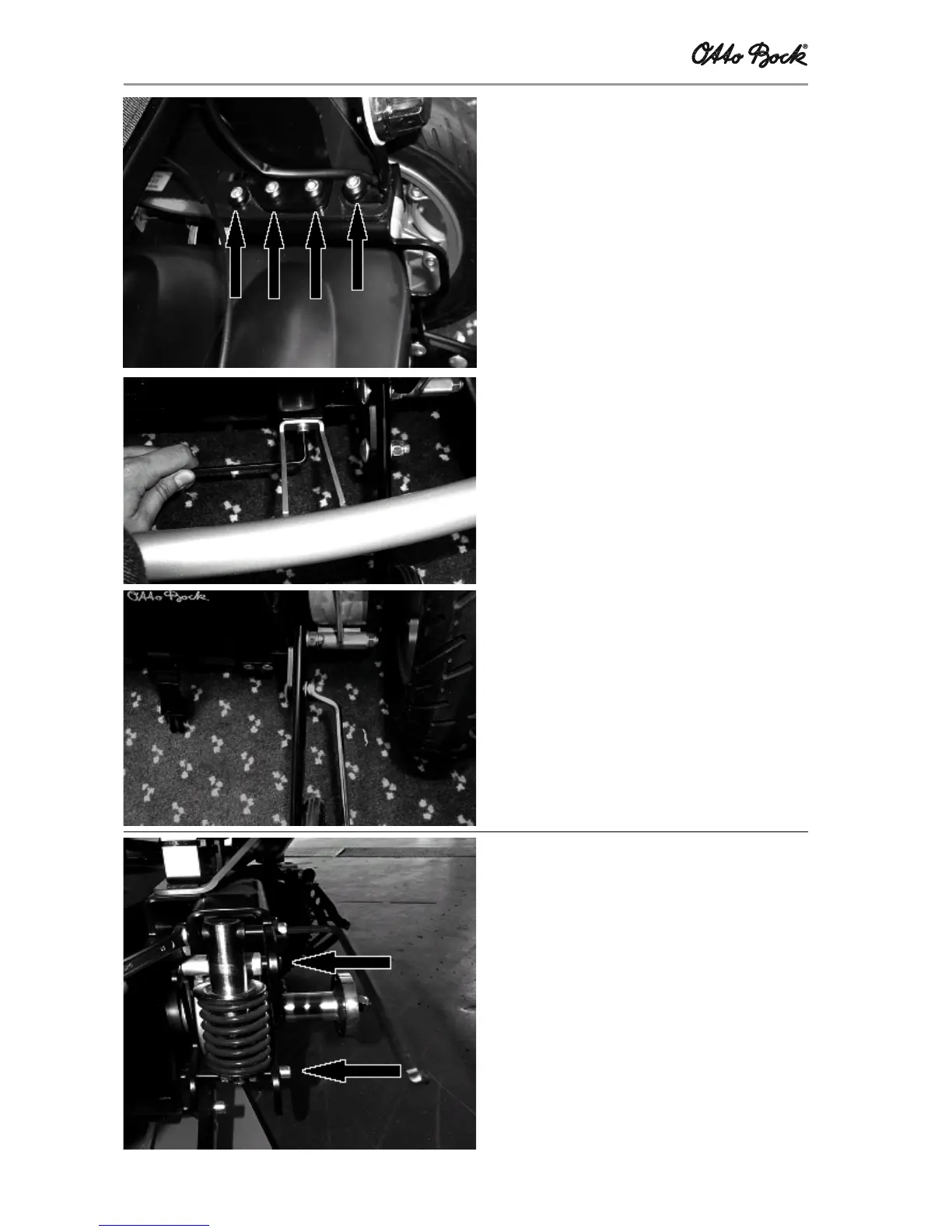
- Undo the eight screw connections located at
the rear frame (four per side)
- Remove frame, seat, and lamps
- Remove the battery case
- Undo the two hexagon socket screws at the
drive bracket to remove the bumper (if any)
- Unscrew two screws each to dismount the
tilting protections
- Remove the tires (see section on „Replacing
the tires“)
- Pull off the wheel flanges
- Undo the brake release wires
- Unscrew the four screw connections used to
fasten the motors
Replacing or removing the rear-wheel springs
The rear-wheel springs are suspended at two
points: One point is at the top of the drive bracket
and the other on the rocker.
The rear wheels need to be dismounted before you
can remove the springs:
- Secure the B500 against slipping or overturn-
ing, and place the B500 on a support which
enables the rear wheels to rotate freely
- Dismount the wheels
- Undo the two screws used to suspend the
rear-wheel springs, and remove the rear-wheel
springs
- Install new rear-wheel springs, or change the
spring effect (turning the top plate either
down or up)
Settings/substitution/replacement














 To Next Page