In principle, the centre of gravity adjustment has the following effects:
Seating centre of gravity Effect
Too far in front of the pivot point Seat tilts far forward when it is unlocked;
high holding forces required during seat adjustment
Too far behind the pivot point Seat tilts far backward when it is unlocked;
high holding forces required during seat adjustment
Setting recommendations
The seating centre of gravity should be individually adjusted according to the clinical picture.
The qualified personnel has to decide whether it is better that the seat swings forward or backward when no hold
ing force is applied while the locking mechanism is released. If possible, the attendant who will be using the mobil
ity base for seating shells should be consulted here.
Setting the seating centre of gravity when using an interface adapter
The seating centre of gravity can be set by releasing the interface adapter and sliding it along the seat bars:
1) If necessary: Remove the seating shell interface with the seating shell / seating system if these make it difficult
to release and slide the interface adapter (see Page12).
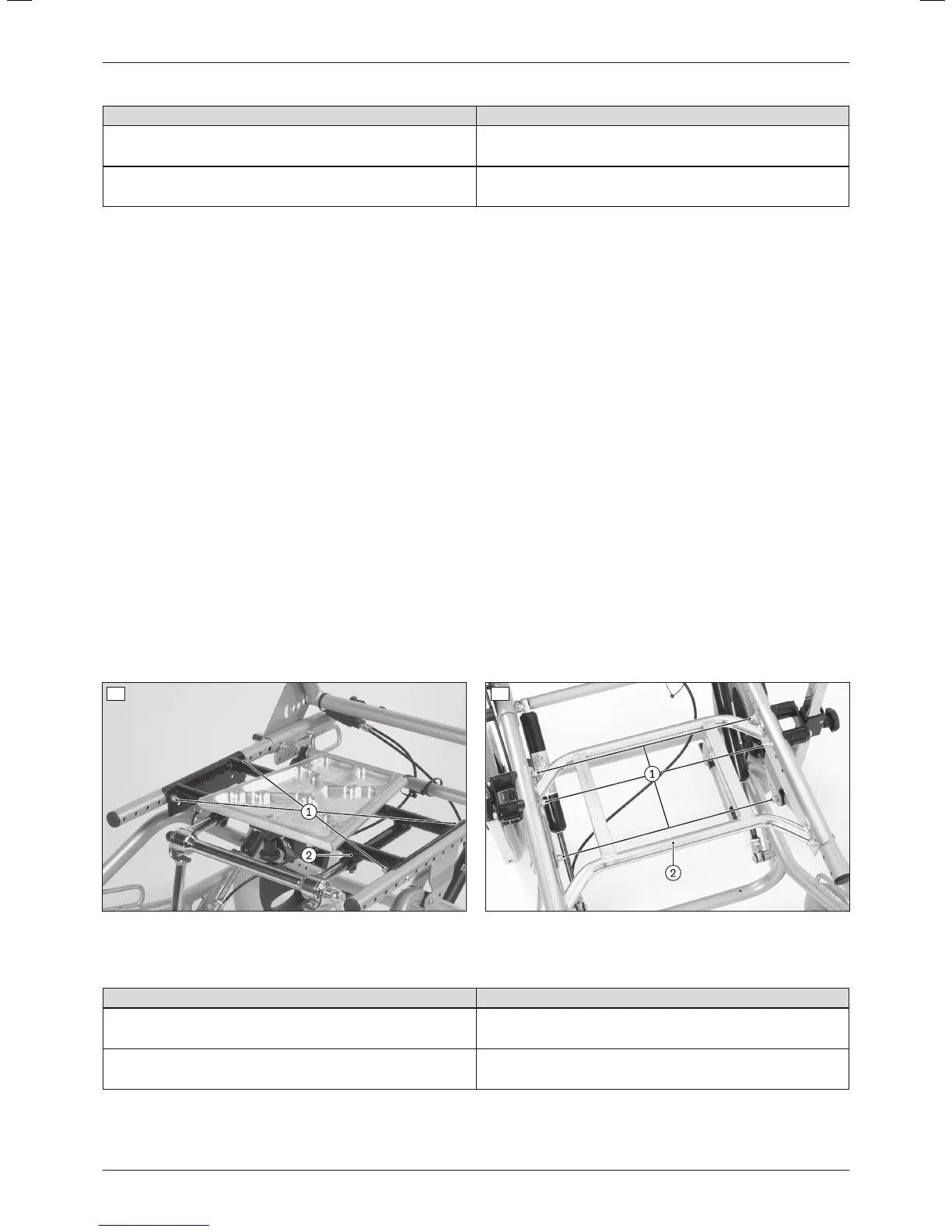
2) Loosen and remove the screw connections between the interface adapter and seat bars (see fig.13, item1;
see fig.14, item1).
3) Slide the interface adapter along the seat bars to the assumed seating centre of gravity (see fig.13, item2; see
fig.14, item2).
4) Insert the screw connections into the appropriate slots between the interface adapter and seat bars and firmly
tighten them to a torque of 10Nm (see fig.13, item1; see fig.14, item1).
5) Mount the seating shell interface with the seating shell / seating system on the interface adapter.
6) Conduct a functional test of the seat tilt and locking mechanism:
→ Tilt the seat and lock it at various positions along the entire adjustment range.
→ Ensure that the seat tilt can move freely and the locking mechanism functions securely. The seat angle must
not be adjustable after letting go of the release lever.
7) Test the seating centre of gravity setting:
→ Sit the user in the seat with the help of an assistant.
→ Tilt the seat and hold it in position. Only low holding forces should be required for tilting.
13 14
Adjusting the seating centre of gravity
If the results are not satisfactory, the setting has to be readjusted without the user in the seat, as follows:
Problem Solution
Seat tilts far forward when it is unlocked;
high holding forces required during seat adjustment
Slide the seat and interface adapter back
Seat tilts far backward when it is unlocked;
high holding forces required during seat adjustment
Slide the seat and interface adapter forward
16
Settings
Discovery













 To Next Page