3: wlan0: <BROADCAST,MULTICAST,UP,LOWER_UP> mtu 1500 qdisc fq_codel state UP group
,→default qlen 1000
link/ether 00:50:56:28:7a:8a brd ff:ff:ff:ff:ff:ff
inet 172.16.79.232/24 brd 172.16.79.255 scope global wlan0
valid_lft forever preferred_lft forever
inet6 fe80::250:56ff:fe28:7a8a/64 scope link
valid_lft forever preferred_lft forever
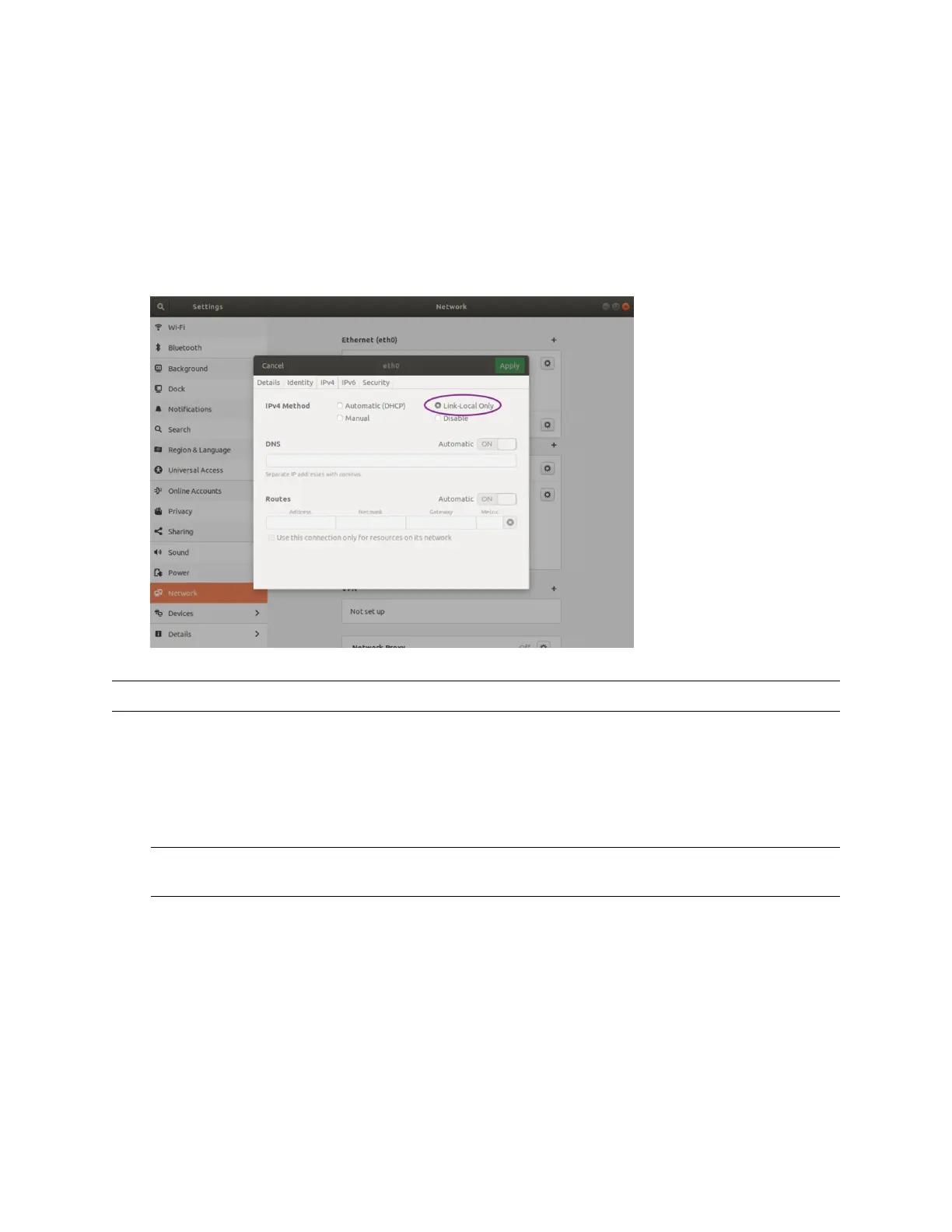
ViaGUI TheimagebelowillustrateshowtosetheinterfacetoLink-Local Only modeusingthegraph-
icaluser interface.
Note: Itcan takeup to60 secondsto obtainan IPaddressfromthe initialpower-upof thesensor.
TheSensorHomepage
1. Typeos-991234567890.local in theaddressbarof yourbrowsertoviewthe sensorhomepage
Note: Ifyou areunable toload the sensor homepage,followthe steps inDetermining the IPv4
Address of the Sensor toverifyyoursensor isonthe networkand hasa validIPv4address.
74


 To Next Page