(continuedfrompreviouspage)
inet 172.16.79.232/24 brd 172.16.79.255 scope global wlan0
valid_lft forever preferred_lft forever
inet6 fe80::250:56ff:fe28:7a8a/64 scope link
valid_lft forever preferred_lft forever
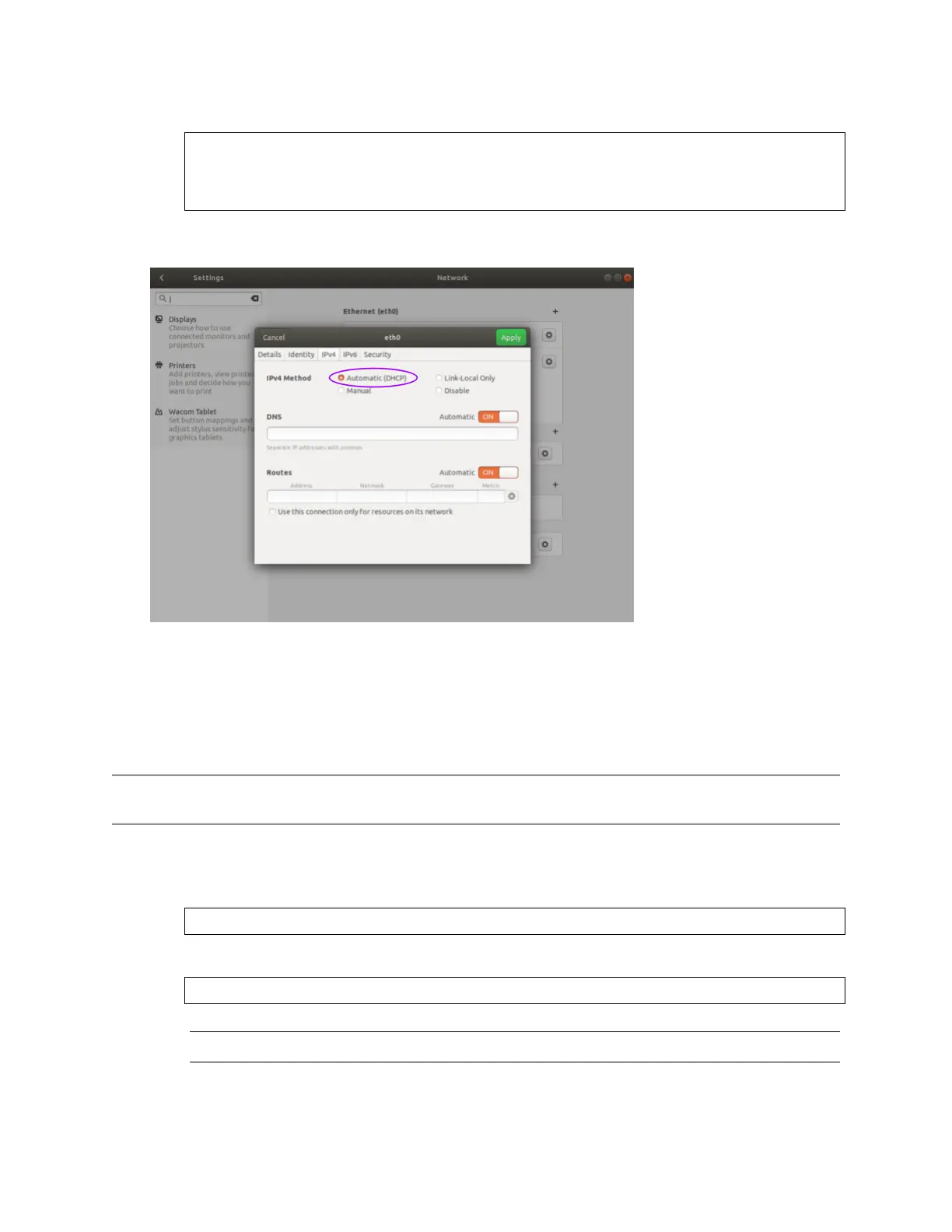
ViaGUI TheimagebelowillustrateshowtosetheinterfacetoAutomatic (DHCP) modeusingthegraph-
icaluser interface.
SettingtheHostInterfacetoStatic IP
Usethistosetyourinterfacetobeassigneda staticIPv4address. ThisisusefulforcontrollingtheIP
addressthatthe sensorwillbe sendingdatato.
Note: Itisrecommendedthatyouunplugthecablefromtheinterfacepriortomakingchangestothe
interface.
ViaCommandLine
Command
nmcli con modify [interface_name] ipv4.method manual ipv4.addresses [ip_address]
Example withinterfacename eth0 andIPv4 address192.0.2.1/24.
username@ubuntu:~$ nmcli con modify eth0 ipv4.method manual ipv4.addresses 192.0.2.1/24
Note: The/24 isshorthand for SubnetMask= 255.255.255.0
78


 To Next Page