40
OutBack Power Systems Inc.
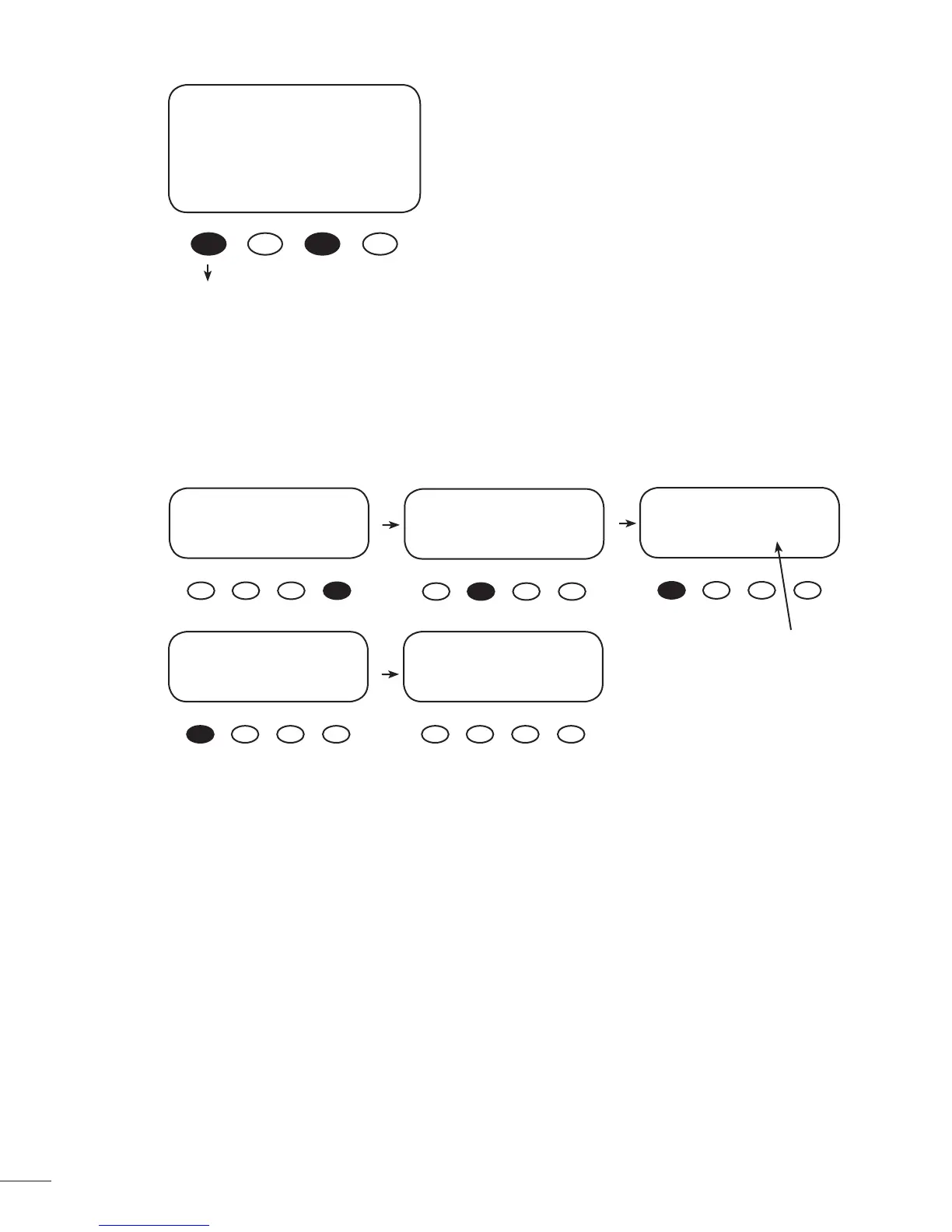
When the Upper Limit is displayed, the desired com-
pensated voltage has been stored and the < - > and
< + > soft keys can be released.
After setting these limits, AUX MODE should be set to
Manual (default setting) if not used.
Note: WIDE/LMIT voltages are not applicable in the
Equalize charging mode.
Pressing the <BACK> soft key returns to the Low Batt
Disconnect screen.
To con rm the Upper Limit and Lower Limit voltages
Limit Set Points (visible and
active when WIDE/LMIT is set
to LMIT in the Misc Menu)
RE-CONNECT VOLTS
>14.8
Upper Limit
BACK - + DisV
*Charger Aux Light
EQ Misc Advance
Logging *Log2
EXIT GO
PkBatV Voc HiVoc
014.7 021.2 022.1
B-MPPT Sunrise
EXIT NEXT 00:03:43
PV 011 V Bat 13.4 V
00.0 A 00.0 A
Watts 0000 Aux On
kWHrs 00.0 Sleeping
PkBatV Voc HiVoc
014.7 021.2 022.1
B-MPPT Sunrise
EXIT NEXT 00:03:43
0000 fl oatTmin
0850 HighWatts
Lo 13.2 Hi 14.8
BACK DCkWh



 To Next Page