Outlaw Audio
34
Treble Use this control to boost or cut treble. The available
choices are:
-10db
-8dB -6dB -4dB -2dB 0
+2dB +4dB +6dB +8db +10db
LFE Trim This control reduces the level of the LFE (or “.1”)
component in a 5.1, 6.1 or 7.1 soundtrack. It does not aect
signals from other channels. Use it if you nd the bass in movie
soundtracks to be too loud. There’s no “proper” setting; what-
ever sounds good to you is correct. The available choices are:
0 -1dB -2dB -3dB -4db -5db
-6dB -7dB -8dB -9db -10db
Dolby Digital/DTS Sub Trim This adjustment lets you
alter the level of the subwoofer output when Dolby Digital
and DTS soundtracks are playing. This does not aect the
subwoofer level with non Dolby Digital/DTS material. Use
it if you want a little more or a little less bass when this
material is playing. The available choices are:
-5db
-4dB -3dB -2dB -1dB 0
+1dB +2dB +3dB +4db +5db
Dolby Digital/DTS Bass Aug This mode can enhance
bass performance during Dolby Digital and DTS soundtrack
playback. It works only if the front speakers are set to Large.
In this mode, the signal to the front left and right speakers
is unaltered, but the bass component of that signal is
also sent to the subwoofer, so you can get enhanced bass
output. The available choices are:
On
O
Dolby PLII/NEO Sub Trim This adjustment lets you
alter the level of the subwoofer output when Dolby Pro
Logic II and DTS NEO:6 surround modes are activated
without aecting the sound when these modes are o. Use
this adjustment if you want a little more or a little less bass
when using these modes. The available choices are:
-5db
-4dB -3dB -2dB -1dB 0
+1dB +2dB +3dB +4db +5db
Dolby PLII/NEO Bass Aug This mode can enhance bass
performance when Dolby Pro Logic II or DTS NEO:6 mode is
engaged. It only works if the front speakers are set to Large.
In this mode, the signal to the front left and right speakers
is unaltered, but the bass component of that signal is also
sent to the subwoofer. The available choices are:
On
O
Stereo+Sub Trim This adjustment lets you alter the level
of the subwoofer output when stereo material is playing,
without aecting the subwoofer level with other material.
Use it if you want a little more or a little less bass for stereo
material. The available choices are:
-5db
-4dB -3dB -2dB -1dB 0
+1dB +2dB +3dB +4db +5db
HDMI Out to TV This feature allows you to route audio
from the Model 975 into your TV’s speakers. Use it when
you want to watch TV without running your surround-
sound system. This setting requires that the Model 975
remain powered on. The available choices are:
On
O
The default is set to OFF. Turning this feature ON will
completely turn o all of the speakers connected to your
Model 975, and must be turned back to OFF in order for
your speakers to be active again.
4. When you are nished, use the remote control’s
menu button and navigation keys to access the
next menu, or exit the OSD.
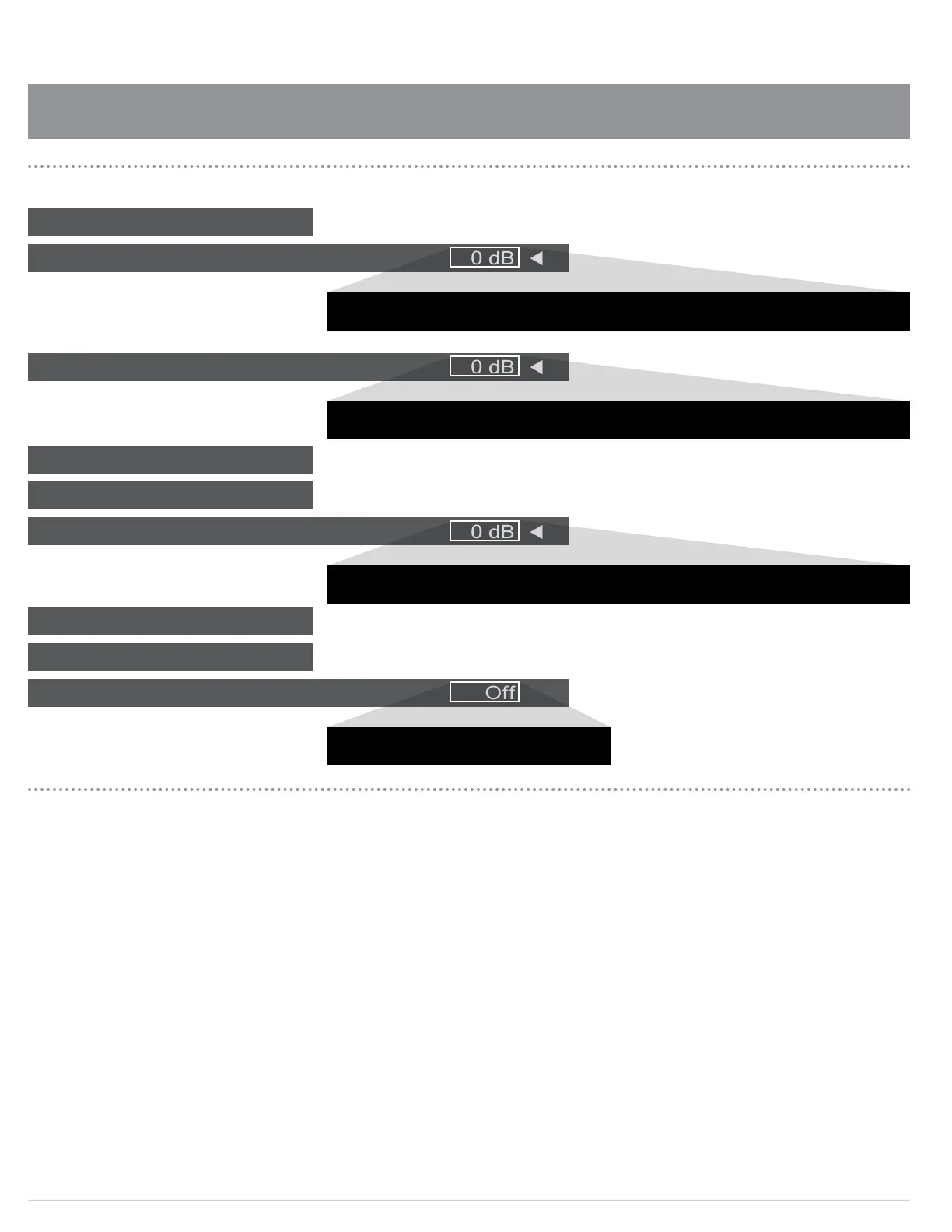
Treble
LFE Trim
Stereo+Sub Trim
HDMI Out to TV
Bass
Dolby PLII/NEO Sub Trim
Dolby PLII/NEO Bass Aug
Dolby Digital/DTS Sub Trim
Dolby Digital/DTS Bass Aug
: 0 dB
: 0 dB
: 0 dB
: Off
Audio Setup Menu Options
-10dB -8dB -6dB -4dB -2dB 0dB +2dB +4dB +6dB +8dB +10dB
0dB -1dB -2dB -3dB -4dB -5dB -6dB -7dB -8dB -9dB -10dB
-5dB -4dB -3dB -2dB -1dB 0dB +1dB +2dB +3dB +4dB +5dB
Off On


 To Next Page