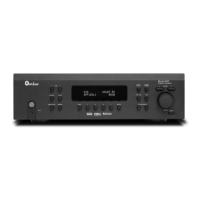
Model 975 7.1 Channel Preamp/Processor
45
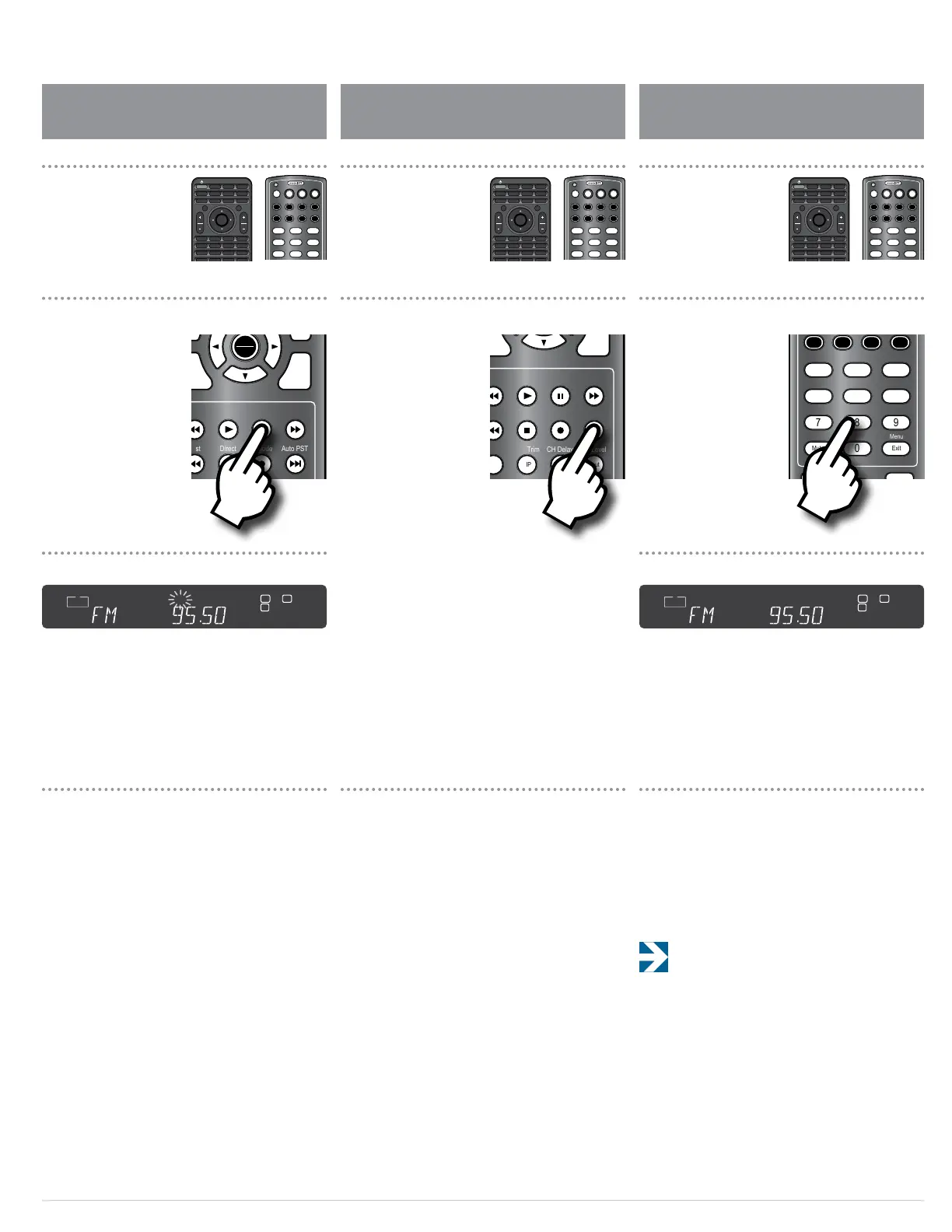
Create Memory Preset Manually
To create memory presets for your favorite sta-
tions manually:
1. Use the CH +/– buttons on the remote to tune the
station you want to set into memory.
2. Press and hold the MEM button on the remote
until the MEM indicator on the front panel display
ashes.
3. Use the numeric keypad to enter the preset
number.
For presets 11 to 15, press 1 rst then the second number.
You can enter as many as 15 presets for FM and 15 for AM.
Create Memory Preset Automatically
To create memory presets automatically:
1. Select the AM or FM band.
2. Press the AUTO PST button on the remote.
The Model 975’s tuner will automatically scan the band,
locate any stations that can be tuned in, and automati-
cally assign the rst 15 stations it encounters in each band
to presets. The station at the lowest frequency will be
assigned preset 1, the station next highest in frequency will
be assigned preset 2, etc.
3. Repeat the process for the other band (AM or FM)
if you wish.
To select a preset station:
1. Use the AM/FM button on the remote or the INPUT
button on the front panel to select AM or FM.
2. Use the numeric keypad to enter the number of
the station you want to listen to.
The station will start playing and its frequency will be
shown on the front panel display.
To access preset 1 more quickly, enter 0 then 1 on the
remote control.
Select a Preset Station
Func
–
CH
AM/FM MEM Spkr Set
Direct T. Mode Auto PST
Stereo LFE Trim CH Delay CH Level
Video Game Aux TV
Status Exit Tone Disc
Menu PIP Swap Input
RPT Last CC Sleep
Info FAV Guide VOD
Night Sync
CBL SAT DISC TV
AUX AUD STB TNR
1 2 3
4 5 6
7 8 9
0
OFF
SRC
PWR
ON
Setup
Mute
OK
Func
+ +
VOL CH
– –
VOL CH
Exit
Menu
Surr Mode
AM/FM MEM Spkr Set
Direct T. Mode Auto PST
LFE Trim CH Delay CH Level
Video Game Aux TV
Status Exit Tone Disc
Menu
PIP Swap Input
RPT Last CC Sleep
Info FAV Guide VOD
Night Sync
CBL SAT DISC TV
AUX AUD STB TNR
1 2 3
4 5 6
7 8 9
0
OFF
Mute
Exit
Menu
Surr Mode AM/FM MEM Spkr Set
Test Direct T. Mode Auto PST
Stereo LFE Trim CH Delay CH Level
Video Game Aux TV
Status Exit Tone Disc
Menu PIP Swap Input
RPT Last CC Sleep
Info FAV Guide VOD
Night Sync
CBL SAT DISC TV
AUX AUD STB TNR
1 2 3
4 5 6
7 8 9
0
L C R
LFE
IN
ANA COX
DUB OPX
SW S
L
B
L
B
R
B
R
B
MULTI
SECMIN
HOURAUTOTITLE CHAPT
CH
KHz
MHz
MEM
L C R
LFE
IN
ANA COX
DUB OPX
SW S
L
B
L
B
R
B
R
B
MULTI
SECMIN
HOURAUTOTITLE CHAPT
CH
KHz
MHz
MEM
Creating a memory preset manually Creating a memory preset automatically Selecting a memory preset
Front Panel DisplayFront Panel Display
SRC
PWR
ON
Setup
Mute
OK
Func
+ +
VOL CH
– –
VOL CH
Exit
Menu
Surr Mode AM/FM MEM Spkr Set
Test Direct T. Mode Auto PST
Stereo LFE Trim CH Delay CH Level
Video Game Aux TV
Status Exit Tone Disc
Menu PIP Swap Input
RPT Last CC Sleep
Info FAV Guide VOD
Night Sync
CBL SAT DISC TV
AUX AUD STB TNR
1 2 3
4 5 6
7 8 9
OFF
SRC
PWR
ON
Setup
Mute
OK
Func
+ +
VOL CH
– –
VOL CH
Exit
Menu
Surr Mode AM/FM MEM Spkr Set
Test Direct T. Mode Auto PST
Stereo LFE Trim CH Delay CH Level
Video Game Aux TV
Status Exit Tone Disc
Menu PIP Swap Input
RPT Last CC Sleep
Info FAV Guide VOD
Night Sync
CBL SAT DISC TV
AUX AUD STB TNR
1 2 3
4 5 6
7 8 9
OFF
SRC
PWR
ON
Setup
Mute
OK
Func
+ +
VOL CH
– –
VOL CH
Exit
Menu
Surr Mode AM/FM MEM Spkr Set
Test Direct T. Mode Auto PST
Stereo LFE Trim CH Delay CH Level
Video Game Aux TV
Status Exit Tone Disc
Menu PIP Swap Input
RPT Last CC Sleep
Info FAV Guide VOD
Night Sync
CBL SAT DISC TV
AUX AUD STB TNR
1 2 3
4 5 6
7 8 9
OFF
OFF
Status
Surr Mode
Disc Game Aux
Video
TV Auto PSTAM/FM Tone
Mute Menu
Tune
Volume
VOL
ENTER
Spkr Set
Delay
Test Ch. Select
Night
Stereo
1
2 3
4
5 6
Direct
Mem
Mono/StereoLFE Trim
OFF
Status
Surr Mode
Disc Game Aux
Video
TV Auto PSTAM/FM Tone
Mute Menu
Tune
Volume
VOL
ENTER
Spkr Set
Delay
Test Ch. Select
Night
Stereo
1
2 3
4
5 6
Direct
Mem
Mono/StereoLFE Trim
OFF
Status
Surr Mode
Disc Game Aux
Video
TV Auto PSTAM/FM Tone
Mute Menu
Tune
Volume
VOL
ENTER
Spkr Set
Delay
Test Ch. Select
Night
Stereo
1
2 3
4
5 6
Direct
Mem
Mono/StereoLFE Trim


 To Next Page