Outlaw Audio
40
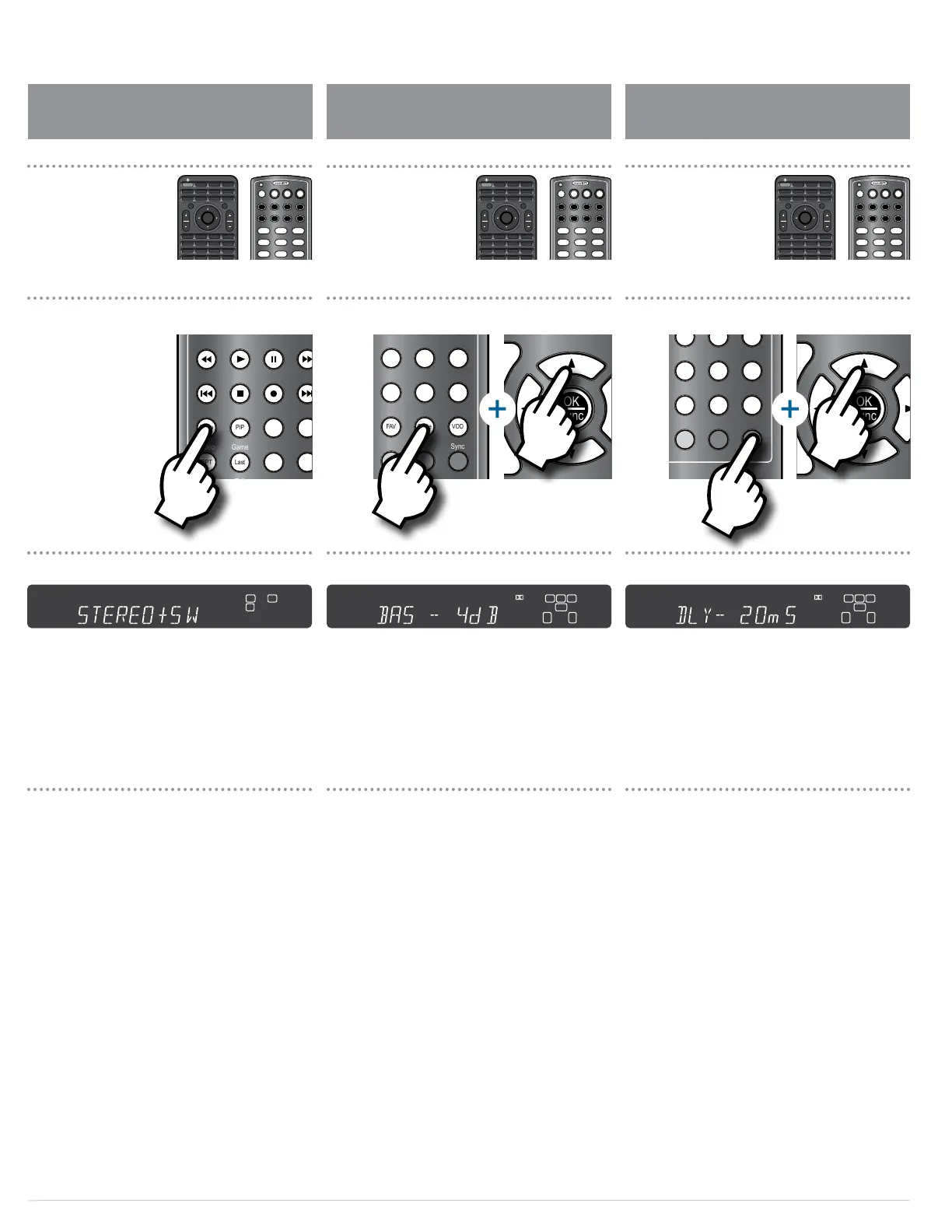
The Model 975 has bass and treble controls that can boost
or cut treble in 2 dB steps, to a maximum ±10 dB. These
controls can be used to ne-tune the sound of your system
for all material, or just for certain movies or music that
need a bit of tweaking.
The bass and treble settings can be adjusted using the
remote control and the front panel display, or through
the menu and on-screen display. To adjust these controls
through the menu/OSD, see pages 33-34.
To adjust the bass and treble:
1. Press the TONE button on the remote.
The front panel display will show the setting of the bass
control, as shown above.
2. Press the UP or DOWN arrow keys () on the
remote to raise or lower the level of bass in dB.
3. Press the TONE button again to set the treble.
The front panel display will show the setting of the treble
control, such as TRB -2 dB.
4. Press the UP or DOWN arrow keys () on the
remote to raise or lower the level of treble in dB.
If you notice a lip sync problem with a movie or TV show
you’re watching, it’s because the audio is taking less time
to process than the video. (Most common when you’re
watching broadcast TV.) The Model 975 lets you delay the
audio slightly to get the audio and video back in sync.
If you nd that a particular source, such as a digital TV
tuner, has a consistent lip sync problem, you can preset
the lip sync for that source only through the Input Setup
submenu (see page 31).
To set the lip sync delay for a source you are viewing:
1. Play the source material (movie or TV show) with
the lip sync problem.
2. Press the SYNC button on the remote.
The front panel display will show the current audio delay
setting, as shown above.
3. Press the UP or DOWN arrow keys () on the
remote to increase or decrease the lip sync delay in
increments of 10 milliseconds (10 mS).
Experiment until you get the dialogue in sync with picture.
Adjusting the Tone Controls Adjusting the Lip Sync Delay
SRC
PWR
ON
Setup
Mute
OK
Func
+ +
VOL CH
– –
VOL CH
Exit
Menu
Surr Mode AM/FM MEM Spkr Set
Test Direct T. Mode Auto PST
Stereo
LFE Trim CH Delay CH Level
Game Aux TV
Exit Tone Disc
PIP Swap Input
Last CC Sleep
FAV Guide VOD
Sync
CBL SAT DISC TV
AUX AUD STB TNR
1 2 3
4 5 6
7 8 9
0
OFF
OK
Func
+ +
VOL CH
– –
VOL CH
Exit
Menu
Surr Mode AM/FM MEM Spkr Set
Test Direct T. Mode Auto PST
Stereo LFE Trim CH Delay CH Level
Video Game Aux TV
Status Exit Tone Disc
Menu PIP Swap Input
RPT Last CC Sleep
Info FAV Guide VOD
Night Sync
CBL SAT DISC TV
AUX AUD STB TNR
1 2 3
4 5 6
7 8 9
0
OFF
OK
Func
+ +
VOL CH
– –
VOL CH
Exit
Menu
Surr Mode AM/FM MEM Spkr Set
Test Direct T. Mode Auto PST
Stereo LFE Trim CH Delay CH Level
Video Game Aux TV
Status Exit Tone Disc
Menu PIP Swap Input
RPT Last CC Sleep
Info FAV Guide VOD
Night Sync
CBL SAT DISC TV
AUX AUD STB TNR
1 2 3
4 5 6
7 8 9
0
OFF
SRC
PWR
ON
Setup
Mute
OK
Func
+ +
VOL CH
– –
VOL CH
Exit
Menu
Surr Mode AM/FM MEM Spkr Set
Test Direct T. Mode Auto PST
Stereo LFE Trim CH Delay CH Level
Video
Game Aux TV
Exit Tone Disc
Last CC Sleep
FAV Guide VOD
Sync
CBL SAT DISC TV
AUX AUD STB TNR
1 2 3
4 5 6
7 8 9
0
OFF
L C R
LFE
IN
ANA COX
DUB OPX
SW S
L
B
L
B
R
B
R
B
MULTI
SECMIN
MEMHOURAUTOTITLE CHAPT
CH
KHz
MHz
L C R
LFE
IN
ANA COX
DUB OPX
SW S
L
B
L
B
R
B
R
B
MULTI
SECMIN
MEMHOURAUTOTITLE CHAPT
CH
KHz
MHz
Accessing the tone controls Setting Lip Sync Delay
Front Panel Display Front Panel Display
SRC
PWR
ON
Setup
Mute
OK
Func
+ +
VOL CH
– –
VOL CH
Exit
Menu
Surr Mode AM/FM MEM Spkr Set
Test Direct T. Mode Auto PST
Stereo LFE Trim CH Delay CH Level
Video Game Aux TV
Status Exit Tone Disc
Menu PIP Swap Input
RPT Last CC Sleep
Info FAV Guide VOD
Night Sync
CBL SAT DISC TV
AUX AUD STB TNR
1 2 3
4 5 6
7 8 9
OFF
SRC
PWR
ON
Setup
Mute
OK
Func
+ +
VOL CH
– –
VOL CH
Exit
Menu
Surr Mode AM/FM MEM Spkr Set
Test Direct T. Mode Auto PST
Stereo LFE Trim CH Delay CH Level
Video Game Aux TV
Status Exit Tone Disc
Menu PIP Swap Input
RPT Last CC Sleep
Info FAV Guide VOD
Night Sync
CBL SAT DISC TV
AUX AUD STB TNR
1 2 3
4 5 6
7 8 9
OFF
SRC
PWR
ON
Setup
Mute
OK
Func
+ +
VOL CH
– –
VOL CH
Exit
Menu
Surr Mode AM/FM MEM
Test Direct T. Mode
Stereo LFE Trim CH Delay
Video Game Aux TV
Menu PIP Swap
RPT Last CC
Sleep
Info FAV Guide VOD
Night Sync
CBL SAT DISC TV
AUX AUD STB TNR
1 2 3
4 5 6
7 8 9
0
OFF
L C R
LFE
IN
ANA COX
DUB OPX
SW S
L
B
L
B
R
B
R
B
MULTI
SECMIN
MEMHOURAUTOTITLE CHAPT
CH
KHz
MHz
Deactivate surround mode
and switch to stereo
Front Panel Display
The Model 975 lets you deactivate surround sound and
switch to stereo at the push of a button. If you have a
subwoofer in your system, the subwoofer can function in
stereo mode.
To switch the Model 975 to stereo mode:
1. Press the STEREO button on the remote control
Any surround sound mode currently in use will be deacti-
vated, and the front panel display will read either STEREO or
STEREO+SW (stereo plus subwoofer), depending on your
speaker conguration settings.
2. To go back into surround sound, press the SURR
MODE on the remote or the front panel.
Switching to Stereo
SRC
PWR
ON
Setup
Mute
OK
Func
+ +
VOL CH
– –
VOL CH
Exit
Menu
Surr Mode AM/FM MEM Spkr Set
Test Direct T. Mode Auto PST
Stereo LFE Trim CH Delay CH Level
Video Game Aux TV
Status Exit Tone Disc
Menu PIP Swap Input
RPT Last CC Sleep
Info FAV Guide VOD
Night Sync
CBL SAT DISC TV
AUX AUD STB TNR
1 2 3
4 5 6
7 8 9
OFF
OFF
Status
Surr Mode
Disc Game Aux
Video
TV Auto PSTAM/FM Tone
Mute Menu
Tune
Volume
VOL
ENTER
Spkr Set
Delay
Test Ch. Select
Night
Stereo
1
2 3
4
5 6
Direct
Mem
Mono/StereoLFE Trim
OFF
Status
Surr Mode
Disc Game Aux
Video
TV Auto PSTAM/FM Tone
Mute Menu
Tune
Volume
VOL
ENTER
Spkr Set
Delay
Test Ch. Select
Night
Stereo
1
2 3
4
5 6
Direct
Mem
Mono/StereoLFE Trim
OFF
Status
Surr Mode
Disc Game Aux
Video
TV Auto PSTAM/FM Tone
Mute Menu
Tune
Volume
VOL
ENTER
Spkr Set
Delay
Test Ch. Select
Night
Stereo
1
2 3
4
5 6
Direct
Mem
Mono/StereoLFE Trim


 To Next Page