Outlaw Audio
44
Chapter 5 Contents
44 Select Tuner and Band
44 Tune a Station Manually
45 Create Memory Preset Manually
45 Create Memory Preset Automatically
45 Select a Preset Station
46 Entering a Station Manually
46 Select FM Mono
Chapter 5 Overview
Tuner Operation
The AM/FM tuner built into the Model
975 can be tuned to any of 15 AM and 15 FM
stations that you set into memory. It can also be
tuned manually. Radio reception requires that
appropriate AM and FM antennas be connected
to the Model 975’s rear panel (see page 24).
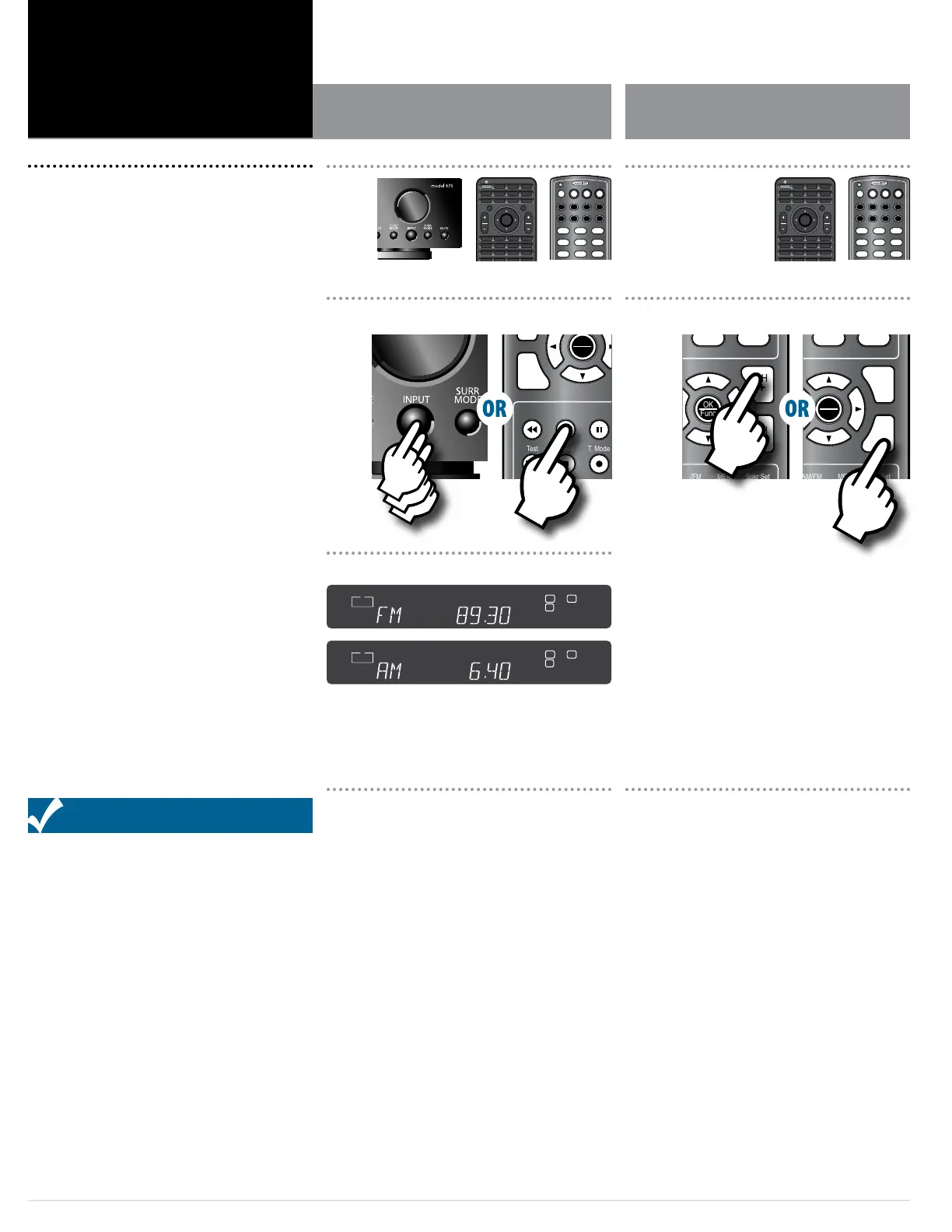
To select the tuner and band from the remote
control:
1. Press the AM/FM button on the remote control.
You will hear the radio station and band that were last play-
ing, and the front panel display will show you the band and
frequency as shown above.
2. Press the AM/FM button again to switch to the
other band.
To select the tuner and band from the front panel
of the Model 975:
Press the INPUT button on the front panel repeat-
edly until the display shows FM or AM, whichever
you choose.
You will hear the radio station and band that were last play-
ing, and the front panel display will show you the band and
frequency as shown above.
Select Tuner and Band Tune a Station Manually
To tune a radio station manually:
1. Press the CH + button on the remote to go to a
higher frequency or the CH – button to go to a
lower frequency.
Each push will change the frequency by 0.1 MHz in FM or
10 KHz in AM.
2. To automatically scan to the next station, hold
either the CH + or CH – button down for about 1
second and release it.
The scan will stop when the Model 975’s tuner nds the
next active frequency.
Func
–
VOL
Surr Mode AM/FM MEM
Test Direct T. Mode
Auto PST
Stereo LFE Trim CH Delay CH Level
Video Game Aux TV
Status Exit Tone Disc
Menu PIP Swap Input
RPT Last CC Sleep
Info FAV Guide VOD
Night Sync
CBL SAT DISC TV
AUX AUD STB TNR
1 2 3
4 5 6
7 8 9
0
OFF
L C R
LFE
IN
ANA COX
DUB OPX
SW S
L
B
L
B
R
B
R
B
MULTI
SECMIN
MEMHOURAUTOTITLE CHAPT
CH
KHz
MHz
L C R
LFE
IN
ANA COX
DUB OPX
SW S
L
B
L
B
R
B
R
B
MULTI
SECMIN
MEMHOURAUTOTITLE CHAPT
CH
KHz
MHz
Activating the Tuner and selecting a band
Front Panel Display
OK
Func
+
CH
–
CH
Exit
Menu
Surr Mode AM/FM MEM Spkr Set
Test Direct T. Mode Auto PST
Stereo LFE Trim CH Delay CH Level
Video Game Aux TV
Status Exit Tone Disc
Menu PIP Swap Input
RPT Last CC Sleep
Info FAV Guide VOD
Night Sync
CBL SAT DISC TV
AUX AUD STB TNR
1 2 3
4 5 6
7 8 9
0
OFF
OK
Func
+
CH
–
CH
Exit
Menu
Surr Mode AM/FM MEM Spkr Set
Test Direct T. Mode Auto PST
Stereo LFE Trim CH Delay CH Level
Video Game Aux TV
Status Exit Tone Disc
Menu PIP Swap Input
RPT Last CC Sleep
Info FAV Guide VOD
Night Sync
CBL SAT DISC TV
AUX AUD STB TNR
1 2 3
4 5 6
7 8 9
0
OFF
Tuning to a radio station
SRC
PWR
ON
Setup
Mute
OK
Func
+ +
VOL CH
– –
VOL CH
Exit
Menu
Surr Mode AM/FM MEM Spkr Set
Test Direct T. Mode Auto PST
Stereo LFE Trim CH Delay CH Level
Video Game Aux TV
Status Exit Tone Disc
Menu PIP Swap Input
RPT Last CC Sleep
Info FAV Guide VOD
Night Sync
CBL SAT DISC TV
AUX AUD STB TNR
1 2 3
4 5 6
7 8 9
OFF
SRC
PWR
ON
Setup
Mute
OK
Func
+ +
VOL CH
– –
VOL CH
Exit
Menu
Surr Mode AM/FM MEM Spkr Set
Test Direct T. Mode Auto PST
Stereo LFE Trim CH Delay CH Level
Video Game Aux TV
Status Exit Tone Disc
Menu PIP Swap Input
RPT Last CC Sleep
Info FAV Guide VOD
Night Sync
CBL SAT DISC TV
AUX AUD STB TNR
1 2 3
4 5 6
7 8 9
OFF
OFF
Status
Surr Mode
Disc Game Aux
Video
TV Auto PSTAM/FM Tone
Mute Menu
Tune
Volume
VOL
ENTER
Spkr Set
Delay
Test Ch. Select
Night
Stereo
1
2 3
4
5 6
Direct
Mem
Mono/StereoLFE Trim
OFF
Status
Surr Mode
Disc Game Aux
Video
TV Auto PSTAM/FM Tone
Mute Menu
Tune
Volume
VOL
ENTER
Spkr Set
Delay
Test Ch. Select
Night
Stereo
1
2 3
4
5 6
Direct
Mem
Mono/StereoLFE Trim


 To Next Page