Model 975 7.1 Channel Preamp/Processor
41
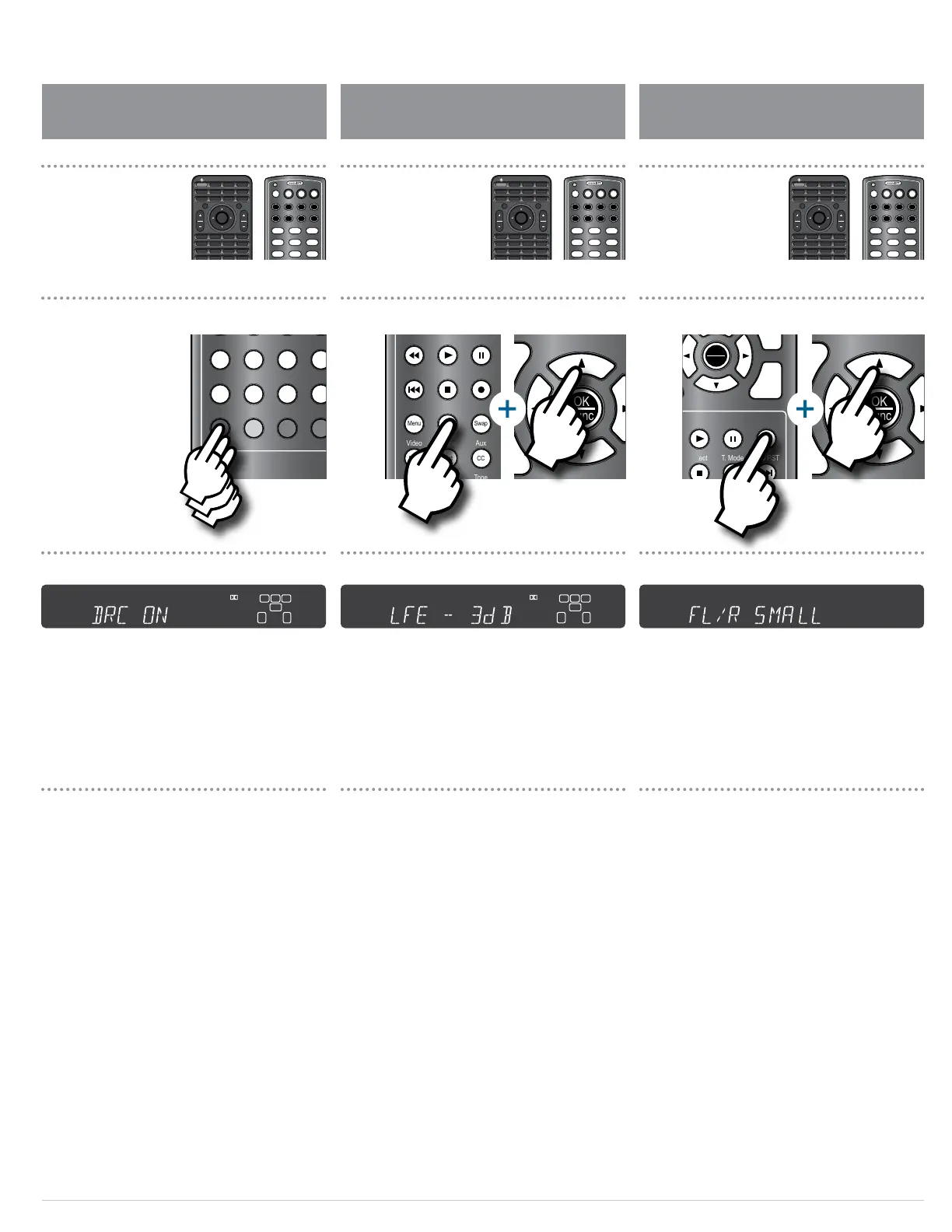
Night mode aects soundtracks produced in Dolby Digital,
Dolby Digital Plus or Dolby TrueHD. It employs Dynamic Range
Compression (DRC), quieting the loud peaks in a soundtrack
while retaining the same volume level for dialogue. There are
three modes:
Auto Activates DRC using instructions encoded in the
soundtrack itself; you may have more or less DRC ef-
fect depending on how the soundtrack was produced.
On Activates DRC for all Dolby soundtracks.
O Deactivates DRC entirely.
Night Mode can be set using the remote control and the
front panel display, or through the menu and the on-screen
display (see page 36).
To activate Night Mode:
1. Press the NIGHT button on the remote control.
The front panel display will show the currently selected DRC
mode, as shown above.
2. Press the NIGHT button repeatedly to change the
mode to DRC on, DRC o or DRC Auto.
This control reduces the level of the LFE (or “.1”) component
in a 5.1, 6.1 or 7.1 soundtrack, to a maximum of -10 dB. It does
not aect signals from other channels. Use it if you nd the
bass in movie soundtracks to be too loud. There’s no “proper”
setting, whatever sounds good to you is correct.
LFE Trim can be set using the remote control and the front
panel display, or through the menu and the on-screen
display. To set LFE trim through the menu/OSD, see page
32. The front display will read “Mode Unavailable” if the
soundtrack you’re playing lacks an LFE signal.
To adjust the LFE trim:
1. Press the LFE TRIM button on the remote.
The current LFE Trim setting will be shown on the front
panel display, as shown above.
2. Press the up or down buttons () on the remote
to adjust the LFE Trim.
You can change the size settings for the speakers in your
system using the remote control and the front panel
display, or through the menu and the on-screen display. To
set speaker size through the menu/OSD, see pages 28-29.
To change the size settings of your system’s speakers:
1. Press the SPKR SET button on the remote.
The front panel display will show the current size setting for
the front left and right speakers, as shown above.
2. Press the up or down buttons () on the remote
to change the size setting for the front left and
right speakers.
3. Press the SPKR SET button again to access the
other speakers in your system.
The available speakers will depend on what surround mode
you set in the Speaker Conguration menu on page 28.
4. Repeat the process for the remaining speakers.
Activating Night Mode (DRC) Adjusting LFE Trim Setting Speaker Size
OK
Func
+ +
VOL CH
– –
VOL CH
Exit
Menu
Surr Mode AM/FM MEM Spkr Set
Test Direct T. Mode Auto PST
Stereo LFE Trim CH Delay CH Level
Video Game Aux TV
Status Exit Tone Disc
Menu PIP Swap Input
RPT Last CC Sleep
Info FAV Guide VOD
Night Sync
CBL SAT DISC TV
AUX AUD STB TNR
1 2 3
4 5 6
7 8 9
0
OFF
OK
Func
+ +
VOL CH
– –
VOL CH
Exit
Menu
Surr Mode AM/FM MEM Spkr Set
Test Direct T. Mode Auto PST
Stereo LFE Trim CH Delay CH Level
Video Game Aux TV
Status Exit Tone Disc
Menu PIP Swap Input
RPT Last CC Sleep
Info FAV Guide VOD
Night Sync
CBL SAT DISC TV
AUX AUD STB TNR
1 2 3
4 5 6
7 8 9
0
OFF
SRC
PWR
ON
Setup
Mute
OK
Func
+ +
VOL CH
– –
VOL CH
Exit
Menu
Surr Mode AM/FM MEM Spkr Set
Test Direct T. Mode Auto PST
Stereo LFE Trim CH Delay CH Level
Video Game Aux TV
Status Exit Tone
RPT Last CC
Info FAV Guide
Night
Sync
CBL SAT DISC TV
AUX AUD STB TNR
1 2 3
4 5 6
7 8 9
0
OFF
SRC
PWR
ON
Setup
Mute
OK
Func
+ +
VOL CH
– –
VOL CH
Exit
Menu
Surr Mode AM/FM MEM Spkr Set
Test Direct T. Mode
Stereo LFE Trim CH Delay
Video Game Aux
Menu PIP Swap
RPT Last CC
Sleep
Info FAV Guide VOD
Night Sync
CBL SAT DISC TV
AUX AUD STB TNR
1 2 3
4 5 6
7 8 9
0
OFF
OK
Func
–
CH
AM/FM MEM Spkr Set
Direct T. Mode Auto PST
Stereo LFE Trim CH Delay CH Level
Video Game Aux TV
Status Exit Tone Disc
Menu PIP Swap Input
RPT Last CC Sleep
Info FAV Guide VOD
Night Sync
CBL SAT DISC TV
AUX AUD STB TNR
1 2 3
4 5 6
7 8 9
0
OFF
L C R
LFE
IN
ANA COX
DUB OPX
SW S
L
B
L
B
R
B
R
B
MULTI
SECMIN
MEMHOURAUTOTITLE CHAPT
CH
KHz
MHz
L C R
LFE
IN
ANA COX
DUB OPX
SW S
L
B
L
B
R
B
R
B
MULTI
SECMIN
MEMHOURAUTOTITLE CHAPT
CH
KHz
MHz
L C R
LFE
IN
ANA COX
DUB OPX
SW S
L
B
L
B
R
B
R
B
MULTI
SECMIN
MEMHOURAUTOTITLE CHAPT
CH
KHz
MHz
Adjusting the LFE trim Accessing speaker size settingsActivating Night Mode
Front Panel Display Front Panel DisplayFront Panel Display
SRC
PWR
ON
Setup
Mute
OK
Func
+ +
VOL CH
– –
VOL CH
Exit
Menu
Surr Mode AM/FM MEM Spkr Set
Test Direct T. Mode Auto PST
Stereo LFE Trim CH Delay CH Level
Video Game Aux TV
Status Exit Tone Disc
Menu PIP Swap Input
RPT Last CC Sleep
Info FAV Guide VOD
Night Sync
CBL SAT DISC TV
AUX AUD STB TNR
1 2 3
4 5 6
7 8 9
OFF
SRC
PWR
ON
Setup
Mute
OK
Func
+ +
VOL CH
– –
VOL CH
Exit
Menu
Surr Mode AM/FM MEM Spkr Set
Test Direct T. Mode Auto PST
Stereo LFE Trim CH Delay CH Level
Video Game Aux TV
Status Exit Tone Disc
Menu PIP Swap Input
RPT Last CC Sleep
Info FAV Guide VOD
Night Sync
CBL SAT DISC TV
AUX AUD STB TNR
1 2 3
4 5 6
7 8 9
OFF
SRC
PWR
ON
Setup
Mute
OK
Func
+ +
VOL CH
– –
VOL CH
Exit
Menu
Surr Mode AM/FM MEM Spkr Set
Test Direct T. Mode Auto PST
Stereo LFE Trim CH Delay CH Level
Video Game Aux TV
Status Exit Tone Disc
Menu PIP Swap Input
RPT Last CC Sleep
Info FAV Guide VOD
Night Sync
CBL SAT DISC TV
AUX AUD STB TNR
1 2 3
4 5 6
7 8 9
OFF
OFF
Status
Surr Mode
Disc Game Aux
Video
TV Auto PSTAM/FM Tone
Mute Menu
Tune
Volume
VOL
ENTER
Spkr Set
Delay
Test Ch. Select
Night
Stereo
1
2 3
4
5 6
Direct
Mem
Mono/StereoLFE Trim
OFF
Status
Surr Mode
Disc Game Aux
Video
TV Auto PSTAM/FM Tone
Mute Menu
Tune
Volume
VOL
ENTER
Spkr Set
Delay
Test Ch. Select
Night
Stereo
1
2 3
4
5 6
Direct
Mem
Mono/StereoLFE Trim
OFF
Status
Surr Mode
Disc Game Aux
Video
TV Auto PSTAM/FM Tone
Mute Menu
Tune
Volume
VOL
ENTER
Spkr Set
Delay
Test Ch. Select
Night
Stereo
1
2 3
4
5 6
Direct
Mem
Mono/StereoLFE Trim


 To Next Page