22
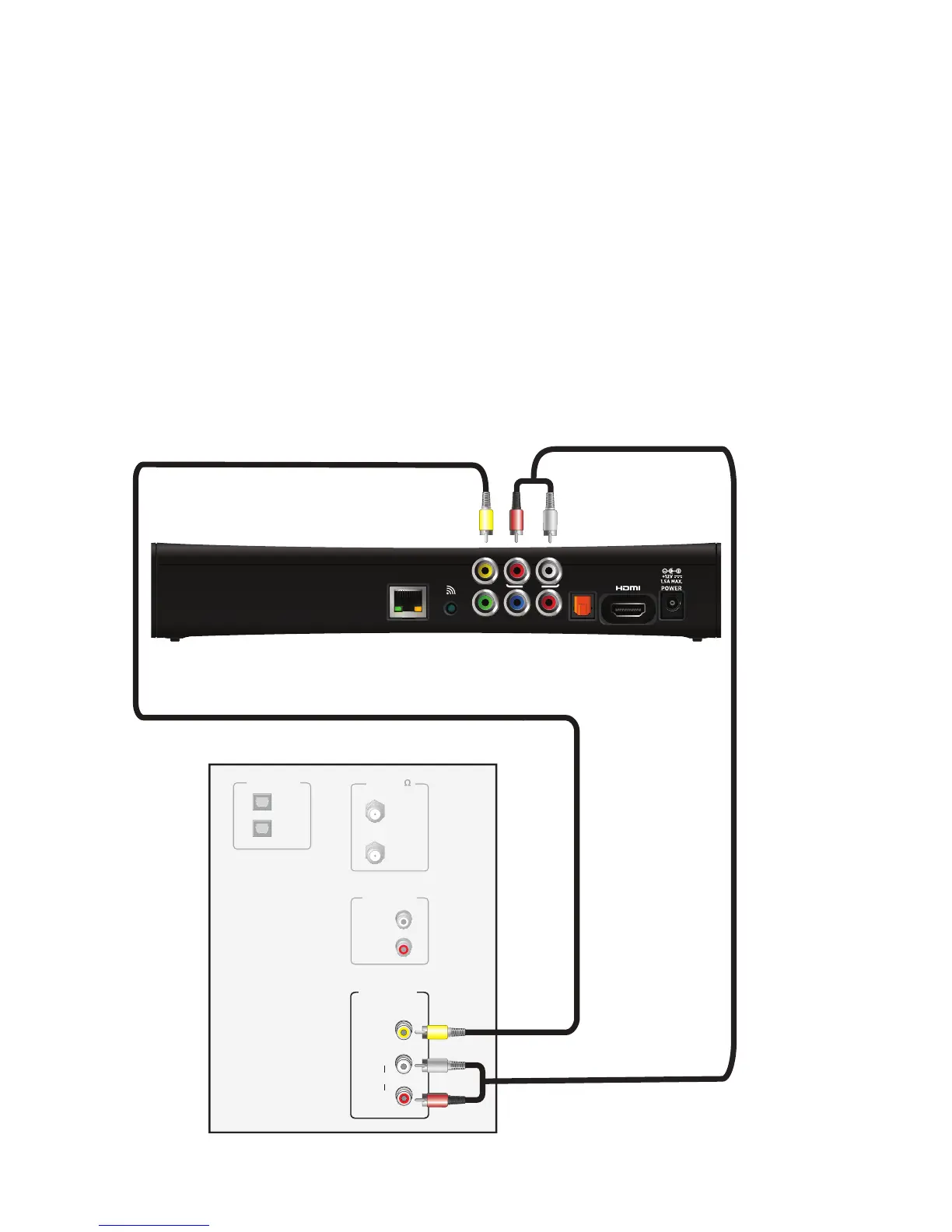
Using a composite video connection
Composite video provides the video connection to an SDTV. You must connect the
audio signal separately.
To connect the set-top box to the TV using a composite video cable:
1. Insert the yellow video connector on the color-coded composite video cable into the
VIDEO OUT (yellow) connector on the set-top box.
2. Insert the other end of the composite video cable into the VIDEO IN (yellow)
connector on the TV.
3. Connect the color-coded audio cable to the AUDIO L (white) and R (red) connectors
on the set-top box.
4. Connect the other end of the color-coded audio cable to the AUDIO L (white) and R
(red) connectors on the TV.
Television
ANT (75 )
IN
OUT
VIDEO
COMPOSITE
VIDEO IN
L
R
AUDIO
AUDIO OUT
L
R
OPTICAL IN
1
2
Set-top box
Audio cable
Composite video cable
YPbPr
OPTICAL
NETWORK
RL
AUDIO
VIDEO OUT
WPS
VIDEO
COMPOSITE
VIDEO IN
L
R
AUDIO



 To Next Page