EasyManua.ls Logo

Pace IPW8000 - Using an HDMI Connection

Pace IPW8000
32 pages
Print Icon
To Next Page IconTo Next Page
To Previous Page IconTo Previous Page
Loading...
17
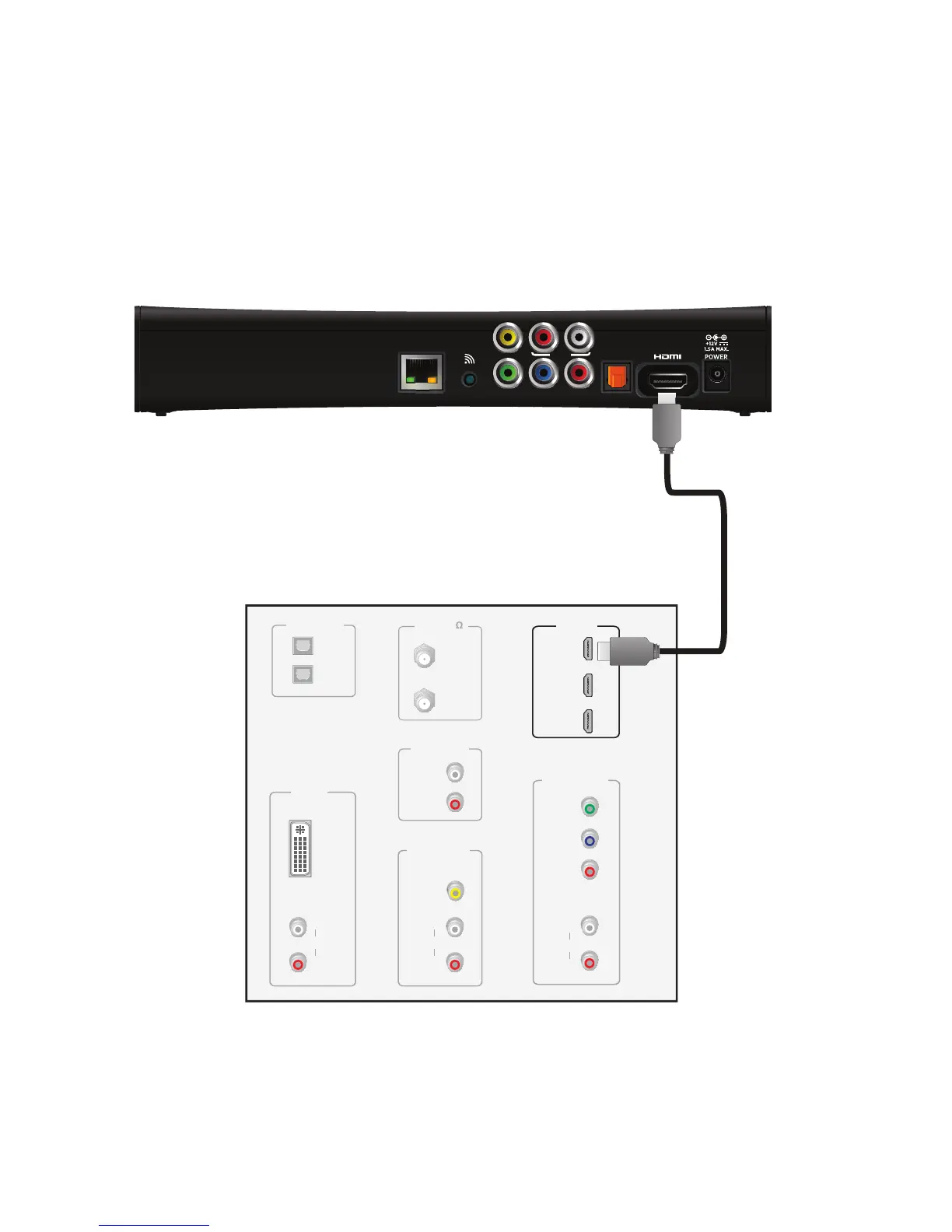
Using an HDMI connection
The HDMI connector provides the connection to an HDTV. HDMI carries signals for
video and audio.
To connect the set-top box to the TV using an HDMI cable:
1. Insert one end of the HDMI cable into the HDMI connector on the set-top box.
2. Insert the other end of the HDMI cable into an available HDMI connector on the TV.
Note: The HDMI port on the TV must support high-bandwidth digital content protection
(HDCP).
Television
HDMI IN
1
2
3
ANT (75 )
IN
OUT
VIDEO
COMPOSITE
VIDEO IN
L
R
AUDIO
DVI IN
L
R
AUDIO
AUDIO OUT
L
R
OPTICAL IN
Y
P
B
PR
COMPONENT
VIDEO IN
L
R
AUDIO
1
2
HDMI cable
Set-top box
YPbPr
OPTICAL
NETWORK
RL
AUDIO
VIDEO OUT
WPS
HDMI IN
1
2
3

Related product manuals