23
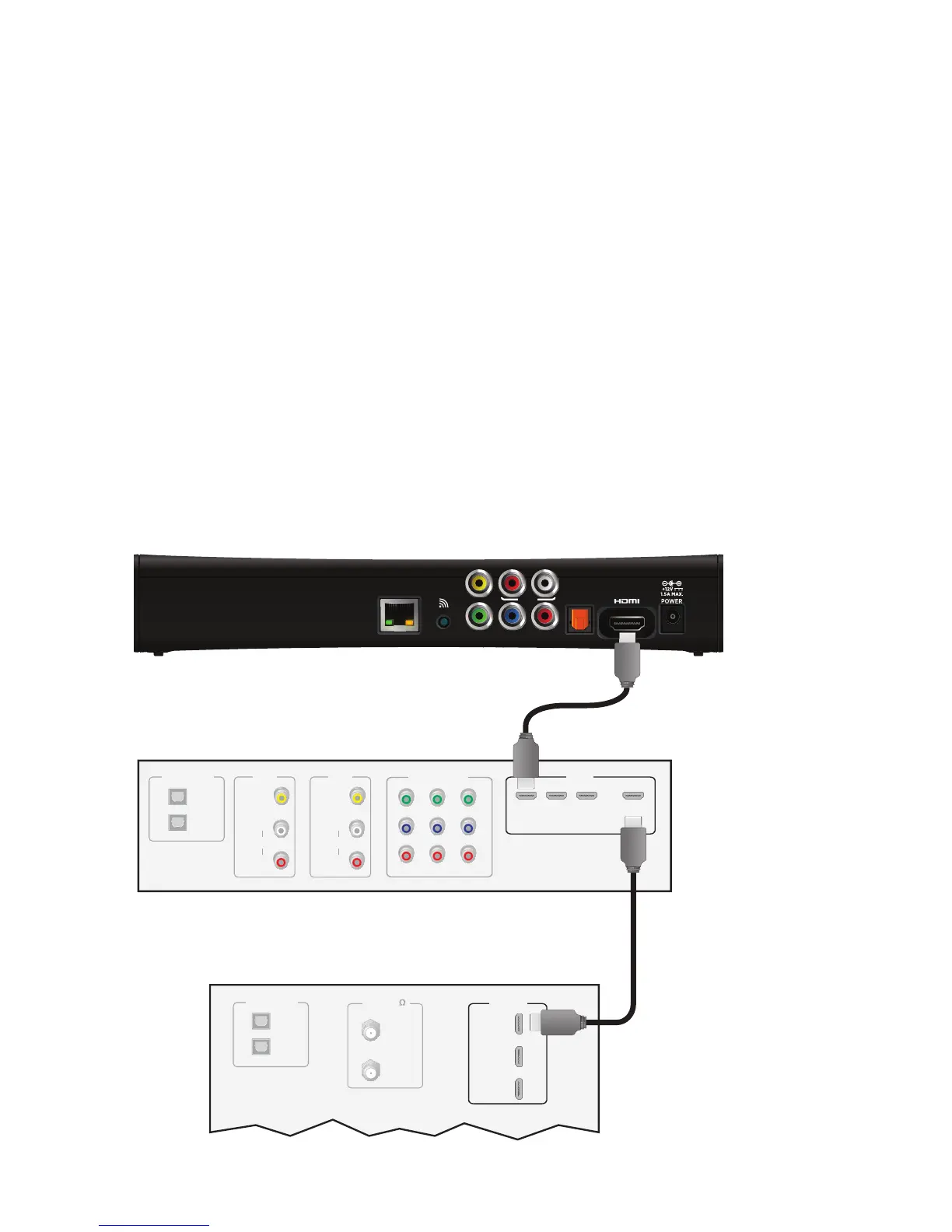
Connecting the set-top box to a home theater system
If your television viewing configuration includes a home theater system, you can
connect the set-top box directly to the home theater system receiver. The following
example uses the HDMI connector to provide the video and audio signals from the set-
top box to the home theater system.
Note: Consult the manual that came with your home theater system for information on
connecting video and audio devices to the home theater receiver.
To connect the set-top box to a home theater receiver using HDMI:
1. Insert one end of the HDMI cable into the HDMI connector on the set-top box.
2. Insert the other end of the HDMI cable into an available HDMI IN connector on the
home theater receiver.
3. Connect a second HDMI cable into an available HDMI OUT connector on the home
theater receiver.
4. Insert the other end of the second HDMI cable into an available HDMI connector on
the TV.



 To Next Page