8
Overview of the equipment
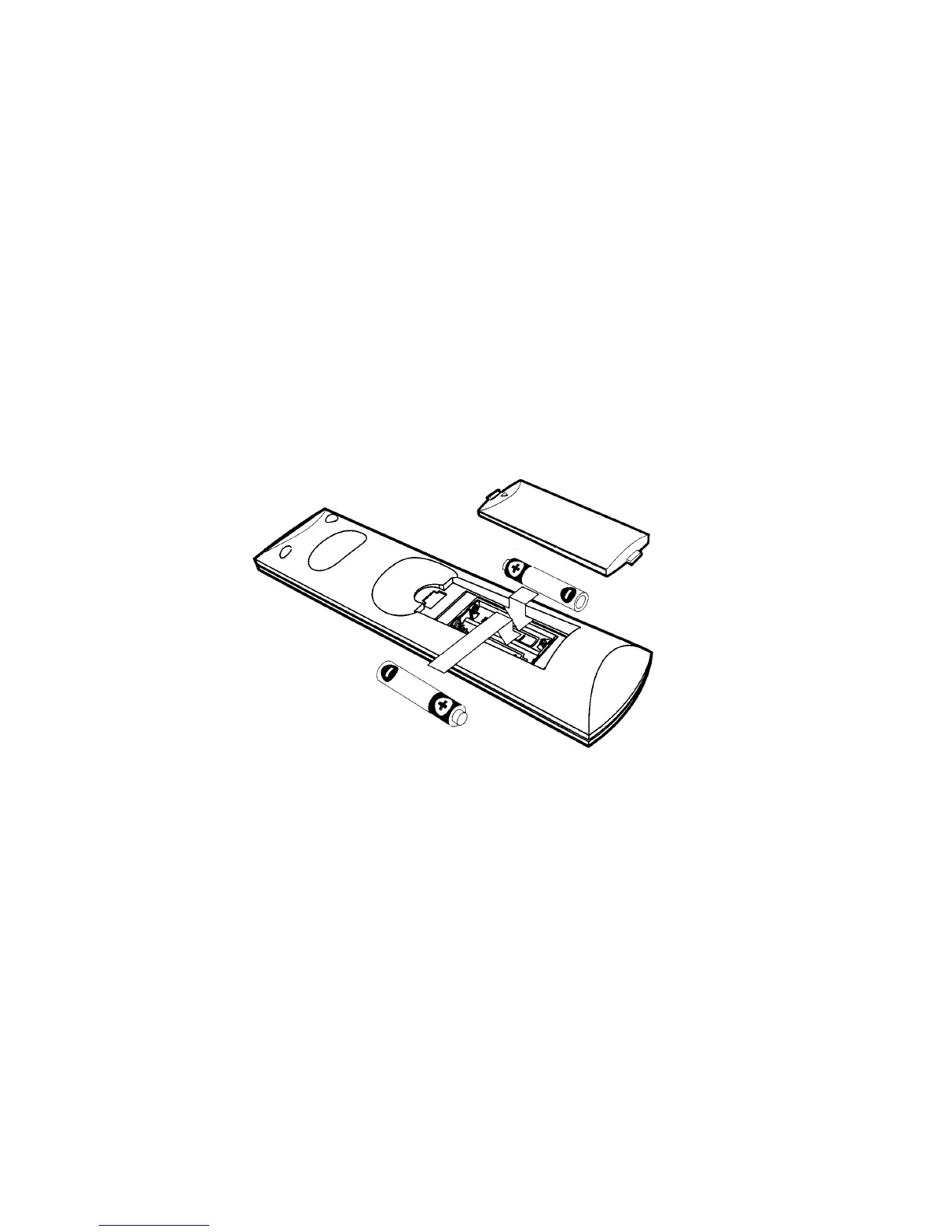
Installing the remote control batteries
Cautions:
Always replace batteries in pairs of the same brand. Do not mix batteries from different
brands or use an old and a new battery.
Replace old or weak batteries to avoid battery leakage which can damage the remote control.
Dispose old batteries thoughtfully with due respect to the environment. Do not incinerate old
batteries.
l) Open the battery compartment on the back of the remote control.
2) Install two AAA (LR03) size batteries as shown.
Make sure the "+" and "-" terminals are oriented correctly.
3) Replace the cover.
4) After changing the batteries, please reset Remote Control Universal Code
Setting.
Remote Control Universal Code Setting
This Remote Control is also compatible with a range of popular CE brands
To use this remote with other CE equipment, you must program the remote with a universal
code number as detailed on page 36.
There are two methods of entering the universal code.
1. Using Automatic Code Search
1) Turn on the CE component (TV, VCR or DVD) you want to control.
2) Press and hold the CE component (TV, VCR or DVD) button until the LED on the
remote control stays on, then release the button.
3) Point the remote at the CE component (TV, VCR or DVD) and press the UP (A) button,
then wait for three seconds or until the LED stops flashing.
At this point the remote control is searching for the correct code. If, after three


 To Next Page