23 (E)
PREPARATION
ENGLISH
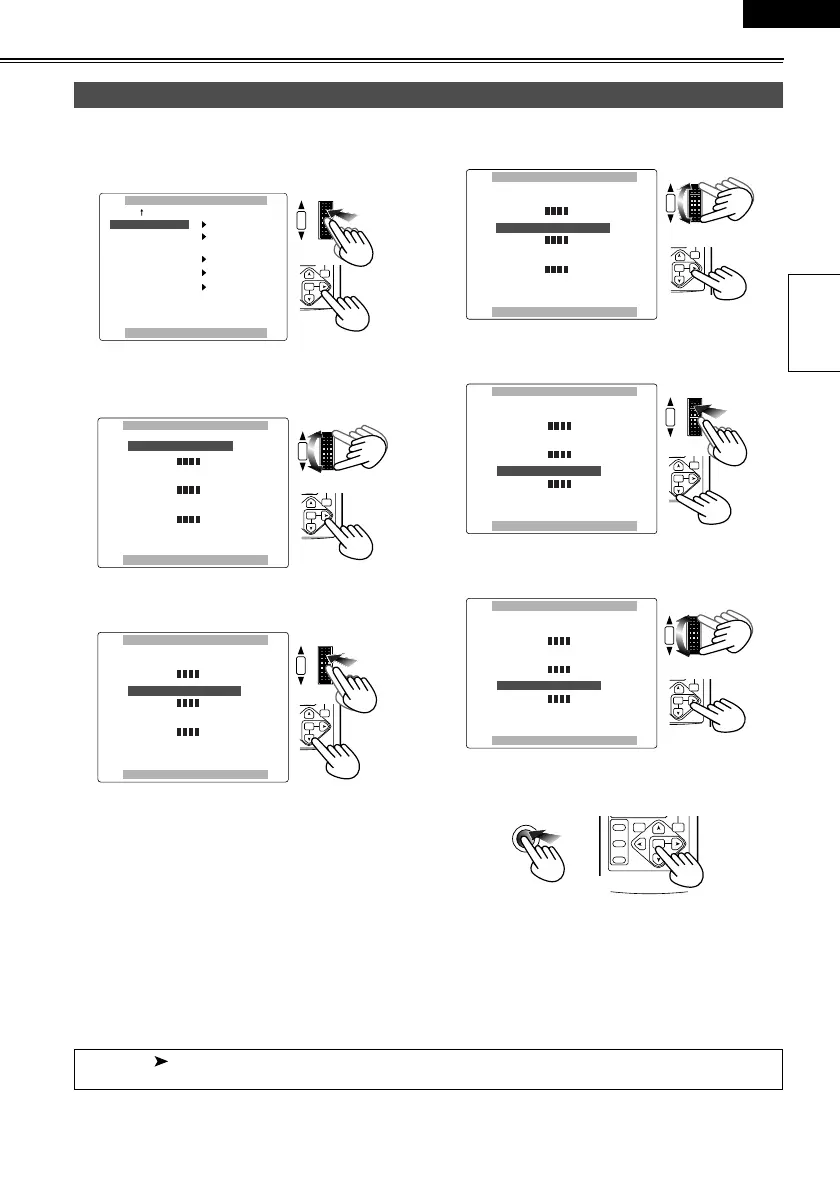
1 Use the menus (P62-64) to select “YES” as the
LCD/EVF SET item setting on the DISPLAY
SETUP screen.
2 The LCD/EVF SET screen with “LCD BRIGHT-
NESS” selected appears. Turn the multi dial to
adjust the brightness of the LCD monitor screen.
3 Upon completion of the settings, press the multi dial
to select “LCD COLOR LEVEL”.
4 Turn the multi dial to adjust the color level of the
LCD monitor screen.
5 Upon completion of the settings, press the multi dial
to select “EVF BRIGHTNESS”.
6 Turn the multi dial to adjust the brightness of the
viewfinder screen.
7 Press the MENU button three times to exit the
menu mode.
Adjusting the screen display
afpmi^v==pbqrm
mrpe==jbkr==ql==obqrok
i`aLbsc==pbq
bsc==jlab
pbic==pellq
bsc==`lilo
bsc==abq^fi
vbp
jfoolo
^rql
lk
lcc
||||
PB.
ZOOM
MENU
ITEM
HUTTER/IRIS
VOL/JOG
PUSH
SET
i`aLbsc==pbq
bsc==_ofdeqkbpp
i`a==`lilo==ibsbi
i`a==_ofdeqkbpp
mrpe==jbkr==ql==obqrok
||||
||||
||||
x=H=z
x=H=z
x=H=z
x====z
|
x====z
|
x====z
|
PB.
ZOOM
MENU
SET
ITEM
SHUTTER/IRIS
VOL/JOG
PUSH
i`aLbsc==pbq
bsc==_ofdeqkbpp
i`a==`lilo==ibsbi
i`a==_ofdeqkbpp
mrpe==jbkr==ql==obqrok
x=H=z
x====z
|
x=H=z
x====z
|
x=H=z
x====z
|
||||
||||
||||
PB.
ZOOM
MENU
SET
ITEM
HUTTER/IRIS
VOL/JOG
PUSH
i`aLbsc==pbq
bsc==_ofdeqkbpp
i`a==`lilo==ibsbi
i`a==_ofdeqkbpp
mrpe==jbkr==ql==obqrok
||||
||||
||||
x====z
|
x=H=z
x====z
|
x=H=z
x====z
|
x=H=z
PB.
ZOOM
MENU
SET
ITEM
HUTTER/IRIS
VOL/JOG
PUSH
i`aLbsc==pbq
bsc==_ofdeqkbpp
i`a==`lilo==ibsbi
i`a==_ofdeqkbpp
mrpe==jbkr==ql==obqrok
x=H=z
x====z
|
x=H=z
x====z
|
x=H=z
x====z
|
||||
||||
||||
PB.
ZOOM
MENU
SET
ITEM
HUTTER/IRIS
VOL/JOG
PUSH
i`aLbsc==pbq
bsc==_ofdeqkbpp
i`a==`lilo==ibsbi
i`a==_ofdeqkbpp
mrpe==jbkr==ql==obqrok
||||
||||
||||
x====z
|
x=H=z
x====z
|
x=H=z
x====z
|
x=H=z
PB.
ZOOM
MENU
SET
ITEM
HUTTER/IRIS
VOL/JOG
PUSH
MENU
SELECT
STORE
OFF/ON
P.B.DIGITAL
VAR.
SEARCH
PB.
ZOOM
MENU
SET
ITEM
When the [ ] button on the remote control unit is used to make adjustments, the level meter reading starts
changing in the opposite direction once it has reached the maximum (or minimum) position.
AG-DVC60E_En.fm 23 ページ 2004年9月2日 木曜日 午後1時43分










 To Next Page